• There is NO official Otland's Discord server and NO official Otland's server list. The Otland's Staff does not manage any Discord server or server list. Moderators or administrator of any Discord server or server lists have NO connection to the Otland's Staff. Do not get scammed!
  • 2026 staff recruitment is open! Check it out and consider applying!

Life and mana

bpm91

Advanced OT User
Joined
May 23, 2019
Messages
1,046
Solutions
7
Reaction score
180
Location
Brazil
YouTube
caruniawikibr
Does anyone have any idea which ot client folder I can change its color? life and mana
tfs 0.4 ver 8.6
Screenshot_1.png
 
For health bar color which is related to name above character by default you'll have to do changes in src\client creature.cpp here exactly.

C++:
void Creature::setHealthPercent(uint8 healthPercent)
{
    if(healthPercent > 92)
        m_informationColor = Color(0x00, 0xBC, 0x00);
    else if(healthPercent > 60)
        m_informationColor = Color(0x50, 0xA1, 0x50);
    else if(healthPercent > 30)
        m_informationColor = Color(0xA1, 0xA1, 0x00);
    else if(healthPercent > 8)
        m_informationColor = Color(0xBF, 0x0A, 0x0A);
    else if(healthPercent > 3)
        m_informationColor = Color(0x91, 0x0F, 0x0F);
    else
        m_informationColor = Color(0x85, 0x0C, 0x0C);

    m_healthPercent = healthPercent;
    callLuaField("onHealthPercentChange", healthPercent);

    if(healthPercent <= 0)
        onDeath();
}

and for the mana bar color which can be found also in creature.cpp you'll have to change this
C++:
                g_painter->setColor(Color::blue);
                g_painter->drawFilledRect(manaRect);
and if you focused on the mana bar you'll find that its 2 colors not only 1, There is a black lined color surrounds the blue one which you can change by changing this
C++:
        g_painter->setColor(Color::black);
        g_painter->drawFilledRect(backgroundRect);
and about the color codes you can find them in src\framework\util inside color.h and color.cpp
I will just post them here in case you can't find them by yourself.
C++:
const Color Color::alpha      = 0x00000000U;
const Color Color::white      = 0xffffffff;
const Color Color::black      = 0xff000000;
const Color Color::red        = 0xff0000ff;
const Color Color::darkRed    = 0xff000080;
const Color Color::green      = 0xff00ff00;
const Color Color::darkGreen  = 0xff008000;
const Color Color::blue       = 0xffff0000;
const Color Color::darkBlue   = 0xff800000;
const Color Color::pink       = 0xffff00ff;
const Color Color::darkPink   = 0xff800080;
const Color Color::yellow     = 0xff00ffff;
const Color Color::darkYellow = 0xff008080;
const Color Color::teal       = 0xffffff00;
const Color Color::darkTeal   = 0xff808000;
const Color Color::gray       = 0xffa0a0a0;
const Color Color::darkGray   = 0xff808080;
const Color Color::lightGray  = 0xffc0c0c0;
const Color Color::orange     = 0xff008cff;
And of course you'll have to recompile your client.
 
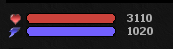
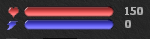
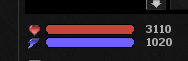
I do not know if I expressed myself wrong, but it would not be the color itself, it would be the graphic effect that has life as you can see there are 2 lives, 1 otc and 1 tibia. tibia's she has more effect
global
Screenshot_3.png
otc
Screenshot_4.png


I need to know what the edge of life and mana is in the image so I can create the same shadow and light effect
 
Last edited:
I can't understand what you mean? All I can see from your photo that Cipsoft's client has lighter color than OTC and a little different shape which looks cylindrical.
So you are talking bout the shape? or the light color? Because if its the light colors then I already explained that above.
 
Back
Top