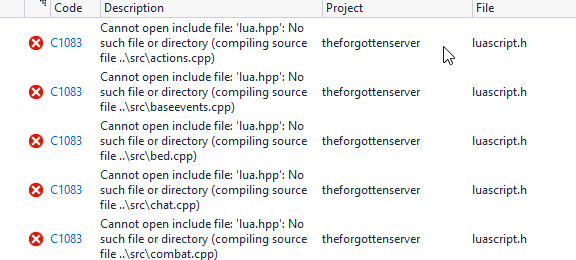
So everything worked fine - compiling was working without any issues until now. I don't really know what to do with this error. Can anyone explain me what to do? I'm kinda lost.


you shouldn't add files anywhere, just needed to edit src/configmanager.cpp and src/luascript.h from <lua.hpp> to <luajit/lua.hpp>Okay, I did add the lua 5.3.5 files in C++ - General
But now this error comes up: Screenshot (http://prntscr.com/op5gr0)

 github.com
You must adding libraries in preference of your project.
@edit
Here you are link for tutorial, make step by step
Compiling TFS 1.0/1.1 latest source. 64 and 32 bits. Pics and lots of explanation.
Welcome to my TFS 1.0/1.1 compiling tutorial. I'm making this one because the other one is a bit messy and people where having errors and the on on Github is a bit advanced. Well enough with the stories lets get to work! 1. First lets get our includes, libs and our compiler. MSVC 2013. Express...otland.net

change to luajit/lua.hpp

windows <luajit/lua.hpp> include by EvilHero90 · Pull Request #2606 · otland/forgottenserver
This fixes the problem on windows that lua.hpp cannot be found, because vcpkg by default installs luajit, which results in <luajit/lua.hpp> #2603
Im using TFS 1.3
github.com
you shouldn't add files anywhere, just needed to edit src/configmanager.cpp and src/luascript.h from <lua.hpp> to <luajit/lua.hpp>Okay, I did add the lua 5.3.5 files in C++ - General
But now this error comes up: Screenshot (http://prntscr.com/op5gr0)