
You are using an out of date browser. It may not display this or other websites correctly.
You should upgrade or use an alternative browser.
You should upgrade or use an alternative browser.
AAC Make MyAcc refresh updates instantly
- Thread starter Joriku
- Start date

slaw
Software Developer
If you are developing locally, to see your changes made in Twig instantly, then you should enable in config.local.php the development mode.
On the live server, other side you should keep the variable as "prod" as it makes the page faster. Then the only way to refresh the changes is to clear cache in Admin Panel.
Code:
$config['env'] = 'dev';On the live server, other side you should keep the variable as "prod" as it makes the page faster. Then the only way to refresh the changes is to clear cache in Admin Panel.
OP
OP

Joriku
Working in the mines, need something?
It's prod mode,If you are developing locally, to see your changes made in Twig instantly, then you should enable in config.local.php the development mode.
Code:$config['env'] = 'dev';
On the live server, other side you should keep the variable as "prod" as it makes the page faster. Then the only way to refresh the changes is to clear cache in Admin Panel.
I tried clearing the cashe in system/cashe and in the admin menu but it didn't switch out the art-work picture that's been switched out
Yes. I did clear cashe in my webbrowser aswell

Leesne
i r peekay
- Joined
- Dec 4, 2017
- Messages
- 396
- Solutions
- 35
- Reaction score
- 263
Are you using cloudflare for the website?
Did you try what slaw suggested?
Are you sure you put the image in the correct folder? in the template folder if you call it from the template folder or the image folder in root if you call it from there?
Did you try what slaw suggested?
Are you sure you put the image in the correct folder? in the template folder if you call it from the template folder or the image folder in root if you call it from there?
OP
OP
Joriku
Working in the mines, need something?
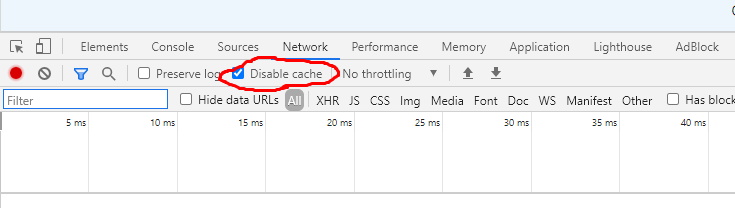
doesn't work, still not instantly updating it. Tried clearing in all waysDid you try with disable cache in web browser?
View attachment 56825
You need to refresh the page after selecting the option.
Yeah, using full SSL connection.Are you using cloudflare for the website?
Did you try what slaw suggested?
Are you sure you put the image in the correct folder? in the template folder if you call it from the template folder or the image folder in root if you call it from there?
Yes, I tried it.
Yes, It's the correct one. Else It wouldn't come in later anyways? Checked it aswell, it's the correct one
Leesne
i r peekay
- Joined
- Dec 4, 2017
- Messages
- 396
- Solutions
- 35
- Reaction score
- 263
You said yes to using cloudflare that has its own cachingdoesn't work, still not instantly updating it. Tried clearing in all ways
Yeah, using full SSL connection.
Yes, I tried it.
Yes, It's the correct one. Else It wouldn't come in later anyways? Checked it aswell, it's the correct one
