
Hello!
I'm struggling with a plugin theme-atomio available for MyAAC website.
The issue is that when I enable displaying outfit feature then this outfit is displayed at top. The drop down menu is below this image, so when a player move a mouce to quests string - the menu disappears.
I was trying to add some z-index in theme-atomio style.css file, but with no luck.
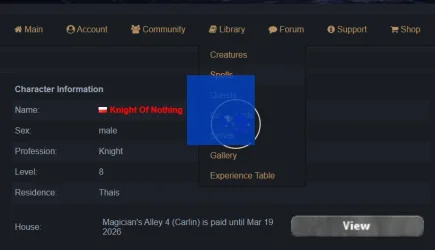
Maybe someone could guide me where to change that?
I found that this image is generated in characters.html.twig here:
<table border="0" cellspacing="1" cellpadding="4" width="100%">
{% if config.characters.outfit %}
<div style="width:64px;height:64px;border:2px solid #F1E0C6; border-radius:50px; padding:13px; margin-top:38px;margin-left:376px;position:absolute;"><img style="margin-left:-60px;margin-top:-60px;width:128px;height:128px;" src="{{ outfit }}" alt="player outfit"/></div>
{% endif %}
but really do not know how to move this image back.
Thanks in advance for help
PS: I'm aware that I can easily disable this "display outfit" feature - but it would be nice to have it enabled.
Regards,
Gover
I'm struggling with a plugin theme-atomio available for MyAAC website.
The issue is that when I enable displaying outfit feature then this outfit is displayed at top. The drop down menu is below this image, so when a player move a mouce to quests string - the menu disappears.
I was trying to add some z-index in theme-atomio style.css file, but with no luck.
Maybe someone could guide me where to change that?
I found that this image is generated in characters.html.twig here:
<table border="0" cellspacing="1" cellpadding="4" width="100%">
{% if config.characters.outfit %}
<div style="width:64px;height:64px;border:2px solid #F1E0C6; border-radius:50px; padding:13px; margin-top:38px;margin-left:376px;position:absolute;"><img style="margin-left:-60px;margin-top:-60px;width:128px;height:128px;" src="{{ outfit }}" alt="player outfit"/></div>
{% endif %}
but really do not know how to move this image back.
Thanks in advance for help
PS: I'm aware that I can easily disable this "display outfit" feature - but it would be nice to have it enabled.
Regards,
Gover
Last edited: