• There is NO official Otland's Discord server and NO official Otland's server list. The Otland's Staff does not manage any Discord server or server list. Moderators or administrator of any Discord server or server lists have NO connection to the Otland's Staff. Do not get scammed!
  • 2026 staff recruitment is open! Check it out and consider applying!

Need script for vbot 4.8, Tibia 8.6

Skolopendromorf

New Member
Joined
Apr 30, 2026
Messages
4
Reaction score
0
GitHub
krewetka123
I need a script for vbot 4.8. It would open a Reward Container (ID19202) from a boss corpse and then collect loot. I should add that TargetBot and looting are installed. The idea is that when the bot flies on a cavbot, it collects loot.
 
I need a script for vbot 4.8. It would open a Reward Container (ID19202) from a boss corpse and then collect loot. I should add that TargetBot and looting are installed. The idea is that when the bot flies on a cavbot, it collects loot.

If you are using vBot 4.8 on OTCv8 and having trouble with the bot ignoring boss reward containers (like the chest that appears on the boss corpse), here is a simple macro solution.

While TargetBot handles standard looting, it often doesn't "Right-Click" these specific containers automatically. This script scans the area, opens the container, and then lets your built-in LootBot/TargetBot handle the rest.

### The Script
Add this to your Ingame Macros or vbot_v4.8/scripts:

LUA:
-- Macro to open Reward Container (ID 19202)
-- Works alongside Cavebot and TargetBot
macro(500, "Open Boss Reward", function()
  -- Scan tiles around the player (7x7 range)
  for x = -7, 7 do
    for y = -5, 5 do
      local tile = getTile({x = pos().x + x, y = pos().y + y, z = pos().z})
      if tile then
        local items = tile:getItems()
        for _, item in ipairs(items) do
          -- Check for Reward Container ID
          if item:getId() == 19202 then
            g_game.use(item)
            -- Delay to prevent execution spam
            delay(1000)
            return
          end
        end
      end
    end
  end
end)

### How it works:
1. Detection: Every 500ms, the bot checks a 7x7 area around your character for Item ID 19202.
2. Interaction: As soon as the boss dies and the container appears, the bot will "Use" (Open) it.
3. Looting: Once the window is open, your existing TargetBot Looting setup will see the items and move them to your backpacks as usual.
4. Cavebot: This runs in the background and does not interfere with your Cavebot walking or "flying" scripts.

### Requirements:
  • vBot 4.8
  • OTCv8
  • Make sure the items inside the reward container are already added to your Loot List!

Hope this helps farming bosses!
 
Last edited:
Here is a professionally formatted post for OtLand. I have structured it to be clear, helpful, and ready for the "Scripts" or "Tutorials" section.

---

If you are using vBot 4.8 on OTCv8 and having trouble with the bot ignoring boss reward containers (like the chest that appears on the boss corpse), here is a simple macro solution.

While TargetBot handles standard looting, it often doesn't "Right-Click" these specific containers automatically. This script scans the area, opens the container, and then lets your built-in LootBot/TargetBot handle the rest.

### The Script
Add this to your Ingame Macros or vbot_v4.8/scripts:

LUA:
-- Macro to open Reward Container (ID 19202)
-- Works alongside Cavebot and TargetBot
macro(500, "Open Boss Reward", function()
  -- Scan tiles around the player (7x7 range)
  for x = -7, 7 do
    for y = -5, 5 do
      local tile = getTile({x = pos().x + x, y = pos().y + y, z = pos().z})
      if tile then
        local items = tile:getItems()
        for _, item in ipairs(items) do
          -- Check for Reward Container ID
          if item:getId() == 19202 then
            g_game.use(item)
            -- Delay to prevent execution spam
            delay(1000)
            return
          end
        end
      end
    end
  end
end)

### How it works:
1. Detection: Every 500ms, the bot checks a 7x7 area around your character for Item ID 19202.
2. Interaction: As soon as the boss dies and the container appears, the bot will "Use" (Open) it.
3. Looting: Once the window is open, your existing TargetBot Looting setup will see the items and move them to your backpacks as usual.
4. Cavebot: This runs in the background and does not interfere with your Cavebot walking or "flying" scripts.

### Requirements:
  • vBot 4.8
  • OTCv8
  • Make sure the items inside the reward container are already added to your Loot List!

Hope this helps farming bosses!
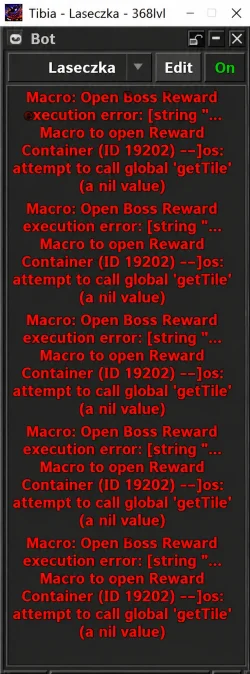
It doesn't work, I get an error. I should also add that the Reward Container is located in the bosses' corpses and cannot be taken from the corpses, only opened.
 

Attachments

The error in the screenshot is not readable, do you mind writing it up or sharing a more HD screenshot of the specific error? :)

It doesn't work, I get an error. I should also add that the Reward Container is located in the bosses' corpses and cannot be taken from the corpses, only opened.


If you are hunting bosses where the Reward Container (ID 19202) spawns inside the boss corpse (and cannot be moved/picked up), standard looting scripts won't open it.

This macro fixes the issue by scanning containers on the ground, finding the reward chest inside the corpse, and opening it so your TargetBot can loot the items.

### Updated Script
Add this to your Ingame Macros:

LUA:
-- Macro to open Reward Container (ID 19202) located inside a corpse
macro(500, "Open Boss Reward", function()
    -- Scan tiles around the player
    for x = -7, 7 do
        for y = -5, 5 do
            local tile = getTile({x = pos().x + x, y = pos().y + y, z = pos().z})
            if tile then
                local items = tile:getItems()
                for _, item in ipairs(items) do
                    -- Check if the item is a container (corpse)
                    if item:isContainer() then
                        -- Check if the Reward Chest (19202) is inside this corpse
                        local containerItems = item:getContainerItems()
                        if containerItems then
                            for _, subItem in ipairs(containerItems) do
                                if subItem:getId() == 19202 then
                                    g_game.use(subItem)
                                    delay(1000)
                                    return
                                end
                            end
                        end
                    -- If the chest is already on top of the tile
                    elseif item:getId() == 19202 then
                        g_game.use(item)
                        delay(1000)
                        return
                    end
                end
            end
        end
    end
end)

### Why this works:
1. Nested Search: It doesn't just look at the floor; it looks inside every container (corpse) within reach.
2. ID 19202 Specific: It targets the exact ID for the Reward Container.
3. Loot Integration: Once the script clicks the chest, the items will appear in a new window, and your TargetBot/LootBot will automatically pull them into your backpacks based on your loot list.

### Setup Tip:
Ensure your TargetBot Looting is active. This script is the "key" to open the box; the LootBot is the "hand" that takes the items.

---

### Why the previous one failed:
The error you likely saw (or why it did nothing) was because getTile():getItems() only returns the objects visible on the ground. By using item:getContainerItems(), we can now peek inside the corpse to find the chest hidden within the first slot.

Give this a shot, it should be much more reliable for bosses!

 
The error in the screenshot is not readable, do you mind writing it up or sharing a more HD screenshot of the specific error? :)


If you are hunting bosses where the Reward Container (ID 19202) spawns inside the boss corpse (and cannot be moved/picked up), standard looting scripts won't open it.

This macro fixes the issue by scanning containers on the ground, finding the reward chest inside the corpse, and opening it so your TargetBot can loot the items.

### Updated Script
Add this to your Ingame Macros:

LUA:
-- Macro to open Reward Container (ID 19202) located inside a corpse
macro(500, "Open Boss Reward", function()
    -- Scan tiles around the player
    for x = -7, 7 do
        for y = -5, 5 do
            local tile = getTile({x = pos().x + x, y = pos().y + y, z = pos().z})
            if tile then
                local items = tile:getItems()
                for _, item in ipairs(items) do
                    -- Check if the item is a container (corpse)
                    if item:isContainer() then
                        -- Check if the Reward Chest (19202) is inside this corpse
                        local containerItems = item:getContainerItems()
                        if containerItems then
                            for _, subItem in ipairs(containerItems) do
                                if subItem:getId() == 19202 then
                                    g_game.use(subItem)
                                    delay(1000)
                                    return
                                end
                            end
                        end
                    -- If the chest is already on top of the tile
                    elseif item:getId() == 19202 then
                        g_game.use(item)
                        delay(1000)
                        return
                    end
                end
            end
        end
    end
end)

### Why this works:
1. Nested Search: It doesn't just look at the floor; it looks inside every container (corpse) within reach.
2. ID 19202 Specific: It targets the exact ID for the Reward Container.
3. Loot Integration: Once the script clicks the chest, the items will appear in a new window, and your TargetBot/LootBot will automatically pull them into your backpacks based on your loot list.

### Setup Tip:
Ensure your TargetBot Looting is active. This script is the "key" to open the box; the LootBot is the "hand" that takes the items.

---

### Why the previous one failed:
The error you likely saw (or why it did nothing) was because getTile():getItems() only returns the objects visible on the ground. By using item:getContainerItems(), we can now peek inside the corpse to find the chest hidden within the first slot.

Give this a shot, it should be much more reliable for bosses!
This corrected script doesn't work either. I messed around with the AI a lot and couldn't get it to work.
 

Attachments

  • 37746b3a-7ffd-45cf-b261-6008e970c282.webp
    37746b3a-7ffd-45cf-b261-6008e970c282.webp
    187.3 KB · Views: 5 · VirusTotal
Back
Top