• There is NO official Otland's Discord server and NO official Otland's server list. The Otland's Staff does not manage any Discord server or server list. Moderators or administrator of any Discord server or server lists have NO connection to the Otland's Staff. Do not get scammed!
  • 2026 staff recruitment is open! Check it out and consider applying!

OTClient otclient auto updater

Darius93

Active Member
Joined
Oct 16, 2022
Messages
88
Reaction score
27
Hello, I have a problem with the OTClient updater.


The issue is that the .exe files I download are being saved in %appdata%.


For example: I have a folder with OTClient on my desktop and I run the .exe file. All files download without any problem, and at the end the .exe file is downloaded as well.


When the update finishes, OTClient closes. Then I try to open the .exe file again from the folder, and it once again starts downloading the .exe file from scratch.


Why is this happening? Is this normal, and how can I fix it?


Another thing: I have the impression that when I use encryption, OTClient becomes slightly laggy during login. This didn’t happen before — why is that?
I should add that I removed all scripts that I added, and it still lags a bit.

im use GitHub - OTCv8/otclientv8: Clean, ready to use version of OTClientV8 - Alternative, highly optimized Tibia client (https://github.com/OTCv8/otclientv8)
 
Last edited:
Does anyone know why when the client downloads the .exe file it doesn’t replace the existing one, but instead saves it in the %AppData% folder?


Every time I start the client again, it downloads the .exe once more, and this goes on infinitely.


I should add that when I downloaded OTClient from Evolunia, everything updated correctly without any issues.
 
the answer is obvious, there is no option to replace .exe of a running process (windows os), to replace .exe you have to use an additional program that will be launched after download( otc process must be terminated), this program will replace .exe and optionally run otc again
 
the answer is obvious, there is no option to replace .exe of a running process (windows os), to replace .exe you have to use an additional program that will be launched after download( otc process must be terminated), this program will replace .exe and optionally run otc again
not true, you can rename current running file as otclient.exe.old and then save new one as otclient.exe
 
So if, as usual, I have the client in the OTS folder named otclient_gl.exe, then should I do it like this in the updater?
PHP:
    "WIN32-WGL" => "otclient_new_gl.exe",
    "WIN32-EGL" => "otclient_new_dx.exe",
    "WIN32-WGL-GCC" => "otclient_new_gcc_gl.exe",
    "WIN32-EGL-GCC" => "otclient_new_gcc_dx.exe",

    "WIN64-WGL" => "otclient_new_gl.exe",
    "WIN64-EGL" => "otclient_new_dx.exe",
    "WIN64-WGL-GCC" => "otclient_new_gcc_gl.exe",
    "WIN64-EGL-GCC" => "otclient_new_gcc_dx.exe",
?
 
Why is this happening? Is this normal, and how can I fix it?
I think that problem may be that you did not change app name and your files 'collide' with some other OTS that also did not change it:
APP_NAME tells updater where to save updated files in %APPDATA%.
So if, as usual, I have the client in the OTS folder named otclient_gl.exe, then should I do it like this in the updater?
Also, as @zygfryd64 said. If your .exe has custom name like MyOTS-v1-DX9.exe, you must edit that config in updater PHP script.

@zygfryd64 IDK where you get these new in client names. Official code use normal .exe names:

Official OTCv8 was delivered as 32-bit app. If you use OTCv8 by otacademy, it's probably 64-bit and these updater.php "keys" must be modified.
OTClient becomes slightly laggy during login
During login it loads .spr and .dat files. In case of encrypted client, it also decrypt these files (.spr may be 300+ MB of data to decrypt), so it may take a bit longer, but it should not affect game after login.
With updater, it loads it from data.zip (IDK compression level - it's looks like it's 0 [none] in data.zip in %APPDATA%), not from 'Windows folder', so unpacking ZIP may also affect .spr and .dat loading time.

not true, you can rename current running file as otclient.exe.old and then save new one as otclient.exe
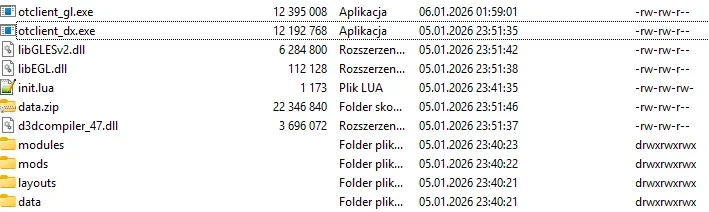
As I remember, OTCv8 does not replace .exe file during update, it just places new .exe file in %APPDATA% and existing client .exe detects that there is updated .exe and runs it (or it's just temporary .exe on screenshot and it's then moved to OTCv8 folder with client, IDK):
1767895612643.webp
 
probably wrong APPNAME or checksum isn't right, and otclient try to redownload it everytime becouse .exe isn't correct.
try to remove .exe from updater, just leave data, modules, init.lua.
 
I think that problem may be that you did not change app name and your files 'collide' with some other OTS that also did not change it:

In init.lua I have this:
Code:
APP_NAME = "evolina"

Also, as @zygfryd64 said. If your .exe has custom name like MyOTS-v1-DX9.exe, you must edit that config in updater PHP script.
In the folder with the OTS that I have on my desktop, I have two files named otclient_dx.exe and otclient_gl.exe,
and my updater.php looks like this:
PHP:
<?php
// CONFIG
$files_dir = "/var/www/html/api/files";
$files_url = "http://ip/api/files";
$files_and_dirs = array("init.lua", "data", "modules", "layouts");
$checksum_file = "checksums.txt";
$checksum_update_interval = 60; // seconds
$binaries = array(
    "WIN32-WGL" => "otclient_gl.exe",
    "WIN32-EGL" => "otclient_dx.exe",
    "WIN32-WGL-GCC" => "otclient_gcc_gl.exe",
    "WIN32-EGL-GCC" => "otclient_gcc_dx.exe",
    "X11-GLX" => "otclient_linux",
    "X11-EGL" => "otclient_linux",
    "ANDROID-EGL" => "", // we can't update android binary
    "ANDROID64-EGL" => "" // we can't update android binary
);
// CONFIG END

function sendError($error) {
    echo(json_encode(array("error" => $error)));
    die();  
}

$data = json_decode(file_get_contents("php://input"));
//if(!$data) {
//    sendError("Invalid input data");
//}

$version = $data->version ?: ; // APP_VERSION from init.lua
$build = $data->build ?: ""; // 2.4, 2.4.1, 2.5, etc
$os = $data->os ?: "unknown"; // android, windows, mac, linux, unknown
$platform = $data->platform ?: ""; // WIN32-WGL, X11-GLX, ANDROID-EGL, etc
$args = $data->args; // custom args when calling Updater.check()
$binary = $binaries[$platform] ?? "";

$cache = null;
$cache_file = sys_get_temp_dir() . DIRECTORY_SEPARATOR . $checksum_file;
if (file_exists($cache_file) && (filemtime($cache_file) + $checksum_update_interval > time())) {
    $cache = json_decode(file_get_contents($cache_file), true);
}
if(!$cache) { // update cache
    $dir = realpath($files_dir);
    $rii = new RecursiveIteratorIterator(new RecursiveDirectoryIterator($dir));
    $cache = array();
    foreach ($rii as $file) {
        if (!$file->isFile())
            continue;
        $path = str_replace($dir, '', $file->getPathname());
        $path = str_replace(DIRECTORY_SEPARATOR, '/', $path);
        $cache[$path] = hash_file("crc32b", $file->getPathname());
    }
    file_put_contents($cache_file . ".tmp", json_encode($cache));
    rename($cache_file . ".tmp", $cache_file);
}
$ret = array("url" => $files_url, "files" => array(), "keepFiles" => false);
foreach($cache as $file => $checksum) {
    $base = trim(explode("/", ltrim($file, "/"))[0]);
    if(in_array($base, $files_and_dirs)) {
        $ret["files"][$file] = $checksum;
    }
    if($base == $binary && !empty($binary)) {
        $ret["binary"] = array("file" => $file, "checksum" => $checksum);
    }
}

echo(json_encode($ret, JSON_PRETTY_PRINT));

?>
I am using the 32-bit version because I have the official OTCv8 version.


In general, all the other files update correctly, but the problem is with the .exe file.
I’d also like to add that I deleted all the .exe files from appdata, and it didn’t help.

I launch the client, it downloads the .exe file, and after the download OTClient closes.
When I start it again, it downloads the file again, and this keeps repeating indefinitely.
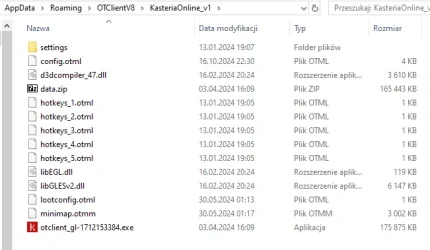
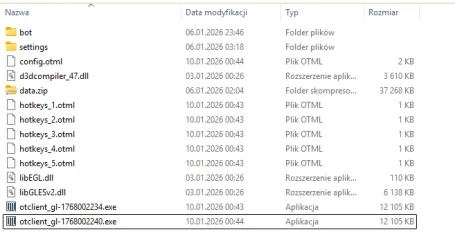
And this is how it looks in AppData:
SIARKA WIZUALIZACJA.webp

Each time I launch the client, it downloads another .exe file.
 
Last edited:
Sure — what about .exe files?
first try to use updater without .exe, just launch client.

than delete client folder evolina from appdata

than try to upload .exe again, so it may fix checksums and make sure to set correct permissions on
Code:
chmod -R 777 /var/www/html/api
 
first try to use updater without .exe, just launch client.

than delete client folder evolina from appdata

than try to upload .exe again, so it may fix checksums and make sure to set correct permissions on
Code:
chmod -R 777 /var/www/html/api
I set the permissions with chmod, removed everything and only left what you told me to keep in the api folder, cleared everything from AppData, but even after uploading the .exe files again it’s still the same. It keeps downloading in a loop.
 
what happens if you start client from appdata folder luanching file otclient_gl-number.exe? it runs correctly?

delete file /tmp/checksums.txt

if you use ssl and domain try to change $files_url = "https://domain.com/api/files";


remove folder mods from /var/www/html/api/files as its not listed in script anyway.

you can also try to set
PHP:
 keepFiles => true
in updater.php
 
Last edited:
what happens if you start client from appdata folder luanching file otclient_gl-number.exe? it runs correctly?

delete file /tmp/checksums.txt

if you use ssl and domain try to change $files_url = "https://domain.com/api/files";
If I run the .exe file from the %AppData% folder, it works correctly.
I removed /tmp/checksums.txt, but that didn’t change anything.


I should add that other files download correctly — only this .exe file is not being replaced.
Also, I tested another server (Evolunia) that also uses OTClient, and everything works normally there.
 
try those steps too

if you use ssl and domain try to change $files_url = "https://domain.com/api/files";


remove folder mods from /var/www/html/api/files as its not listed in script anyway.

you can also try to set
PHP:
keepFiles => true

in updater.php
 
Back
Top