
-
2026 staff recruitment is open! Check it out and consider applying!
You are using an out of date browser. It may not display this or other websites correctly.
You should upgrade or use an alternative browser.
You should upgrade or use an alternative browser.
Portal Question 8.6
- Thread starter Rune-Dayz
- Start date

You can add a movement stepin script.
Then add the uniqueids to the teleports/objects/items and in movements.xml.
Code:
local config = {
   [8001] = {pos = {x = 94, y = 112, z = 7}, level = 400}, -- position it should teleport the player to
   [8002] = {pos = {x = 94, y = 113, z = 7}, level = 400},
   [8003] = {pos = {x = 94, y = 114, z = 7}, level = 500}
}

function onStepIn(cid, item, position, fromPosition)

     local x = config[item.uid]
     if not x then
         return false
     end
     if getPlayerLevel(cid) >= x.level then
         doTeleportThing(cid, x.pos)
         doSendMagicEffect(x.pos, CONST_ME_TELEPORT)
     else
         doTeleportThing(cid, fromPosition)
         doPlayerSendCancel(cid, "You need to be at least level "..x.level.." to enter.")
     end
     return true
end@Limos can u pm me i wanna show u something
what file do i add this tooYou can add a movement stepin script.
Then add the uniqueids to the teleports/objects/items and in movements.xml.Code:local config = { [8001] = {pos = {x = 94, y = 112, z = 7}, level = 400}, -- position it should teleport the player to [8002] = {pos = {x = 94, y = 113, z = 7}, level = 400}, [8003] = {pos = {x = 94, y = 114, z = 7}, level = 500} } function onStepIn(cid, item, position, fromPosition) local x = config[item.uid] if not x then return false end if getPlayerLevel(cid) >= x.level then doTeleportThing(cid, x.pos) doSendMagicEffect(x.pos, CONST_ME_TELEPORT) else doTeleportThing(cid, fromPosition) doPlayerSendCancel(cid, "You need to be at least level "..x.level.." to enter.") end return true end
Last edited by a moderator:
Create a new Lua file in movements for this script.
For other kind of support you can ask it here too.
For other kind of support you can ask it here too.
@Limos i did it and then when i tested it it still moved my char inside portal
ive also have this problem with bless i tryed so many skripts but none of them seem to work when i die i lose all my items idk why bless doesnt keep the items i tryed so many skripts i asked so many people for help but not many can understand the problem so i was wonderig if you could take a look for me.. this is the biggest problem im haveing
@Limos
like if the object is on the portal it will still tp the char in but if its not on the object it worksCreate a new Lua file in movements for this script.
For other kind of support you can ask it here too.
ive also have this problem with bless i tryed so many skripts but none of them seem to work when i die i lose all my items idk why bless doesnt keep the items i tryed so many skripts i asked so many people for help but not many can understand the problem so i was wonderig if you could take a look for me.. this is the biggest problem im haveing
@Limos
Last edited by a moderator:
Code:
function onPrepareDeath(cid, deathList)
     local n = 0
     for x = 1, 5 do
         if getPlayerBlessing(cid, x) then
             n = n + 1
         end
     end
     if n == 5 and getCreatureSkullType(cid) ~= SKULL_RED then
         doCreatureSetDropLoot(cid, false)
     else
         doCreatureSetDropLoot(cid, true)
     end
     return true
endPost how you added it and what happens.
If you're not sure what's wrong you can always add prints in the script, it will show this in your console.
For example under function onPrepareDeath.
If it's added correct you will see that message in your console when a player dies.
If you're not sure what's wrong you can always add prints in the script, it will show this in your console.
For example under function onPrepareDeath.
Code:
print("script load test")286 018 650
just tv me red tryed doing it idk what he did
-- ### END OF CONFIG ###
SQL_COMUNICATION_INTERVAL = SQL_interval * 1000
function onLogin(cid)
if(InitShopComunication == 0) then
local eventServ = addEvent(sql_communication, SQL_COMUNICATION_INTERVAL, {})
InitShopComunication = eventServ
end
registerCreatureEvent(cid, "PlayerDeath")
registerCreatureEvent(cid, "Ushuriel")
registerCreatureEvent(cid, "Zugurosh")
registerCreatureEvent(cid, "Madareth")
registerCreatureEvent(cid, "Golgordan")
registerCreatureEvent(cid, "Annihilon")
registerCreatureEvent(cid, "Hellgorak")
registerCreatureEvent(cid, "createTeleport")
registerCreatureEvent(cid, "pointsforlvl")
registerCreatureEvent(cid, "LevelReward")
registerCreatureEvent(cid, "levelup")
registerCreatureEvent(cid, "blessings")
return TRUE
end
just tv me red tryed doing it idk what he did
-- ### END OF CONFIG ###
SQL_COMUNICATION_INTERVAL = SQL_interval * 1000
function onLogin(cid)
if(InitShopComunication == 0) then
local eventServ = addEvent(sql_communication, SQL_COMUNICATION_INTERVAL, {})
InitShopComunication = eventServ
end
registerCreatureEvent(cid, "PlayerDeath")
registerCreatureEvent(cid, "Ushuriel")
registerCreatureEvent(cid, "Zugurosh")
registerCreatureEvent(cid, "Madareth")
registerCreatureEvent(cid, "Golgordan")
registerCreatureEvent(cid, "Annihilon")
registerCreatureEvent(cid, "Hellgorak")
registerCreatureEvent(cid, "createTeleport")
registerCreatureEvent(cid, "pointsforlvl")
registerCreatureEvent(cid, "LevelReward")
registerCreatureEvent(cid, "levelup")
registerCreatureEvent(cid, "blessings")
return TRUE
end
Last edited by a moderator:
For teamviewer help start a meeting (the one to the right) and post the meeting id (starts with m).

A question why do you have this?
Code:-- ### END OF CONFIG ### SQL_COMUNICATION_INTERVAL = SQL_interval * 1000 function onLogin(cid) if(InitShopComunication == 0) then local eventServ = addEvent(sql_communication, SQL_COMUNICATION_INTERVAL, {}) InitShopComunication = eventServ end
With who are you talking with? o_ohow come the body doesnt show up now?

Shadowsong
Game Developer & Graphic Designer
- Joined
- Feb 23, 2010
- Messages
- 3,446
- Solutions
- 21
- Reaction score
- 3,014
- Location
- Bosnia & Herzegovina
- YouTube
- ShivaShadowsong
what file do i add this too
Let me explain this the easiest way possible:
In map editor, edit the tile where your object/teleport will be. Put action ID 18135 on it.
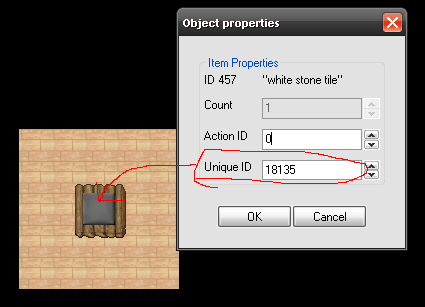
Step 2: In your movements.xml file, add this:
Code:
<movevent type="StepIn" uniqueid="18135" event="script" value="levelteleport.lua"/>Step 3: In your movements/scripts/ folder, create a file called levelteleport.lua and paste this code into it:
Code:
local config = {
   [18135] = {pos = {x = 94, y = 112, z = 7}, level = 400}, -- position it should teleport the player to
   [18136] = {pos = {x = 94, y = 113, z = 7}, level = 400},
   [18137] = {pos = {x = 94, y = 114, z = 7}, level = 500}
}

function onStepIn(cid, item, position, fromPosition)

     local x = config[item.uid]
     if not x then
         return false
     end

     if getPlayerLevel(cid) >= x.level then
         doTeleportThing(cid, x.pos)
         doSendMagicEffect(x.pos, CONST_ME_TELEPORT)
     else
         doTeleportThing(cid, fromPosition)
         doPlayerSendCancel(cid, "You need to be at least level "..x.level.." to enter.")
     end

     return true
end
You don't need to create a teleport item, or anything else on this tile. This will automatically work like a teleport when you apply this script.
However, you can put an orb, a teleport item (without destination coordinates) or whatever else you want on this tile to make it look cooler, and it will still work. Like this:
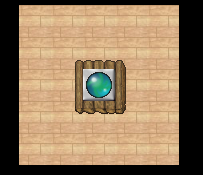
Credits to @Limos for the posted script, I just illustrated the instructions to make it easier to understand for the beginner scripters.
Code:
function onPrepareDeath(cid, deathList)
     local n = 0
     for x = 1, 5 do
         if getPlayerBlessing(cid, x) then
             n = n + 1
         end
     end
     if n == 5 and getCreatureSkullType(cid) ~= 4 then
         doCreatureSetDropLoot(cid, false)
     end
     return true
endCan't find what?