• There is NO official Otland's Discord server and NO official Otland's server list. The Otland's Staff does not manage any Discord server or server list. Moderators or administrator of any Discord server or server lists have NO connection to the Otland's Staff. Do not get scammed!
  • 2026 staff recruitment is open! Check it out and consider applying!

Windows Ports

Oldschool'er

Tibia since 1998'
Joined
Dec 14, 2010
Messages
2,198
Reaction score
149
Location
United States
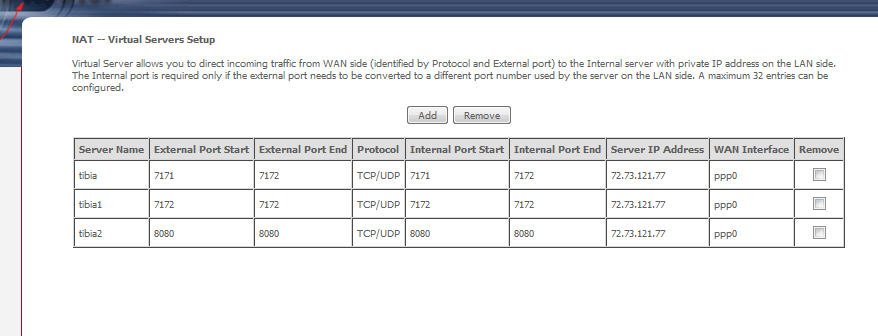
Trying to open my ports, i dont know if i did this right, can anyone tell me if i did it right?
9Fs84sg.png
 
Use this:
7171 - 7172 TCP/UDP local address.
80 - 80 TCP/UDP local address.

Get local address from command prompt (type ipconfig, and look for IPv4 address)
Looks like you have:
7171-7172 TCP/UDP - Global Address
7172-7172 TCP/UDP - Global Address
80-80 TCP/UDP - Global Address
 
Use this:
7171 - 7172 TCP/UDP local address.
80 - 80 TCP/UDP local address.

Get local address from command prompt (type ipconfig, and look for IPv4 address)
Looks like you have:
7171-7172 TCP/UDP - Global Address
7172-7172 TCP/UDP - Global Address
80-80 TCP/UDP - Global Address

when you say local address the 1 in the picture or 192.168.1.1?
 
I can if you want just pm me and have everything you need open
:)

ok, lets try another thing tell me when you're ready for me to go to teamviewer :D
 
Last edited by a moderator:
Open CMD as Admin
Write in the command line: ipconfig
You will get a bunch of text and numbers..

You will see IPv4-Adress: 192.168.x.x

You should have that as server IP Adress instead of 72.23.121.77
 
Maybe he doesn't know what command prompt is...
Go to start menu - run. When "run" is open, type cmd and press enter.
This opens your command prompt.
Next type ipconfig into your prompt and look for your IPv4 address, Should be like 192.168.0.1 or somethin similar. It is NOT your default gateway!
 
I've been trying to help him, but its kind of weird.... I think he is using 2 different routers.
His default is 10.0.0.1 but he can also use 192.168.1.1...

I tried on the 192.168.1.1, but it didn't worked..
I then tried on 10.0.0.1, but said that 7171 was being used by another service.

In both of them I used the Ipv4, but none worked...
I know I can do this, because I've done it before... but I don't know whats wrong.
xD
 
I've been trying to help him, but its kind of weird.... I think he is using 2 different routers.
His default is 10.0.0.1 but he can also use 192.168.1.1...

I tried on the 192.168.1.1, but it didn't worked..
I then tried on 10.0.0.1, but said that 7171 was being used by another service.

In both of them I used the Ipv4, but none worked...
I know I can do this, because I've done it before... but I don't know whats wrong.
xD

Sounds like he might be connected with both cable and wireless, he should try disable one of them and get on it again.

To check if the port is already in use simply open the CMD (with administrator privileges) and type netstat -a -b and look at the numeric adresses.

Will look something like
Code:
TCP 192.168.1.1:7171 (or what ever your adress is)
[NameOfProgram.exe]
 
Back
Top
