• There is NO official Otland's Discord server and NO official Otland's server list. The Otland's Staff does not manage any Discord server or server list. Moderators or administrator of any Discord server or server lists have NO connection to the Otland's Staff. Do not get scammed!

Solved problem adding ground to grounds.xml in RME

Thorn

Spriting since 2013
Joined
Sep 24, 2012
Messages
2,203
Solutions
1
Reaction score
923
Location
Chile
hello , hey i have having problems adding a new ground to grounds.xml, if i do it correctly, where should i find the new ground? where inside terrain, cave?nature?town? how do i set this?
also is not working,
i added this in grounds.xml
Code:
<brush name="hola" type="ground" server_lookid="21632" z-order="3530">
        <item id="21632" chance="1000"/>
        <border align="outer" id="135"/>
        <border align="inner" to="none" id="1"/>
    </brush>

and this in borders.xml

Code:
 <border id="135">
        <borderitem edge="n"   item="21633"/>
        <borderitem edge="w"   item="21635"/>
        <borderitem edge="e"   item="21636"/>
        <borderitem edge="s"   item="21634"/>
        <borderitem edge="cnw" item="21641"/>
        <borderitem edge="cne" item="21642"/>
        <borderitem edge="cse" item="21643"/>
        <borderitem edge="csw" item="21644"/>
        <borderitem edge="dnw" item="21637"/>
        <borderitem edge="dne" item="21638"/>
        <borderitem edge="dse" item="21639"/>
        <borderitem edge="dsw" item="21640"/>
    </border>

these are the ids
CNpEk9yCL.png
-FikspZlM.png


this is in object builder
fz85ichE3.png


plz, if anyone know how to fix this, and do this process correctly, plz show me how
 
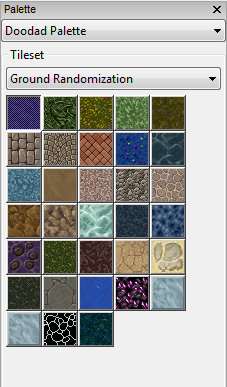
Solved the issue with him via PM, here is what I said for future searchers.
If you want it in your own tileset doodad file or terrain file you will do something like this:

Code:
<tileset name="Ground Randomization">
<doodad>
<brush name="greyish sand"/>
<brush name="Dark Green Jungle Grass"/>
<brush name="grass patch"/>
<brush name="bright green grass"/>
<brush name="swamp grass"/>
<brush name="darker pavement"/>
<brush name="dark brown cobble"/>
<brush name="layered brown tile"/>
<brush name="dark uranian grass"/>
<brush name="brook"/>
<brush name="lunar grass"/>
<brush name="poopie water"/>
<brush name="roshamuul pavement"/>
<brush name="roshamuul dark pavement"/>
<brush name="roshamuul brick pavement"/>
<brush name="roshamuul dirt"/>
<brush name="debris dirt"/>
<brush name="light blue brook"/>
<brush name="lunar dirt"/>
<brush name="lunar mushroom"/>
<brush name="lunar brook"/>
<brush name="dark grass"/>
<brush name="soul sand"/>
<brush name="dark cracked sand"/>
<brush name="sand with stones"/>
<brush name="dark elven grass"/>
<brush name="10.5 pavement"/>
<brush name="freshwater stuff"/>
</doodad>
</tileset>
1QnRGe7.png


Add in your brush name from doodads.xml and reload. Keep in mind the <doodad> will classify where it goes, if you want it in terrain you need to change it to <terrain> and all the corresponding brushes from something like this:

Code:

<brush name="bones" type="doodad" server_lookid="2231" draggable="true" on_blocking="true" thickness="6/10">
<item id="2231" chance="10"/>
<item id="2230" chance="10"/>
<item id="2229" chance="10"/>
</brush>

Will need to have the type="doodad" changed to type="terrain" but this shouldn't matter for items in grounds.xml. If you want to add it onto your current list, you need to add it onto wherever you need it. For instance, in Notepad++, will find town on line 505 in tilesets.xml.
Also the borderid in your code needs to be changed and not conflict with others, such as if you make another ground brush it will need to be border id="136".
 
Back
Top