
• There is NO official Otland's Discord server and NO official Otland's server list. The Otland's Staff does not manage any Discord server or server list. Moderators or administrator of any Discord server or server lists have NO connection to the Otland's Staff. Do not get scammed!
  • 2026 staff recruitment is open! Check it out and consider applying!

Problem with compiling OTClient on Windows

Ercio

New Member
Joined
Sep 18, 2022
Messages
2
Reaction score
0
GitHub
Ercio
Hi,
did someone have similar troubles with compiling OTClient on windows?
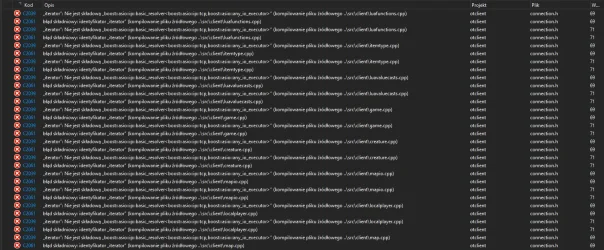
Ive tried to compile following tutorial from OTS Guide section - compile client on windows and the only thing that was diffrent in my case was version of Virtual Studio - on tutorial was 2017 i was using 2022 - after press Release x64 compile i have 150 errors that mainly say something about boost:asio after that i deleted everything - downloaded Virtual Studio 2017 to have everything simillar like it was on tutortial and still after pressing compile OTClient i have lots of errors for example :
1755780799525.webp

Previously when i have 150 errors on VS2022 version ive tryied to change connection.h file and connection.hpp file with chat gpt help to solve the problem but it didnt work out. Any ideas where i am doing mistake? I am total newbie and ngl. im using chat gpt help a lot.

PS. my boost version is 1.8.8 should i downgrade it?
 
 
Are there any guides on how to compile OtClient by mehah? Because I can't seem to get it to work.
 
Hi,
did someone have similar troubles with compiling OTClient on windows?
Ive tried to compile following tutorial from OTS Guide section - compile client on windows and the only thing that was diffrent in my case was version of Virtual Studio - on tutorial was 2017 i was using 2022 - after press Release x64 compile i have 150 errors that mainly say something about boost:asio after that i deleted everything - downloaded Virtual Studio 2017 to have everything simillar like it was on tutortial and still after pressing compile OTClient i have lots of errors for example :

View attachment 94407

Previously when i have 150 errors on VS2022 version ive tryied to change connection.h file and connection.hpp file with chat gpt help to solve the problem but it didnt work out. Any ideas where i am doing mistake? I am total newbie and ngl. im using chat gpt help a lot.

PS. my boost version is 1.8.8 should i downgrade it?
Hello , I saw your post about having issues compiling OTClient on Windows with Visual Studio — here’s the proper way to fix it step by step. Working Fix (tested on Windows 10 / 11): , Use the updated OTClient source: Don’t use the old repo — clone this one instead (it’s maintained and compiles cleanly): https://github.com/OTCv8/otclient → git clone https://github.com/OTCv8/otclient.git && cd otclient Install dependencies: You’ll need Boost (recommended version 1.82.0), SDL2, OpenAL, PhysFS, LibZip, and Zlib. The easiest way is to use vcpkg: bash vcpkg install boost-asio boost-system sdl2 openal-soft physfs libzip zlib && vcpkg integrate install - Open Visual Studio properly: Use Visual Studio 2022 (Community Edition is fine). Open the project using CMakeLists.txt, not the old .sln file. When prompted, choose x64 - Release as the build configuration. - Configure CMake: In the CMake settings, make sure these variables are set: BOOST_ROOT = C:/path/to/vcpkg/installed/x64-windows and SDL2_DIR = C:/path/to/vcpkg/installed/x64-windows. Then click “Configure” and “Generate”. - Build OTClient: Go to Build → Build All (Ctrl+Shift+B). If everything’s set correctly, it will compile with zero errors. The final executable will be in build/x64/Release/otclient.exe. Common mistakes to avoid: Don’t mix 32-bit and 64-bit libraries, don’t use Boost newer than 1.84 (some versions cause ASIO template errors), and make sure you run Visual Studio as Administrator. Extra Tip: If you just want a modern, working OTClient (8.6+ support, Lua 5.4, better rendering), use OTCv8 — it builds out of the box on Windows with no Boost issues: https://github.com/OTCv8/otclient That should fix your problem completely. If you still get errors, post the first 3–5 lines of the build log so we can pinpoint it.

I hope this helps.
 
Are there any guides on how to compile OtClient by mehah? Because I can't seem to get it to work.
 
Hi,
did someone have similar troubles with compiling OTClient on windows?
Ive tried to compile following tutorial from OTS Guide section - compile client on windows and the only thing that was diffrent in my case was version of Virtual Studio - on tutorial was 2017 i was using 2022 - after press Release x64 compile i have 150 errors that mainly say something about boost:asio after that i deleted everything - downloaded Virtual Studio 2017 to have everything simillar like it was on tutortial and still after pressing compile OTClient i have lots of errors for example :

View attachment 94407

Previously when i have 150 errors on VS2022 version ive tryied to change connection.h file and connection.hpp file with chat gpt help to solve the problem but it didnt work out. Any ideas where i am doing mistake? I am total newbie and ngl. im using chat gpt help a lot.

PS. my boost version is 1.8.8 should i downgrade it?
HTML:
https://tibiadevs.com/forums/topic/19-como-compilar-otcv8-pc-e-mobile-vs2022/
 
Back
Top