
• There is NO official Otland's Discord server and NO official Otland's server list. The Otland's Staff does not manage any Discord server or server list. Moderators or administrator of any Discord server or server lists have NO connection to the Otland's Staff. Do not get scammed!

Lua Remove only 2 top items?

Nekiro

Legendary OT User
TFS Developer
Joined
Sep 7, 2015
Messages
2,759
Solutions
127
Reaction score
2,279
Hello, i have written script but i dont know how to remove just 2 items from stack of items.
Example:
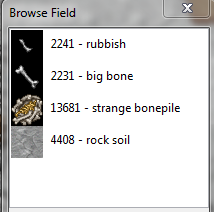
70e9aa1d64751722fbde28287411a9c2.png


And i want just to remove 2 top items from stack or item with item id = "333"
same with adding items.
 
If you want to remove just 2 items from a stack (of say 100) you can use item:remove(2)
If you want to remove an item of id 333 from the ground but you do not currently know where it is on that tile you can use tile:getItemById(333)
 
If you want to remove just 2 items from a stack (of say 100) you can use item:remove(2)
If you want to remove an item of id 333 from the ground but you do not currently know where it is on that tile you can use tile:getItemById(333)

Thanks but it will remove 2 first items or which ?
 
Item:remove(2) doesnt work, removing just one item.

and how to remove item from position player used this item on?

i mean target:getposition remove(ID) something like that
 
Idk, try:

Code:
local tile = Tile(position)
if tile then
    local topItem = tile:getTopTopItem()
    if topItem then
        topItem:remove(2)
    end
end
 
Code:
function removeTopItems(pos, amount)
local tile = Tile(pos)

   if tile then
     local item = tile:getTopTopItem()
     if item then
       local count = item:getCount()
       local amount = amount or 1
      
       if count >= amount then
         item:remove(amount)
       else
         amount = amount - count
         removeTopItems(pos, amount)
       end
     end
   end
end
Not sure what were you looking for.
This will remove any item from top, regardless what is the itemID, it will even remove borders..
You have to make some escapes if there are some specific items you dont want to be removed.
if you wanted to remove some specific item then use tile:getItemById()
 
Code:
    function onUse(player, item, fromPosition, target, toPosition, isHotkey)
    if item.itemid == 2243 and target.actionid == 5102 then
        Game.createMonster('Rat, {x = toPosition.x - 1, y = toPosition.y + 1, z = toPosition.z})
        item:remove(1)
        target:remove(2)
        end
    return true
end

Here's what i wrote.

Itemid is item which i use on the item with action id :)

But all is working expect target:remove(2) its removing only one item from tile.
 
Code:
function specialremove(pos, itemID, amount)
local tile = Tile(pos)

   if tile then
     local item = tile:getItemById(itemID)
 
     if item then
       local count = item:getCount()
       local amount = amount or 1
       
       if count >= amount then
         item:remove(amount)
       else
         amount = amount - count
         specialremove(pos, itemID, amount)
       end
     end
   end
end
 
Code:
function specialremove(pos, itemID, amount)
local tile = Tile(pos)

   if tile then
     local item = tile:getItemById(itemID)

     if item then
       local count = item:getCount()
       local amount = amount or 1
      
       if count >= amount then
         item:remove(amount)
       else
         amount = amount - count
         specialremove(pos, itemID, amount)
       end
     end
   end
end

Nice, im now trying to merge this script with my...
If you want help me more, you can xD
Its function so i can use it like : "specialremove(pos, itemID, amount)" ?
 
Back
Top