• There is NO official Otland's Discord server and NO official Otland's server list. The Otland's Staff does not manage any Discord server or server list. Moderators or administrator of any Discord server or server lists have NO connection to the Otland's Staff. Do not get scammed!
  • 2026 staff recruitment is open! Check it out and consider applying!

TFS 1.X+ Respriting?

iLeet

New Member
Joined
Jul 28, 2008
Messages
133
Reaction score
0
Hello Friends,

I haven't been active in the OT community for what feels like a decade.
I am wondering how we go about extracting the sprites and recompiling them after modification?
I am using OTClient and TFS 1.6
I did some searching but can't seem to find any solid answers.

Thanks for the help,
iLeet
 
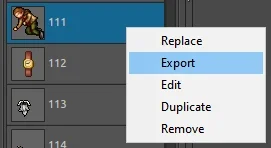
- You can Export Sprites like so in ObjectBuilder, after which a prompt open, export as PNG.

1737292525059.webp

- Edit your sprite however you want it, after which go back to ObjectBuilder and either Replace or Duplicate the same Object and drag your new sprite inside. You can use any editing program, Photoshop, Aseprite, Gimp

- Press Save, a prompt will open if you wish to replace current sprite, press No! This will create new sprites instead of replacing the old, which you may want to use later on. If you press yes, the existing sprites will be overwritten.

- After that go to File > Compile.

Done!

Note: If you have duplicated your Object, make sure to also open your ItemEditor and "Create Missing Items" and Save
 
- You can Export Sprites like so in ObjectBuilder, after which a prompt open, export as PNG.

View attachment 89620

- Edit your sprite however you want it, after which go back to ObjectBuilder and either Replace or Duplicate the same Object and drag your new sprite inside. You can use any editing program, Photoshop, Aseprite, Gimp

- Press Save, a prompt will open if you wish to replace current sprite, press No! This will create new sprites instead of replacing the old, which you may want to use later on. If you press yes, the existing sprites will be overwritten.

- After that go to File > Compile.

Done!

Note: If you have duplicated your Object, make sure to also open your ItemEditor and "Create Missing Items" and Save
Thanks for the info!
Now the issue I am facing is I cannot find a version compatible with protocol 13.10.
 
Hmm doesnt that use Asset Editor or something(?)
Asset editor seems to work!
The last question I have is, after editing and recompiling assets. I would like to use my new graphics in RME. I use OTAcademy's RME which somehow and use spr/dat for 1310 from otsme. Im not sure how exactly they have a spr/dat since 1310 doesnt use it. How would I use my new assets in this map editor?
Thanks for the help so far!
 
Back
Top