• There is NO official Otland's Discord server and NO official Otland's server list. The Otland's Staff does not manage any Discord server or server list. Moderators or administrator of any Discord server or server lists have NO connection to the Otland's Staff. Do not get scammed!

Solved RME metadata - unknown flag

Mjmackan

Mapper ~ Writer
Joined
Jul 18, 2009
Messages
1,478
Solutions
18
Reaction score
195
Location
Sweden
Searching through otland, suddenly when simply opening my files in objectbuilder then shutting it down i can no longer edit my custom map.

Using RME 3.7.0

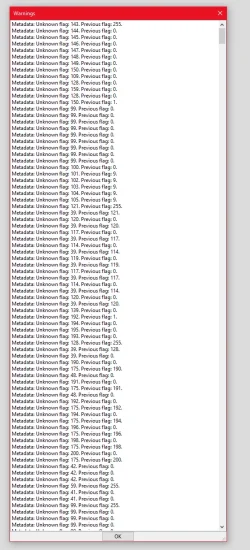
It gets stuck for a long time on metadata then this prompt shows, when hitting ok it crashes.
I guess I have to remove the flags but where?
1778892080432.webp
 

Attachments

Solution
I solved this myself, but since there were so many that had same issue without an answer here's how i solved it.

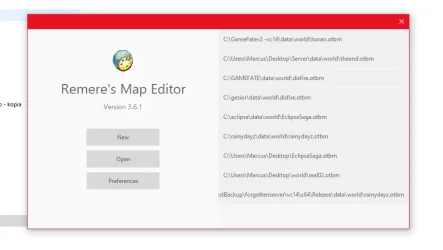
AFAIK its the .dat file thats somehow corrupt, i was lucky to have a backup in hand. It may help to go through object builder to compile a new version. Directly changing to that file did not work, so some type of cache is still not being cleaned within the change, therefor i had to change to a clean version of 10.98 in this case, then back to my backup or newly compiled .dat & .spr -file. Whats important is that you do the changes in the introduction window, im pasting a image below so you know which im talking about. Go to preferences when you do these changes. Changing directly in the files or when map editor is open...
I solved this myself, but since there were so many that had same issue without an answer here's how i solved it.

AFAIK its the .dat file thats somehow corrupt, i was lucky to have a backup in hand. It may help to go through object builder to compile a new version. Directly changing to that file did not work, so some type of cache is still not being cleaned within the change, therefor i had to change to a clean version of 10.98 in this case, then back to my backup or newly compiled .dat & .spr -file. Whats important is that you do the changes in the introduction window, im pasting a image below so you know which im talking about. Go to preferences when you do these changes. Changing directly in the files or when map editor is open wouldnt do it for me.


1778937807521.webp
 
Solution
Back
Top