Follow along with the video below to see how to install our site as a web app on your home screen.
Note: This feature may not be available in some browsers.
There is NO official Otland's Discord server and NO official Otland's server list. The Otland's Staff does not manage any Discord server or server list. Moderators or administrator of any Discord server or server lists have NO connection to the Otland's Staff. Do not get scammed!
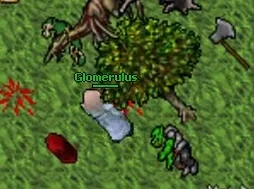
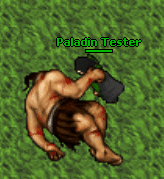
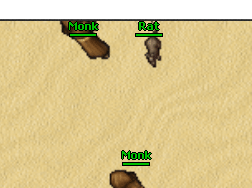
Did you problem any issues with monster health bars and names near the edge of the game screen?
Previously, the bottom bar wouldn't appear when a creature was within one tile of the screen's edge.
Also, the bar/name at the top no align correctly when positioned.
Did you problem any issues with monster health bars and names near the edge of the game screen?
Previously, the bottom bar wouldn't appear when a creature was within one tile of the screen's edge.
Also, the bar/name at the top no align correctly when positioned. View attachment 101365
Did you problem any issues with monster health bars and names near the edge of the game screen?
Previously, the bottom bar wouldn't appear when a creature was within one tile of the screen's edge.
Also, the bar/name at the top no align correctly when positioned. View attachment 101365
Yeah, this client is indeed great. It's really easy to create new features there. I already created many of them including dungeon finder, simple store, action bars, disable server log, tooltips (with showing what is inside a container), rarity frames, ring timers, cyclopedia (items, bestiary, charms), loot/exp analyzer, websockets connection, auto-updater, dat/spr encryption/scrumbling, crash reports to discord and many more.
I did all of that with AI, because im not a programmer at all. Previously I was working with Tibianic-DLL. The amount of tokens required to create something in Tibianic-DLL vs TFC is huge.
That’s great, I’m happy to see people starting to use Fabian’s TFC.
This client is really good, honestly kind of surreal. I hope the community starts using it more too. OTC was good, but it became very messy, with too many files and subfolders. It is also hard to track memory leaks properly. Using ASan and Valgrind with OTC requires a strong PC to run well, and I couldn’t handle it anymore, so I gave up trying to trace the memory leaks there, haha.
For me, TFC is a good path and has a future. A friend of mine is already working on TFC for protocol 15.24, and everything is going very well. They are also implementing QML and other systems to make it look and behave closer to the original CipSoft client.
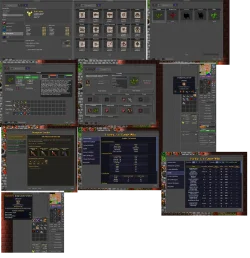
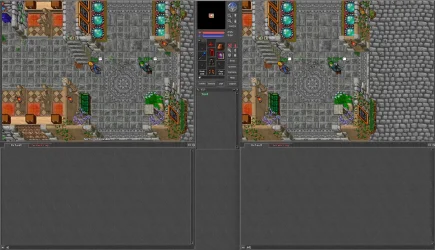
Few screenshoots from my 772 version of the TFC. It was really easy to migrate all functions from TIbianic-DLL and create new ones.
In a month I will start this project in test phase - maybe it will tell us more how it behave when few players will play at the same time.
If people would listen to me 6 years ago my server was the only one who was using this client in production mode, now converted it to work with cipsoft gameserver wich works much way better than their original client
Few screenshoots from my 772 version of the TFC. It was really easy to migrate all functions from TIbianic-DLL and create new ones.
In a month I will start this project in test phase - maybe it will tell us more how it behave when few players will play at the same time.
Congratulations on your work, it looks really beautiful!
In my opinion, TFC is a very promising path and it could be the future. Congratulations to everyone involved in the project.
We also need to really appreciate Fabian for making the source open. He was a genius for doing that, and because of it, the community can now study, improve, and create new things based on the project.
I hope @fabian766 comes back someday and sees that his work is still helping many people. This project really has a lot of potential.
I haven't moved on to the implementations yet, though I am making some adjustments; however, for some reason no matter how I tweak the calculation, i can't get the walking animation to appear behind the tree tile (it's the only one with this issue).
I've already fixed the problem with the cyclops corpse.
any ex: (x-1, y) (x+1, y) for east-west movement and vice-versa.
Now, the tree is only causing issues with north-south movement ex: (x, y-1) (x, y+1).
I haven't moved on to the implementations yet, though I am making some adjustments; however, for some reason no matter how I tweak the calculation, i can't get the walking animation to appear behind the tree tile (it's the only one with this issue).
I've already fixed the problem with the cyclops corpse.
any ex: (x-1, y) (x+1, y) for east-west movement and vice-versa.
Now, the tree is only causing issues with north-south movement ex: (x, y-1) (x, y+1).
I was too excited about implementing things like CAM before I realized making actions like spells or moving items within the inventory while auto walking from map clicking would freeze your character and then jump it into animation and walking again.
If anyone has solved that yet I'd love a pointer.
Post automatically merged:
To anyone who's noticed the cap amount and other text being a bit off this is due to DPI-Virtualization so don't spend time trying to adjust fonts or sizes.
If an app doesn't explicitly declare that it handles DPI scaling itself, Windows assumes it's DPI-unaware, renders it at 96 DPI into an offscreen bitmap, then stretches that bitmap to match the display's actual scale factor.
You can manually disable it to see what it would like by right clicking the client, go into Properties, Compatibility, High DPI scaling override, check Override high DPI scaling behavior. Scaling performed by: App
Fix for the build: Declare PerMonitorV2 DPI awareness via an embedded application manifest. This tells Windows "I'll handle my own scaling, don't virtualize me", the window then renders at native resolution with zero blur.
Both tags matter: dpiAwareness=PerMonitorV2 is what you actually want (Windows 10 1703+), but dpiAware=true (the older 2005 schema) is the fallback for anything older that doesn't understand the 2016 schema, without it you'd silently regress on older Windows.
Wire it into the build so it gets embedded in the EXE. With MSBuild/vcxproj, that's a one-line project item, no resource script editing needed:
MSBuild's manifest tool (mt.exe) merges it automatically at link time. (If you're on CMake instead, the equivalent is adding the .manifest file to your target sources, or passing it via linker flags)
Rebuild. No SDL2 hint (SDL_HINT_VIDEO_HIGHDPI_DISABLED etc.) is involved; that hint affects SDL's own high-DPI backbuffer flag, not this OS-level bitmap-stretching behavior, so it won't fix this class of bug on its own.



streamable.com
Post automatically merged:

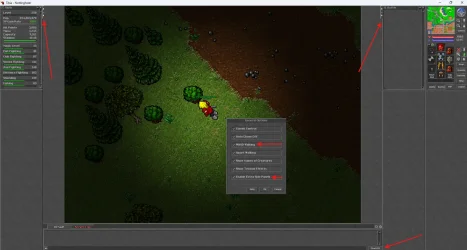
 Extra Panels (arrows hardcoded in C++)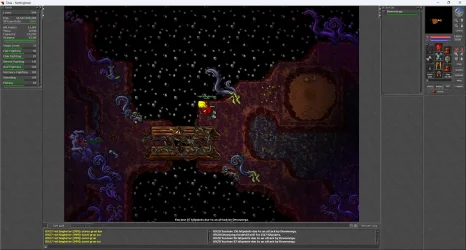

 btw does it works better than otc and even the real cip client?