• There is NO official Otland's Discord server and NO official Otland's server list. The Otland's Staff does not manage any Discord server or server list. Moderators or administrator of any Discord server or server lists have NO connection to the Otland's Staff. Do not get scammed!
  • 2026 staff recruitment is open! Check it out and consider applying!

Solved Tfs 0.4 Tibia 860 Multi World

MaSc

TFS Scripter
Joined
Aug 28, 2017
Messages
500
Solutions
3
Reaction score
118
now i need to open 3 worlds for example world x world z world Y
I need when people login use only one ip for example: multi-world.com
one port > 7171
and when login Char one>world x char two world z char three world y ,..
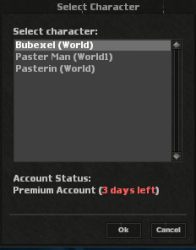
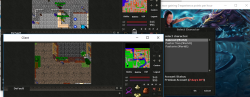
not different ip different port why than i open it multi worlld if i will make different ip / port than i make 3 servers .. not 1 server multi worlds i need some thing like the 2018-08-31 at 13-43-56.png photo i compile with -d-login-server__ but i need the player join with one ip one port.. not different ip different port

 
now i need to open 3 worlds for example world x world z world Y
I need when people login use only one ip for example: multi-world.com
one port > 7171
and when login Char one>world x char two world z char three world y ,..
not different ip different port why than i open it multi worlld if i will make different ip / port than i make 3 servers .. not 1 server multi worlds i need some thing like the View attachment 32825 photo i compile with -d-login-server__ but i need the player join with one ip one port.. not different ip different port
Tfs version?
 
now i need to open 3 worlds for example world x world z world Y
I need when people login use only one ip for example: multi-world.com
one port > 7171
and when login Char one>world x char two world z char three world y ,..
not different ip different port why than i open it multi worlld if i will make different ip / port than i make 3 servers .. not 1 server multi worlds i need some thing like the View attachment 32825 photo i compile with -d-login-server__ but i need the player join with one ip one port.. not different ip different port
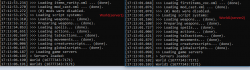
Which source editions you made? Can you share rhe lined that you edited pls?
 
im having a similar problem could u help me please? @Geisor.pl @Sir Sezago

i have setup everything properly between bot servers using 1 database
config.lua1
Code:
-- Messages
    motd = "Welcome to the World"
    serverName = "World"
    loginMessage = "Welcome to World"
    displayGamemastersWithOnlineCommand = true

    -- MySql
    sqlType = "mysql"
    sqlHost = "127.0.0.1"
    sqlPort = 3306
    sqlUser = "root"
    sqlPass = ""
    sqlDatabase = "otx"
    sqlFile = "schemas/otxserver.s3db"
    sqlKeepAlive = 0
    mysqlReadTimeout = 10
    mysqlWriteTimeout = 10
    mysqlReconnectionAttempts = 5
    encryptionType = "sha1" --// encryptionType can be (plain, md5, sha1, sha256 or sha512).

    -- World / Ip / Port
    worldId = 0
    ip = ip = "xxx.xxx.xxx.x"
    worldType = "open"

server.xml1

Code:
<server id="0" name="World" versionMin="770" versionMax="772" address="127.0.0.1" port="7171"/>
    <server id="1" name="World1" versionMin="770" versionMax="772" address="127.0.0.1" port="7171"/>


config.lua2
Code:
-- Messages
    motd = "Welcome to the World1"
    serverName = "World1"
    loginMessage = "Welcome to The World1"
    displayGamemastersWithOnlineCommand = true

    -- MySql
    sqlType = "mysql"
    sqlHost = "127.0.0.1"
    sqlPort = 3306
    sqlUser = "root"
    sqlPass = ""
    sqlDatabase = "otx"
    sqlFile = "schemas/otxserver.s3db"
    sqlKeepAlive = 0
    mysqlReadTimeout = 10
    mysqlWriteTimeout = 10
    mysqlReconnectionAttempts = 5
    encryptionType = "sha1" --// encryptionType can be (plain, md5, sha1, sha256 or sha512).

-- World / Ip / Port
    worldId = 1
    ip = "xxx.xxx.xxx.xx"
    worldType = "open"

server.xml2

Code:
<server id="0" name="World" versionMin="770" versionMax="772" address="127.0.0.1" port="7171"/>
    <server id="1" name="World1" versionMin="770" versionMax="772" address="127.0.0.1" port="7171"/>

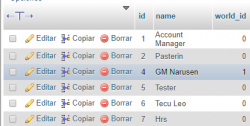
i have world_id column in the database and between the both exe everything seems to be okay there no errors
36283
36284

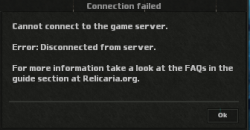
i can access to the account login list without problem but i cannot login to the game itself what could be missing?

3628536286
 
Last edited:
@Felipe93
If you want to run 2 worlds on one IP, they must use diffrent ports. One game server on port 7172, second on 7173.
Only real debuging you can do with Wireshare. You need to check to what IP and port tibia client is trying to connect.
 
i know
@Felipe93
If you want to run 2 worlds on one IP, they must use diffrent ports. One game server on port 7172, second on 7173.
Only real debuging you can do with Wireshare. You need to check to what IP and port tibia client is trying to connect.
what u mean with real debugging? , i want to be able to connect with same ports using same client how @Sir Sezago did it? i want to do in that way too
 
Last edited:
how can i use 1 port to two game servers? there is a code in another tfs server distro to check out?
You don't.

7171 is login server. You can use this one port, to login to both game servers. (Shows your character list.)
7172 is the first game server.
7173 is the second game server.
---
Well actually, you can use the same port if you have 2 separate IP's.
But if you're only using 1 IP, then you have to use 2 ports.
 
i managed to connect with the same client with differents ports, using tibianic client and with otclient worked good too, i thought it aint gonna worked the way i wanted to, but it did oajsoa..
thanks guys
36296
 
Last edited:
Even if you use different ports for different characters it will still display in the same character list (because the login port 7171 is the same for all of them, only the game port is different). Each world has its own game port.

The game port you send to the client in protocolgame.cpp (normally 7172) is the port the client will send the login character packet request back to. E.g.: If you add the game port 7173 to a character in protocolgame.cpp, and the user selects that character to login, the login packet from the client to the server is then sent on 7173.

protocolgame.cpp
C++:
//Add char list
output->addByte(0x64);
uint8_t size = std::min<size_t>(std::numeric_limits<uint8_t>::max(), account.characters.size());
output->addByte(size);
for (uint8_t i = 0; i < size; i++) {
    output->addString(account.characters[i]);
    output->addString(g_config.getString(ConfigManager::SERVER_NAME));
    output->add<uint32_t>(inet_addr(g_config.getString(ConfigManager::IP).c_str()));
    output->add<uint16_t>(g_config.getNumber(ConfigManager::GAME_PORT));
 }


This is how different characters are on different worlds (game ports):
Change this line: output->add<uint16_t>(g_config.getNumber(ConfigManager::GAME_PORT));
To: output->add<uint16_t>(account.characters[i].port);

No need for client modifications.
 
Back
Top