- Joined
- Dec 23, 2014
- Messages
- 2,474
- Solutions
- 69
- Reaction score
- 1,132
I don't know how I run into these problems. I have been compiling my server for a long...long time. Today, I am randomly getting this error:

I am using vcpkg and have not updated or changed it.

I just can't make sense of it. I am compiling x64 release. I updated the CMakeLists.txt file but only after I started getting this error. Does anyone have any ideas on what I can do. The linker problem is for cryptopp.
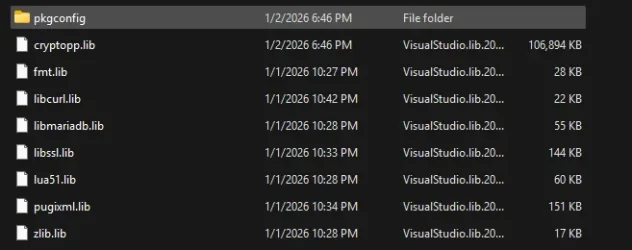
I am using vcpkg and have not updated or changed it.
I just can't make sense of it. I am compiling x64 release. I updated the CMakeLists.txt file but only after I started getting this error. Does anyone have any ideas on what I can do. The linker problem is for cryptopp.
Code:
cmake_minimum_required(VERSION 3.16)

# ------------------------------------------------------------------------------
# Project
# ------------------------------------------------------------------------------
project(tfs LANGUAGES CXX)

# ------------------------------------------------------------------------------
# Global settings
# ------------------------------------------------------------------------------
set(CMAKE_CXX_STANDARD 20)
set(CMAKE_CXX_STANDARD_REQUIRED ON)
set(CMAKE_DISABLE_SOURCE_CHANGES ON)
set(CMAKE_DISABLE_IN_SOURCE_BUILD ON)

# ------------------------------------------------------------------------------
# vcpkg triplet handling (must be before project() in older setups, but OK here)
# ------------------------------------------------------------------------------
if (DEFINED ENV{VCPKG_DEFAULT_TRIPLET} AND NOT DEFINED VCPKG_TARGET_TRIPLET)
    set(VCPKG_TARGET_TRIPLET "$ENV{VCPKG_DEFAULT_TRIPLET}"
        CACHE STRING "The vcpkg triplet")
endif()

list(APPEND CMAKE_MODULE_PATH "${CMAKE_CURRENT_SOURCE_DIR}/cmake")

# ------------------------------------------------------------------------------
# Compiler warnings / flags
# ------------------------------------------------------------------------------
if (NOT WIN32)
    add_compile_options(
        -Wall
        -Wextra
        -Wnon-virtual-dtor
        -Wold-style-cast
        -pedantic
        -Werror
        -pipe
        -fvisibility=hidden
    )
endif()

if (CMAKE_CXX_COMPILER_ID STREQUAL "GNU")
    add_compile_options(-fno-strict-aliasing)
elseif (CMAKE_CXX_COMPILER_ID STREQUAL "Clang")
    add_compile_options(-Wimplicit-fallthrough -Wmove)
endif()

# ------------------------------------------------------------------------------
# Dependencies (vcpkg-first, target-based)
# ------------------------------------------------------------------------------

# Crypto++ (vcpkg)
find_package(CryptoPP QUIET)
if (CryptoPP_FOUND)  # vcpkg-provided cmake package called CryptoPP
    set(Crypto++_LIBRARIES "cryptopp-static")
else()
    find_package(Crypto++ REQUIRED)
endif ()

# fmt
find_package(fmt CONFIG REQUIRED)

# MariaDB / MySQL
find_package(unofficial-libmariadb CONFIG QUIET)
if (unofficial-libmariadb_FOUND)
    set(MYSQL_CLIENT_TARGET unofficial::libmariadb)
else()
    find_package(MySQL REQUIRED)
    set(MYSQL_CLIENT_TARGET MySQL::MySQL)
endif()

# Threads
find_package(Threads REQUIRED)

# PugiXML
find_package(PugiXML CONFIG REQUIRED)

# Lua / LuaJIT
option(USE_LUAJIT "Use LuaJIT" ON)

if (USE_LUAJIT)
    find_package(LuaJIT REQUIRED)
    set(LUA_TARGET LuaJIT::LuaJIT)
else()
    find_package(Lua REQUIRED)
    set(LUA_TARGET Lua::Lua)
endif()

# Boost
find_package(Boost 1.85 REQUIRED
    COMPONENTS system iostreams locale date_time filesystem
)

# ------------------------------------------------------------------------------
# Subdirectories / targets
# ------------------------------------------------------------------------------
add_subdirectory(src)

add_executable(tfs ${tfs_MAIN})
target_link_libraries(tfs
    PRIVATE
        tfslib
        cryptopp::cryptopp
        fmt::fmt
        ${MYSQL_CLIENT_TARGET}
        Threads::Threads
        PugiXML::PugiXML
        ${LUA_TARGET}
        Boost::system
        Boost::iostreams
        Boost::locale
)

# ------------------------------------------------------------------------------
# IPO / LTO
# ------------------------------------------------------------------------------
cmake_policy(SET CMP0069 NEW)
include(CheckIPOSupported)

check_ipo_supported(RESULT ipo_supported OUTPUT ipo_error)
if (ipo_supported)
    message(STATUS "IPO / LTO enabled")
    set_target_properties(tfs PROPERTIES INTERPROCEDURAL_OPTIMIZATION ON)
else()
    message(STATUS "IPO / LTO not supported: ${ipo_error}")
endif()

# ------------------------------------------------------------------------------
# Precompiled headers
# ------------------------------------------------------------------------------
target_precompile_headers(tfs PRIVATE src/otpch.h)
Last edited: