• There is NO official Otland's Discord server and NO official Otland's server list. The Otland's Staff does not manage any Discord server or server list. Moderators or administrator of any Discord server or server lists have NO connection to the Otland's Staff. Do not get scammed!
  • 2026 staff recruitment is open! Check it out and consider applying!

TFS 1.7

michalsteliga

New Member
Joined
Jun 4, 2026
Messages
3
Reaction score
3
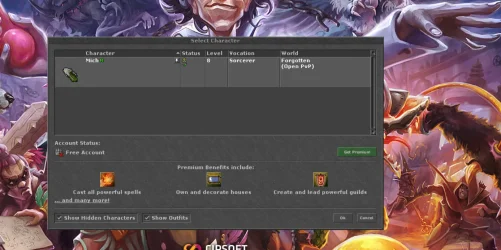
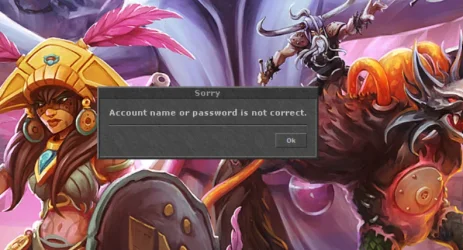
I am having trouble configuring my server on a VPS (Ubuntu) and I am currently stuck. The login server (port 8080) works correctly; the Tibia client connects, retrieves the character list, and displays it without any issues. Unfortunately, after selecting a character and clicking 'Ok', the game shows the error: 'Account name or password is not correct'.

Specifications:

  • Engine: The Forgotten Server (TFS) 1.7
  • Client: 13.10
  • Environment: Ubuntu VPS
What I have already checked:

  • Logging into the login server (fetching the character list) works fine.
  • After clicking 'Ok' on the character selection screen, the client attempts to connect to the game server port (7171).
  • tcpdump confirms that packets from the client are reaching the server at the exact moment I select a character.
  • Running the server with the --debug flag shows no errors or information about the connection attempt in the console when I click 'Ok' (the console remains completely blank)
 

Attachments

  • Zrzut ekranu 2026-06-04 113607.webp
    Zrzut ekranu 2026-06-04 113607.webp
    121.6 KB · Views: 14 · VirusTotal
  • Zrzut ekranu 2026-06-04 113611.webp
    Zrzut ekranu 2026-06-04 113611.webp
    65.5 KB · Views: 13 · VirusTotal
-- Combat settings
-- NOTE: valid values for worldType are: "pvp", "no-pvp" and "pvp-enforced"
worldType = "pvp"
hotkeyAimbotEnabled = true
protectionLevel = 1
killsToRedSkull = 3
killsToBlackSkull = 6
pzLocked = 60000
removeChargesFromRunes = true
removeChargesFromPotions = true
removeWeaponAmmunition = true
removeWeaponCharges = true
timeToDecreaseFrags = 24 * 60 * 60
whiteSkullTime = 15 * 60
stairJumpExhaustion = 2000
experienceByKillingPlayers = false
expFromPlayersLevelRange = 75

-- Connection Config
-- NOTE: maxPlayers set to 0 means no limit
-- NOTE: allowWalkthrough is only applicable to players
-- NOTE: two-factor auth requires token and timestamp in session key
-- NOTE: statusCountMaxPlayersPerIp allows you to only count up to X players per IP in status response (0 = disabled)
ip = "192.166.218.169"
bindOnlyGlobalAddress = false
gameProtocolPort = 7171
statusProtocolPort = 7172
httpPort = 8080
httpWorkers = 1
maxPlayers = 0
onePlayerOnlinePerAccount = true
allowClones = false
allowWalkthrough = true
serverName = "Forgotten"
statusTimeout = 5000
statusCountMaxPlayersPerIp = 0
replaceKickOnLogin = true
maxPacketsPerSecond = 25
enableTwoFactorAuth = false
gameServerExternalAddress = "192.166.218.169"
-- Pathfinding
-- pathfindingInterval handles how often paths are force drawn
-- pathfindingDelay delays any recently drawn paths from drawing again
-- pathfindingDelay does not delay pathfindingInterval
pathfindingInterval = 200
pathfindingDelay = 300

-- Deaths
-- NOTE: Leave deathLosePercent as -1 if you want to use the default
-- death penalty formula. For the old formula, set it to 10. For
-- no skill/experience loss, set it to 0.
deathLosePercent = -1

-- Houses
-- NOTE: set housePriceEachSQM to -1 to disable the ingame buy house functionality
-- NOTE: valid values for houseRentPeriod are: "daily", "weekly", "monthly", "yearly"
-- use any other value to disable the rent system
housePriceEachSQM = 1000
houseRentPeriod = "never"
houseOwnedByAccount = false
houseDoorShowPrice = true
onlyInvitedCanMoveHouseItems = true

-- Item Usage
timeBetweenActions = 200
timeBetweenExActions = 1000

-- Map
-- NOTE: set mapName WITHOUT .otbm at the end
mapName = "forgotten"
mapAuthor = "Komic"

-- Market
marketOfferDuration = 30 * 24 * 60 * 60
premiumToCreateMarketOffer = true
checkExpiredMarketOffersEachMinutes = 60
maxMarketOffersAtATimePerPlayer = 100

-- MySQL
mysqlHost = "127.0.0.1"
mysqlUser = "******"
mysqlPass = "******"
mysqlDatabase = "ots"
mysqlPort = 3306
mysqlSock = ""
 
Thank you for the suggestion regarding removing the login plugin from MyAAC. Unfortunately, after carefully checking my file structure, this method did not work. In my system, the login functionality is not treated as an external plugin, but rather it is deeply integrated into the core system code.

In my plugins folder, I only have the following extensions, none of which are responsible for the main login module:

  • account-create-hint: The folder containing the logic for the plugin that displays hints during the account creation process.
  • account-create-hint.json: The configuration file (JSON format) for the account-create-hint plugin.
  • email-confirmed-reward: The folder containing the logic for the plugin that grants rewards after a user confirms their email address.
  • email-confirmed-reward.json: The configuration file (JSON format) for the email-confirmed-reward plugin.
  • example.json: A sample configuration file that serves as a template for creating new plugins within the system.
As you can see, there is no "login" plugin in my directory that I could remove to achieve the desired result. Nevertheless, thank you for your help!

Could you please assist me with further analysis? My issue with the "login plugin" is more complex because it is built directly into the system's core. I would like to find a safe way to restrict access to the login function or disable it without compromising the system's stability. Are there any configuration files (for instance, inside the system/ folder) where I could change permissions or disable a specific module instead of manually interfering with the template files? I would be very grateful for any further advice and guidance on where else to look for the appropriate settings.
 
Back
Top