
You are using an out of date browser. It may not display this or other websites correctly.
You should upgrade or use an alternative browser.
You should upgrade or use an alternative browser.
The application was unable to start correctly (0xc000007b).
- Thread starter Daffik
- Start date

- Joined
- Feb 14, 2015
- Messages
- 5,638
- Solutions
- 559
- Reaction score
- 3,976
OpenTibia DLL Pack (v2.0)
download the required dlls for what you compiled (most likely 64 bit dlls needed) and put them in the folder where your exe is located
download the required dlls for what you compiled (most likely 64 bit dlls needed) and put them in the folder where your exe is located

- Joined
- Feb 14, 2015
- Messages
- 5,638
- Solutions
- 559
- Reaction score
- 3,976
0x000007b isn't related to missing VS dlls, if that were the problem, it would say there's a missing dll, not just give an error code (0x000007b)or this v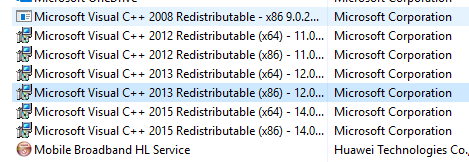
whisperftw
New Member
- Joined
- Jul 20, 2010
- Messages
- 6
- Reaction score
- 0
ye nah ye doesn't work, how do I manage to get the correct dll-s to be used when needed then? how am I supposed to know which dlls need to be x84 and which ones x64. I did All in One runtime installation which should remove error 0xc0000007b but did not.. im out of ideas.
It won't tell I have dll-s missing or something like that, simple and plain stupid 0xc0000007b error which can be caused by so many things.
It won't tell I have dll-s missing or something like that, simple and plain stupid 0xc0000007b error which can be caused by so many things.
- Joined
- Feb 14, 2015
- Messages
- 5,638
- Solutions
- 559
- Reaction score
- 3,976
OpenTibia DLL Pack (v2.0) (https://otland.net/threads/opentibia-dll-pack-v2-0.155310/)ye nah ye doesn't work, how do I manage to get the correct dll-s to be used when needed then? how am I supposed to know which dlls need to be x84 and which ones x64. I did All in One runtime installation which should remove error 0xc0000007b but did not.. im out of ideas.
It won't tell I have dll-s missing or something like that, simple and plain stupid 0xc0000007b error which can be caused by so many things.

This DLL pack needs to be updated since its missing DLLs that are needed for TFS 1.x, so I think he needs to find them in vcpkg folder or he can use this ones for latest TFS 1.3.
Attachments
-
dll.zip842.1 KB · Views: 47 · VirusTotal
