
You are using an out of date browser. It may not display this or other websites correctly.
You should upgrade or use an alternative browser.
You should upgrade or use an alternative browser.
Tibia 7.7 Server Decompiled
- Thread starter fusion32
- Start date


Erikas Kontenis
Excellent OT User
@fusion32 You have done an incredible contribution showing your knowledge in engineering and OTS! I am reading your GitHub readme where you speak that people are gate-keeping its open tibia resources & etc that I will not quote. However, look how you are leading by example. You have a fork of 7.4, people are sharing its ideas how to dockerize the backends. Good job you all & I am super happy seeing such threads!
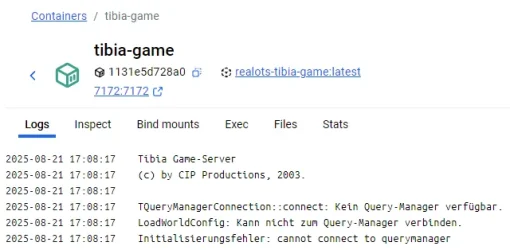
I've also been able to create Docker for login, query and webb, but still issues with the game. Getting the same results as this. I've been trying for the last couple of days without any success. There is something missing that I don't know what.

Chriistian.L.B
Intermediate OT User
- Joined
- Apr 17, 2008
- Messages
- 237
- Solutions
- 5
- Reaction score
- 138
@fusion32 helped me with that solution:
Looking at the config file for the query manager, that default "nXE?/>j`" password translates to "a6glaf0c" which is the default password on config.cfg. The actual problem is that I moved any initial data from sql/schema.sql into sql/init.sql and the query manager will reject connections if it can't find the server by name. The solution is to run sqlite3 tibia.db < sql/init.sql to insert at least the server config into the database.
Looking at the config file for the query manager, that default "nXE?/>j`" password translates to "a6glaf0c" which is the default password on config.cfg. The actual problem is that I moved any initial data from sql/schema.sql into sql/init.sql and the query manager will reject connections if it can't find the server by name. The solution is to run sqlite3 tibia.db < sql/init.sql to insert at least the server config into the database.
OP
OP

fusion32
Intermediate OT User
- Joined
- Jun 7, 2010
- Messages
- 42
- Solutions
- 2
- Reaction score
- 141
@elao @iNux
I'm not entirely sure how docker manages networking. The thing is, traffic with the query manager is NOT encrypted at all, so I chose to make it bind to the loopback interface, meaning it will only accept local connections (see
Just as a sidenote, I didn't modify how the game server talks to the query manager, and the leaked config file would make it connect through "127.0.0.1" so this is supposedly the way it was designed. But I think it was only a bridge to a remote database server. The difference here is that I made it hold an sqlite3 database to simplify single world setups.
@Morrison
The server should be up for a few more weeks, although either nobody was really interested in testing it or couldn't make the client connect to it. Either way, I just checked it and it's still up and running but it doesn't use any default RSA key so you'd need to change it to be able to login. The key itself is listed on the website (the number with 309 digits).
I'm not entirely sure how docker manages networking. The thing is, traffic with the query manager is NOT encrypted at all, so I chose to make it bind to the loopback interface, meaning it will only accept local connections (see
src/connection.cc:56). I'd suppose there is some mechanism for different containers to communicate through the loopback interface, or else a regular mysql container with remote only connections wouldn't work either. You could technically bind to INADDR_ANY but you'd need to configure the firewall to block all external traffic to it, so it's probably not the best solution.Just as a sidenote, I didn't modify how the game server talks to the query manager, and the leaked config file would make it connect through "127.0.0.1" so this is supposedly the way it was designed. But I think it was only a bridge to a remote database server. The difference here is that I made it hold an sqlite3 database to simplify single world setups.
@Morrison
The server should be up for a few more weeks, although either nobody was really interested in testing it or couldn't make the client connect to it. Either way, I just checked it and it's still up and running but it doesn't use any default RSA key so you'd need to change it to be able to login. The key itself is listed on the website (the number with 309 digits).
I was able to get connected and played for a bit of nostalgia. I've been flirting with setting up an old 7.7 server for nostalgia sake for a long time but wanted a real decomp and the gate kept stuff you mentioned kept me away. Thanks for releasing this, looks super promising.
rudger
Active Member
Really impressive 

 .
.
How can we edit the map?
.How can we edit the map?
Erikas Kontenis
Excellent OT User
Really impressive
How can we edit the map?
.sec map editor were already published in the RealOTS distro. This whole distro/tools should be more well organized by someone for example, maybe in your readme @fusion32

Here you can found the map editors that works with the cipsoft map format(you can even see the houses contents, trashs in all caves, etc): Realots Map Editor (http://www.mediafire.com/download/7qg69xtdi264cma/Realots+Map+Editor.rar)

Olddies
Classicot.com
You can only see the map not edit it with this rme, and there are not sources code from this one so basically we dont have map editor yet.sec map editor were already published in the RealOTS distro. This whole distro/tools should be more well organized by someone for example, maybe in your readme @fusion32
Here you can found the map editors that works with the cipsoft map format(you can even see the houses contents, trashs in all caves, etc): Realots Map Editor (http://www.mediafire.com/download/7qg69xtdi264cma/Realots+Map+Editor.rar)

elao
Active Member
- Joined
- Mar 21, 2025
- Messages
- 32
- Reaction score
- 38
Actually you can edit (map only. no monsters, no actions). You just need to make sure you select .sec format when saving too.
But it's very old and has lots of bugs. And not having the source code makes it difficult to fix things.
But it's very old and has lots of bugs. And not having the source code makes it difficult to fix things.

Forkz
Advanced OT User
- Joined
- Jun 29, 2020
- Messages
- 588
- Solutions
- 17
- Reaction score
- 161
This map editor is for previews only..sec map editor were already published in the RealOTS distro. This whole distro/tools should be more well organized by someone for example, maybe in your readme @fusion32
Here you can found the map editors that works with the cipsoft map format(you can even see the houses contents, trashs in all caves, etc): Realots Map Editor (http://www.mediafire.com/download/7qg69xtdi264cma/Realots+Map+Editor.rar)
You can only see the map not edit it with this rme, and there are not sources code from this one so basically we dont have map editor yet
Yes you can edit, also export it, i have done quets in cip files, small changes, using this rme, the only bug i have found, when u save it, it dont break the lines, in signs, street signs...
Olddies
Classicot.com
map converter, .otbm to json, json to .sec, but before you need to convert the otbm to client id, i did this test with nostalrius map since it uses client id it did work perfectly ( converted nostalrius 7.1 based map)
Attachments
-
OTBM2JSON2SEC.zip125.3 KB · Views: 33 · VirusTotal
Olddies
Classicot.com
Gesior for RealOTS fixed already done version by @Gesior.pl maybe it need few fixes but atleast basics things are working correctly.

 github.com
check the readme.
GitHub - Olddies710/Gesior-RealOTS: Gesior Acc for RealOTS leaked game engine
Gesior Acc for RealOTS leaked game engine. Contribute to Olddies710/Gesior-RealOTS development by creating an account on GitHub.
github.com
check the readme.
OP
OP
fusion32
Intermediate OT User
- Joined
- Jun 7, 2010
- Messages
- 42
- Solutions
- 2
- Reaction score
- 141
I might be able to patch some map editor to load/save these types of files but it would have to be later this year. It's also not as straightforward because map data is persistent, and any changes to the original map (ORIGMAP) are not automatically transfered. It would need to collect deltas and export additional patch files that are loaded at startup, and that loader remains untested.

Chriistian.L.B
Intermediate OT User
- Joined
- Apr 17, 2008
- Messages
- 237
- Solutions
- 5
- Reaction score
- 138
Yes, you can test it and report any possible bugs. @fusion32 is actively fixing all issues that have been reported.Is the server still up and running for testing purpose?
Similar threads

- Replies
- 65
- Views
- 8K


- Replies
- 56
- Views
- 9K


- Replies
- 13
- Views
- 2K
- Replies
- 12
- Views
- 2K

- Replies
- 4
- Views
- 1K

- Replies
- 23
- Views
- 5K
