
You are using an out of date browser. It may not display this or other websites correctly.
You should upgrade or use an alternative browser.
You should upgrade or use an alternative browser.
Web Images
- Thread starter Ward_214
- Start date




Natan Beckman
Well-Known Member
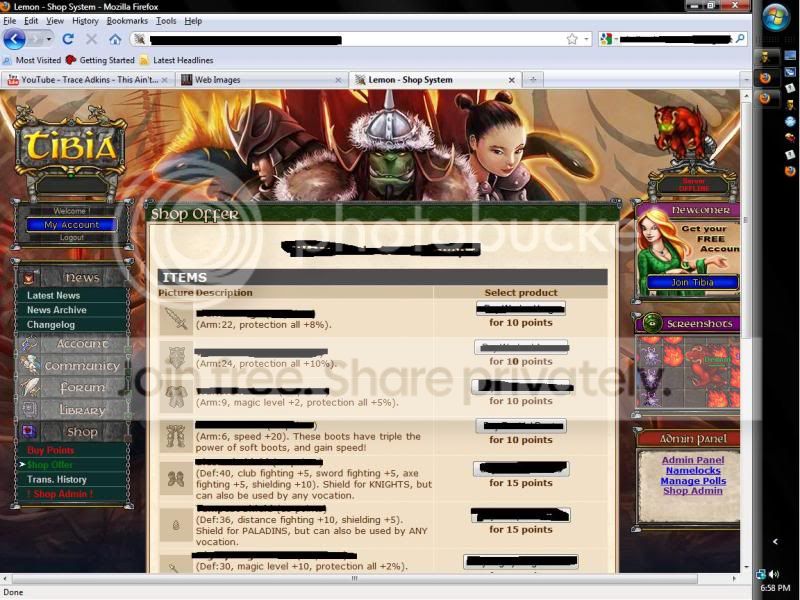
Go in the images folder inside it will have a folder named items copy paste it into the htdocs folder along with the others and renames it to item_images and modify images gif jpg ready for

Sonical
Inactive
In shop system change this line
to
line ~175
Rep++
PHP:
$main_content .= '<tr bgcolor="#F1E0C6"><td align="center"><img src="item_images/'.$item['id'].'.jpg"></td><td><b>'.$item['name'].'</b> ('.$item['points'].' points)<br />'.$item['description'].'</td><td align="center">';
PHP:
$main_content .= '<tr bgcolor="#F1E0C6"><td align="center"><img src="item_images/'.$item['id'].'.gif"></td><td><b>'.$item['name'].'</b> ('.$item['points'].' points)<br />'.$item['description'].'</td><td align="center">';Rep++

president vankk
Web Developer & AuraOT Owner
- Joined
- Jul 10, 2009
- Messages
- 5,719
- Solutions
- 9
- Reaction score
- 339
