
-
2026 staff recruitment is open! Check it out and consider applying!
You are using an out of date browser. It may not display this or other websites correctly.
You should upgrade or use an alternative browser.
You should upgrade or use an alternative browser.
Website Wont Go Global
- Thread starter Dkadsfe
- Start date


Itutorial
Legendary OT User
- Joined
- Dec 23, 2014
- Messages
- 2,461
- Solutions
- 68
- Reaction score
- 1,123
You should only need to port forward:
7171
7172
80
8080
Make sure its both tcp/udp on all ports.
You might need to try a few different settings in your config.lua file for the website. Such as:
7171
7172
80
8080
Make sure its both tcp/udp on all ports.
You might need to try a few different settings in your config.lua file for the website. Such as:
Code:
// phpmyadmin username for OT server: (DONT USE "root" if ur hosting to public.).
    $config['sqlUser'] = '127.0.0.1, root, locahost';

    // phpmyadmin password for OT server:
    $config['sqlPassword'] = 'password';

    // The database name to connect to. (This is usually same as username).
    $config['sqlDatabase'] = 'database';

    // Hostname is usually localhost or 127.0.0.1.
    $config['sqlHost'] = '127.0.0.1, localhost, root';
knighters god
Active Member
- Joined
- Feb 14, 2009
- Messages
- 166
- Solutions
- 1
- Reaction score
- 40
Portforward port 7171-7172 Tcp/Udp
Portforward port 80 Tcp/Udp
Don't forget to forward it to your IPv4 adress.
[[ To find your IPv4 adress you can go to CMD (Command prmpt) and type ipconfig ]]
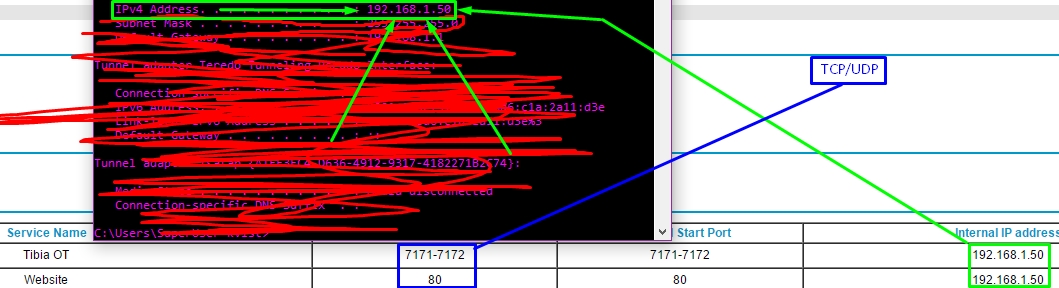
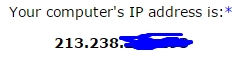
People from outside your network will access your website using your global ip-address.
You can find it using multiple websites. I'll link one here http://www.myipaddress.com/show-my-ip-address/
In config.php you can find this. Put 127.0.0.1 at $config['sqlHost'] = '127.0.0.1';
And make sure all of these matches yours.
Start MYsql and Apache
Portforward port 80 Tcp/Udp
Don't forget to forward it to your IPv4 adress.
[[ To find your IPv4 adress you can go to CMD (Command prmpt) and type ipconfig ]]
People from outside your network will access your website using your global ip-address.
You can find it using multiple websites. I'll link one here http://www.myipaddress.com/show-my-ip-address/
In config.php you can find this. Put 127.0.0.1 at $config['sqlHost'] = '127.0.0.1';
And make sure all of these matches yours.
Code:
    // ------------------------ \\
    // MYSQL CONNECTION DETAILS \\
    // ------------------------ \\

    // phpmyadmin username for OT server: (DONT USE "root" if ur hosting to public.).
    $config['sqlUser'] = 'OtServ';

    // phpmyadmin password for OT server:
    $config['sqlPassword'] = '2HCkRkQQxPrL';

    // The database name to connect to. (This is usually same as username).
    $config['sqlDatabase'] = 'otserv';

// Hostname is usually localhost or 127.0.0.1.
    $config['sqlHost'] = '127.0.0.1';
Start MYsql and Apache