
• There is NO official Otland's Discord server and NO official Otland's server list. The Otland's Staff does not manage any Discord server or server list. Moderators or administrator of any Discord server or server lists have NO connection to the Otland's Staff. Do not get scammed!
  • 2026 staff recruitment is open! Check it out and consider applying!

How to correctly add sprites

BulawOw

Soul of Shinobi
Joined
Sep 15, 2014
Messages
204
Solutions
8
Reaction score
62
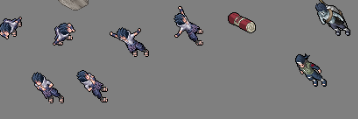
Hello lets say i try to add this spr (this spr is taken from spr showoff, will not be used its just example)

7913316664255fd0a71a1108aba294b4.png

What are the correct steps that i should do to add them so if adding monsters the pixels should match so prevent pixels jumping while monster is moving etc basically from 0 to correctly working spr in game
 
Solution
32x32 each sprite. Pink background in *.bmp then program automatically transparent it or make *.png with transparent.

Example, how look elf outfit with walking animation and change outfit color. Thats you must prepare for full working outfit
latest
Hello lets say i try to add this spr (this spr is taken from spr showoff, will not be used its just example)


7913316664255fd0a71a1108aba294b4.png

What are the correct steps that i should do to add them so if adding monsters the pixels should match so prevent pixels jumping while monster is moving etc basically from 0 to correctly working spr in game
In ObjectBuilder, pick any monster or outfit and look how its made? Simple...
You dont need to create thread about this if you have answer in program that you use :p
 
In ObjectBuilder, pick any monster or outfit and look how its made? Simple...
You dont need to create thread about this if you have answer in program that you use :p
after ur answer maybe i put question wrong i mean how to prepeare spr cause i cant put it in the version that i showed in the screen there have to be steps that i have to make before adding to objectbuilder probably pransparent background and kinda put the right in the crop or something to be sure all pixels match
 
32x32 each sprite. Pink background in *.bmp then program automatically transparent it or make *.png with transparent.

Example, how look elf outfit with walking animation and change outfit color. Thats you must prepare for full working outfit
latest
 
Solution
Back
Top