
-
New resources must be posted under Resources tab. A discussion thread will be created automatically, you can't open threads manually anymore.
You are using an out of date browser. It may not display this or other websites correctly.
You should upgrade or use an alternative browser.
You should upgrade or use an alternative browser.
Feature [TFS 1.4] OTS statistics (C++/Lua/SQL) by kondra
- Thread starter Gesior.pl
- Start date

Way20
Well-Known Member
- Joined
- Sep 29, 2014
- Messages
- 227
- Solutions
- 3
- Reaction score
- 92
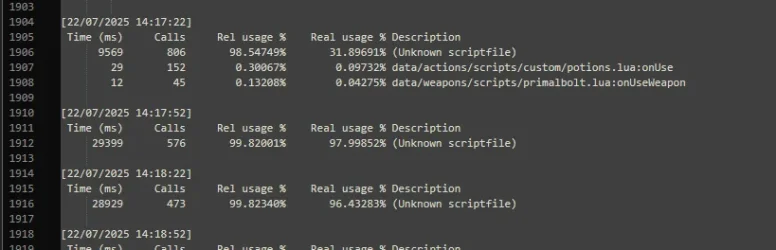
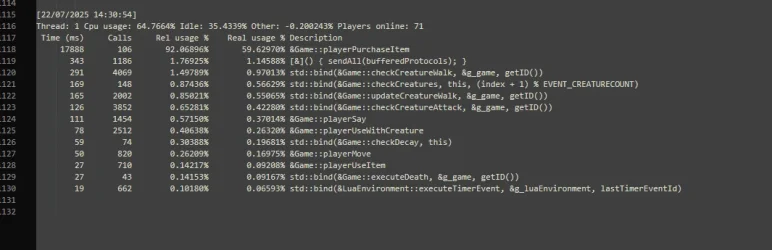
First tell us more information about your server, which TFS version and protocol you're running. For now, dispatcher thread shows very high cpu usage by function Game:Can someone help me with this?
 layerPurchaseItem, so it might be NPC related.
OP
OP

Can someone help me with this?
(Unknown scriptfile) is anonymous function or function called by addEvent. You already know that it's called by Game::playerPurchaseItem, so check, what can be executed by it from C++, that may call some function without name or addEvent. It takes over 100 ms per call, so only things I can imagine is player:save() called after item buy OR there is a player with ex. 50k items in BP and no empty slot in BP, so every time he tries to buy items, it loops over 50k items to find empty slot - fix for this is to limit capacity of players to ex. 5k or 10k (nobody really needs more, even on evo with 1kk levels).My updated TFS 1.4 on branch 'compilation' ( GitHub - gesior/forgottenserver-gesior at compilation (https://github.com/gesior/forgottenserver-gesior/tree/compilation) ) has code to track
addEvents in OTS Stats. It's simple to add, uses some extra RAM and CPU (probably around 1% per addEvent):OTS Stats: add Lua addEvent source and CPU usage tracking · gesior/forgottenserver-gesior@ffe5e89
A free and open-source MMORPG server emulator written in C++ - OTS Stats: add Lua addEvent source and CPU usage tracking · gesior/forgottenserver-gesior@ffe5e89
 github.com
special.log with names like addEvent-123123 to translate that 123123 to .lua file name and line, where it was called, you have to log OTS terminal into file ex. ./tfs | tee -a console.log. Every time OTS executes some addEvent Lua code for first time, it shows it's ID and file name and line. It work that way because some calls may be reported as whole function Lua code, not just file name and line and I don't want to pass KBs of code to OTS Stats every function call.
They lagging the server by buying ton of items every second and it drops to the ground over and over ( Kinda suprised main TFS haven't added a fix for it yet ) this is just possible if you got alot of money  100 cc is alredy enough
People abuse the function "ignore capacity" from npcs and that's how they buy ton of items that are dropping on the ground..
It will ignore the capacity and if u got 1 free slot in your backpack and you buy 100 shovels, 1 will be added into your backpack and the other 99 will be dropped on the ground
Easiest solution would be to remove the ignore capacity checks
 github.com
github.com
github.com
github.com
github.com
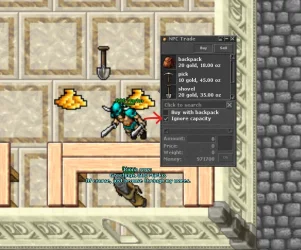
100 cc is alredy enough People abuse the function "ignore capacity" from npcs and that's how they buy ton of items that are dropping on the ground..
It will ignore the capacity and if u got 1 free slot in your backpack and you buy 100 shovels, 1 will be added into your backpack and the other 99 will be dropped on the ground
Easiest solution would be to remove the ignore capacity checks
forgottenserver/data/npc/lib/npc.lua at master · otland/forgottenserver
A free and open-source MMORPG server emulator written in C++ - otland/forgottenserver
github.com
forgottenserver/data/npc/lib/npc.lua at master · otland/forgottenserver
A free and open-source MMORPG server emulator written in C++ - otland/forgottenserver
github.com
forgottenserver/data/npc/lib/npc.lua at master · otland/forgottenserver
A free and open-source MMORPG server emulator written in C++ - otland/forgottenserver
github.com
Last edited:

Terotrificy
Veteran OT User
Honestly I don't think it's related to drop items to the floor by itself, I think it's related to the queryDestination function that recursively searches through the player's inventory and nested containers to find a valid destination slot for an item, when no explicit target index is provided. That's a TFS feature, not replicated from cipsoft due the fact cipsoft doesn't recursively searches through nested containers when you add items to player container (be it fishing, buying items, etc). I disabled it on my server to replicate cipsoft intended behavior, I'm dropping 500 items to the floor non-stop right now from shop and 0 freezes.They lagging the server by buying ton of items every second and it drops to the ground over and over ( Kinda suprised main TFS haven't added a fix for it yet ) this is just possible if you got alot of money
People abuse the function "ignore capacity" from npcs and that's how they buy ton of items that are dropping on the ground..
It will ignore the capacity and if u got 1 free slot in your backpack and you buy 100 shovels, 1 will be added into your backpack and the other 99 will be dropped on the ground
Easiest solution would be to remove the ignore capacity checks
forgottenserver/data/npc/lib/npc.lua at master · otland/forgottenserver
A free and open-source MMORPG server emulator written in C++ - otland/forgottenserverforgottenserver/data/npc/lib/npc.lua at master · otland/forgottenserver
A free and open-source MMORPG server emulator written in C++ - otland/forgottenserverforgottenserver/data/npc/lib/npc.lua at master · otland/forgottenserver
A free and open-source MMORPG server emulator written in C++ - otland/forgottenserver
View attachment 93865
In other words, in TFS when a player buys items and their main backpack is full, the server will search inside all other open backpacks or containers to place the new items. CipSoft never did this. If the main backpack and inventory slots were full, the items were simply dropped on the ground below the player. This recursive container search is specific to TFS and adds unnecessary overhead in situations like mass item insertion.

- Joined
- Dec 26, 2013
- Messages
- 2,127
- Solutions
- 14
- Reaction score
- 1,522
- Location
- USA
- GitHub
- Codinablack
You are partially mistaken about cipsoft not doing this... they definitely don't "recursively check", however, if you buy items and have room but the room is not in the most top level backpack on tibia, it will most certainly go to the next available OPEN backpack... The key distinction here is that the backpack must be OPEN for it to be considered, and it goes by order as well... meaning if you have three containers open, but the one on top is much deeper or after the other two in the slots, doesn't matter, it will still go to the top open one first (if the main backpack is full), and continue on downward after that... This is far superior than just "recursively checking all containers" for a couple reasons, first, it gives players control on the container the items go to, secondly, it avoids any loops caused by recursion.Honestly I don't think it's related to drop items to the floor by itself, I think it's related to the queryDestination function that recursively searches through the player's inventory and nested containers to find a valid destination slot for an item, when no explicit target index is provided. That's a TFS feature, not replicated from cipsoft due the fact cipsoft doesn't recursively searches through nested containers when you add items to player container (be it fishing, buying items, etc). I disabled it on my server to replicate cipsoft intended behavior, I'm dropping 500 items to the floor non-stop right now from shop and 0 freezes.
In other words, in TFS when a player buys items and their main backpack is full, the server will search inside all other open backpacks or containers to place the new items. CipSoft never did this. If the main backpack and inventory slots were full, the items were simply dropped on the ground below the player. This recursive container search is specific to TFS and adds unnecessary overhead in situations like mass item insertion.
You are however absolutely correct about the query method being a BIG bottleneck.
Terotrificy
Veteran OT User
I'm not sure how CipSoft handles this in modern versions, but based on the 2007 leaked tarball, items purchased from NPCs are only placed in a very limited set of locations: the player's hands, backpack, and arrow slot. If there are containers (e.g., backpacks) in those slots, the items will be placed inside them only if there is room. However, any containers inside those containers, even if they're open, are completely ignored. The item insertion logic does not recursively search through nested containers. So, even if you have 4 backpacks in your main equipment slots, each containing multiple open backpacks inside, those inner backpacks will never receive items. Once the outer containers are full, any remaining items are simply dropped on the ground.You are partially mistaken about cipsoft not doing this... they definitely don't "recursively check", however, if you buy items and have room but the room is not in the most top level backpack on tibia, it will most certainly go to the next available OPEN backpack... The key distinction here is that the backpack must be OPEN for it to be considered, and it goes by order as well... meaning if you have three containers open, but the one on top is much deeper or after the other two in the slots, doesn't matter, it will still go to the top open one first (if the main backpack is full), and continue on downward after that... This is far superior than just "recursively checking all containers" for a couple reasons, first, it gives players control on the container the items go to, secondly, it avoids any loops caused by recursion.
You are however absolutely correct about the query method being a BIG bottleneck.
Is that what you meant or was something else? Because I have just checked on realots and it works as I explained above.
Last edited:
- Joined
- Dec 26, 2013
- Messages
- 2,127
- Solutions
- 14
- Reaction score
- 1,522
- Location
- USA
- GitHub
- Codinablack
It's 2025... can we please stop referencing 18 year old leak as the "authority" on what "cipsoft does"... k? Please and thank you...I'm not sure how CipSoft handles this in modern versions, but based on the 2007 leaked tarball, items purchased from NPCs are only placed in a very limited set of locations: the player's hands, backpack, and arrow slot. If there are containers (e.g., backpacks) in those slots, the items will be placed inside them only if there is room. However, any containers inside those containers, even if they're open, are completely ignored. The item insertion logic does not recursively search through nested containers. So, even if you have 4 backpacks in your main equipment slots, each containing multiple open backpacks inside, those inner backpacks will never receive items. Once the outer containers are full, any remaining items are simply dropped on the ground.
Is that what you meant or was something else? Because I have just checked on realots and it works as I explained above.
I don't live in the past when I talk about tibia... I live in the now.... I honestly could not care less about how tibia handled things 18 years ago... when you said "tibia doesn't do this", don't use present tense verbs if you don't mean it... you should have said "tibia didn't used to do this back in 2007"...
At any rate... wasn't trying to argue... I was simply trying to add to the conversation... as tibia DOES handle this MUCH better than TFS CURRENTLY handles it...
Terotrificy
Veteran OT User
I get your point, and to be fair, I try to speak based on things I can actually confirm. In this case, that means looking at the reverse-engineered code from the 2007 tarball and checking in-game. It's not about living in the past, it's just the only version of CipSoft's logic that we can see and analyze directly. I prefer that over guessing how the game behaves today just based on in-game perception.It's 2025... can we please stop referencing 18 year old leak as the "authority" on what "cipsoft does"... k? Please and thank you...
I don't live in the past when I talk about tibia... I live in the now.... I honestly could not care less about how tibia handled things 18 years ago... when you said "tibia doesn't do this", don't use present tense verbs if you don't mean it... you should have said "tibia didn't used to do this back in 2007"...
At any rate... wasn't trying to argue... I was simply trying to add to the conversation... as tibia DOES handle this MUCH better than TFS CURRENTLY handles it...
That being said, my question was only to understand whether your comment referred to the behavior of the tarball or modern Tibia, which I think is a fair distinction, just to be sure we were talking about the same thing. You might also want to point out what version of Tibia you're referring to, given how much the game has changed over the years.
Also, I did phrase it in past tense in my previous comment. If that was somehow ambiguous to you, it would’ve been enough to just ask what version I was referring to, like I did with you, instead of getting unnecessarily upset and say my claim is mistaken.
So I wasn’t implying anything about how it works today, just describing how it works in the leaked version and probably why cipsoft made it work that way, to not overhead the whole thing like TFS currently does.
- Joined
- Dec 26, 2013
- Messages
- 2,127
- Solutions
- 14
- Reaction score
- 1,522
- Location
- USA
- GitHub
- Codinablack
Well at the risk of keeping this "debate" going.. (which is not what I want)... I can't have someone tell me they did something that they didn't do... so..I get your point, and to be fair, I try to speak based on things I can actually confirm. In this case, that means looking at the reverse-engineered code from the 2007 tarball and checking in-game. It's not about living in the past, it's just the only version of CipSoft's logic that we can see and analyze directly. I prefer that over guessing how the game behaves today just based on in-game perception.
That being said, my question was only to understand whether your comment referred to the behavior of the tarball or modern Tibia, which I think is a fair distinction, just to be sure we were talking about the same thing. You might also want to point out what version of Tibia you're referring to, given how much the game has changed over the years.
Also, I did phrase it in past tense in my previous comment. If that was somehow ambiguous to you, it would’ve been enough to just ask what version I was referring to, like I did with you, instead of getting unnecessarily upset and say my claim is mistaken.
So I wasn’t implying anything about how it works today, just describing how it works in the leaked version and probably why cipsoft made it work that way, to not overhead the whole thing like TFS currently does.

There above is the exact statement you made, and as an english speaking native, I can assure you, that is most definitely NOT past tense...
It really doesn't matter now though.. honestly, I was agreeing with you mostly anyways, that it's a crappy way to handle it, and it's a bottleneck, and tibia doesn't recursively check... but they do however consider open bags and that's all I was trying to say...
Terotrificy
Veteran OT User
It would’ve been enough to just clarify you were talking about RealOTS or modern Tibia when I asked. You could also have mentioned that my wording was a bit ambiguous, with present tense at the start and past tense after, and that would’ve been totally fair.Well at the risk of keeping this "debate" going.. (which is not what I want)... I can't have someone tell me they did something that they didn't do... so..
View attachment 93877
There above is the exact statement you made, and as an english speaking native, I can assure you, that is most definitely NOT past tense...
It really doesn't matter now though.. honestly, I was agreeing with you mostly anyways, that it's a crappy way to handle it, and it's a bottleneck, and tibia doesn't recursively check... but they do however consider open bags and that's all I was trying to say...
In any case we both agree on how poorly TFS handles this mechanic.

Bee King
Well-Known Member
- Joined
- May 9, 2024
- Messages
- 128
- Reaction score
- 56
After doing this installation, even when disabling it in config.lua, the server doesn't complete the shutdown during the global save... I need to run killall -s 9 to fully close it and start the reopening process... does anyone know the reason?
Both using this code and the other one with database saving, the server doesn't shut down completely.
Both using this code and the other one with database saving, the server doesn't shut down completely.
Both using this code and the other one with database saving, the server doesn't shut down completely.
LUA:
while true
do
        ./tfs
sleep 300
done
Both using this code and the other one with database saving, the server doesn't shut down completely.
LUA:
#!/bin/bash

# Script de auto-restart com backup para servidor TFS

BINARY_NAME=tfs
MYSQL_USER=xxxx
MYSQL_PASS='xxxx'
MYSQL_DATABASE=xxxx

mkdir -p console crashlog mysql_backup
ulimit -c unlimited

while true; do
    TIMESTAMP=$(date '+%Y-%m-%d_%H-%M')

    # Backup do banco de dados
    mysqldump -u "$MYSQL_USER" -p"$MYSQL_PASS" "$MYSQL_DATABASE" > "mysql_backup/${TIMESTAMP}.sql"

    # Compactar logs antigos
    find console/ -name "*.log" -mtime +3 -exec gzip -f {} \;
    find crashlog/ -name "*.bin" -mtime +3 -exec gzip -f {} \;
    find crashlog/ -name "*.core" -mtime +3 -exec gzip -f {} \;
    find mysql_backup/ -name "*.sql" -mtime +3 -exec gzip -f {} \;

    # Backup do binário
    cp "$BINARY_NAME" "crashlog/${TIMESTAMP}.bin"

    echo "[$TIMESTAMP] Iniciando servidor..."

    (
        # Subshell para capturar log e limitar execução
        timeout 300s ./"$BINARY_NAME" 2>&1 | while IFS= read -r line; do
            echo "$(date '+%Y-%m-%d_%H-%M-%S') $line"
            echo "$line" >> console.log.tmp

            # Detecta se o servidor está dando shutdown
            if echo "$line" | grep -q "Shutting down... done!"; then
                echo "[$(date '+%Y-%m-%d_%H-%M-%S')] Shutdown detectado..."
                shutdown_time=$(date '+%H:%M')
            fi
        done
    )

    # Verifica se o console parou, mas o processo ainda está vivo
    if pgrep -x "$BINARY_NAME" >/dev/null; then
        CURRENT_HOUR=$(date '+%H')
        CURRENT_MINUTE=$(date '+%M')
        if [ "$CURRENT_HOUR" -eq 10 ] && [ "$CURRENT_MINUTE" -ge 36 ] && [ "$CURRENT_MINUTE" -le 38 ]; then
            echo "[$(date '+%Y-%m-%d_%H-%M-%S')] Servidor travado após shutdown no horário do Global Save. Forçando encerramento..."
            killall -s 9 "$BINARY_NAME"
            sleep 5
        fi
    fi

    # Salva log diário e limpa temporário
    cat console.log.tmp >> "console/console_${TIMESTAMP%_*}.log"
    mv console.log.tmp console.log

    # Se core dump existir
    if [ -f core ]; then
        mv core "crashlog/${TIMESTAMP}.core"
    fi

    echo "Servidor caiu. Reiniciando em 60 segundos... (CTRL+C para cancelar)"
    sleep 60
done
Last edited:
Bee King
Well-Known Member
- Joined
- May 9, 2024
- Messages
- 128
- Reaction score
- 56
For those who installed it and the global save doesn't work correctly (doesn't fully kill the server after the global save to restart automatically):
Here's what I did: for example, the global save starts at 10:30 and takes 5 minutes to shut down... so I added a line in crontab -e to completely kill the server at 10:36, and then the restart works normally.
In the terminal:
Then add:
Then press:
Control + X, then Y to save.
Here's what I did: for example, the global save starts at 10:30 and takes 5 minutes to shut down... so I added a line in crontab -e to completely kill the server at 10:36, and then the restart works normally.
In the terminal:
Code:
crontab -eThen add:
Code:
36 10 * * * /usr/bin/killall -s 9 tfsThen press:
Control + X, then Y to save.
can someone help add this code to TFS 1.2? Everything works for me except I’m having trouble adding my scheduler.cpp:

 pastebin.com
I don’t know where to add it:
pastebin.com
I don’t know where to add it:
my scheduler.h:
pastebin.com
I don’t know where to add it:
my tasks.cpp:
pastebin.com
I don’t know where to add it:
my tasks.h:
pastebin.com
/** * The Forgotten Server - a free and open-source MMORPG server emulator * - Pastebin.com
Pastebin.com is the number one paste tool since 2002. Pastebin is a website where you can store text online for a set period of time.
C++:
SchedulerTask* createSchedulerTaskWithStats(uint32_t delay, TaskFunc&& f, const std::string& description, const std::string& extraDescription)
C++:
return new SchedulerTask(delay, std::move(f), description, extraDescription);my scheduler.h:
/** * The Forgotten Server - a free and open-source MMORPG server emulator * - Pastebin.com
Pastebin.com is the number one paste tool since 2002. Pastebin is a website where you can store text online for a set period of time.
C++:
        SchedulerTask(uint32_t delay, TaskFunc&& f, const std::string& description, const std::string& extraDescription) :
        Task(std::move(f), description, extraDescription), delay(delay) {}
C++:
friend SchedulerTask* createSchedulerTaskWithStats(uint32_t, TaskFunc&&, const std::string&, const std::string&);my tasks.cpp:
/** * The Forgotten Server - a free and open-source MMORPG server emulator * - Pastebin.com
Pastebin.com is the number one paste tool since 2002. Pastebin is a website where you can store text online for a set period of time.
my tasks.h:
/** * The Forgotten Server - a free and open-source MMORPG server emulator * - Pastebin.com
Pastebin.com is the number one paste tool since 2002. Pastebin is a website where you can store text online for a set period of time.
OP
OP
TFS 1.4 scheduler/dispatcher code has some important optimization (it uses a lot less CPU) and is 100% compatible with TFS 1.2 scheduler/dispatcher code.can someone help add this code to TFS 1.2? Everything works for me except I’m having trouble adding my scheduler.cpp:
You can just use whole
tasks.cpp, tasks.h, scheduler.cpp, scheduler.h files from my commit in TFS 1.2.Are you talking about this?TFS 1.4 scheduler/dispatcher code has some important optimization (it uses a lot less CPU) and is 100% compatible with TFS 1.2 scheduler/dispatcher code.
You can just use wholetasks.cpp, tasks.h, scheduler.cpp, scheduler.hfiles from my commit in TFS 1.2.
Because I don't see the code here.
forgottenserver-gesior/src at 1.2 · gesior/forgottenserver-gesior
A free and open-source MMORPG server emulator written in C++ - gesior/forgottenserver-gesior
github.com
OP
OP
I mean that you can copy 4-6 files (scheduler/tasks = 4 files, stats = 2 files) from my TFS 1.4+ to TFS 1.2 and it should compile without errors.Are you talking about this?
IDK which commit did optimizations in TFS 1.4+, but for sure there are some ex.:
Dispatcher optimizations by yamaken93 · Pull Request #3326 · otland/forgottenserver
Pull Request Prelude I have followed proper The Forgotten Server code styling. I have read and understood the contribution guidelines before making this PR. I am aware that this PR may be clo...
github.com
You can just copy
scheduler.cpp, scheduler.h, stats.cpp, stats.h, tasks.cpp and tasks.h from my updated TFS 1.4:forgottenserver-gesior/src at compilation · gesior/forgottenserver-gesior
A free and open-source MMORPG server emulator written in C++ - gesior/forgottenserver-gesior
github.com