• There is NO official Otland's Discord server and NO official Otland's server list. The Otland's Staff does not manage any Discord server or server list. Moderators or administrator of any Discord server or server lists have NO connection to the Otland's Staff. Do not get scammed!
  • 2026 staff recruitment is open! Check it out and consider applying!

TFS 1.X+ TFS 1.4.2 storages has commas?

Mjmackan

Mapper ~ Writer
Joined
Jul 18, 2009
Messages
1,474
Solutions
17
Reaction score
194
Location
Sweden
Hey, suddenly a comma was added to all sort of item, storages and such when upgrading to 1.4.2.
Fetching an itemid = 2062,0.
Checking a storage of a player = 9999.0

Where or how to remove this? It really F ups with my old scripts not expecting this comma from everything.
 
Solution
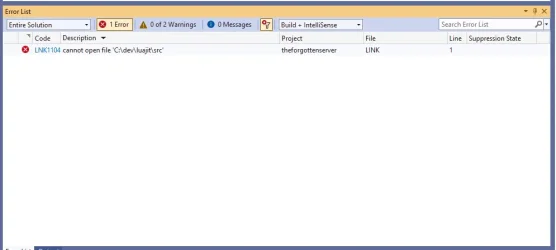
Linux would be easier this time I feel, I can't for the love of *** get luajit to Link to Visual Studio 2022, I get the cannot open file 'C:\dev\luajit\src' and not sure its caused of this update but I also get:
E2500 a literal operator template must have a template parameter list equivalent to '<char ...>' theforgottenserver C:\gesior\vcpkg_installed\x64-windows\x64-windows\include\fmt\format.h 4449
Line 4449: template <detail_exported::fixed_string Str> constexpr auto operator""_a() {

Got any tips master @Gesior.pl ?
TFS 1.4 does not use 'vcpkg.json' to define required libraries, so on Windows you can waste hours to collect them all.

If you are already using my 1.4 branch, I switched from...
Compile with LuaJIT instead of Lua. On Linux:
Code:
apt install libluajit-5.1-dev
mkdir build
cd build
cmake -DUSE_LUAJIT=1 ..
make
Linux would be easier this time I feel, I can't for the love of *** get luajit to Link to Visual Studio 2022, I get the cannot open file 'C:\dev\luajit\src' and not sure its caused of this update but I also get:
E2500 a literal operator template must have a template parameter list equivalent to '<char ...>' theforgottenserver C:\gesior\vcpkg_installed\x64-windows\x64-windows\include\fmt\format.h 4449
Line 4449: template <detail_exported::fixed_string Str> constexpr auto operator""_a() {

Got any tips master @Gesior.pl ?
 
Linux would be easier this time I feel, I can't for the love of *** get luajit to Link to Visual Studio 2022, I get the cannot open file 'C:\dev\luajit\src' and not sure its caused of this update but I also get:
E2500 a literal operator template must have a template parameter list equivalent to '<char ...>' theforgottenserver C:\gesior\vcpkg_installed\x64-windows\x64-windows\include\fmt\format.h 4449
Line 4449: template <detail_exported::fixed_string Str> constexpr auto operator""_a() {

Got any tips master @Gesior.pl ?
TFS 1.4 does not use 'vcpkg.json' to define required libraries, so on Windows you can waste hours to collect them all.

If you are already using my 1.4 branch, I switched from Lua to LuaJIT as part of "feat: optimized decay algorithm (#2)" PR by mistake (it was supposed to be separate PR), but you can add these changes and it will make VS2022 use LuaJIT:

Info about my 1.4 branch:
I prefer to test my TFS code changes on 10.98, so I made my own TFS 1.4 branch called 'compilation'. I add there tested optimizations/bug fixes, but most important goal is to keep it 'compile' on newest Linuxes and Windows:
Right now it's 99.99% compatible with TFS 1.4 datapack. Only change is that I moved 'global storages' from Lua to C++. Now they accept only integer values and values are saved in database. Official TFS 1.4 accepts any Lua data type (tables, objects etc.) as values and resets them every server restart (they are not stored in database).
If you use official TFS 1.4 data folder, it will overwrite my C++ changes, as I had to remove these Lua lines to make my C++ code work:
So with official TFS 1.4 data my C++ code is 100% compatible. All extra features are on/off in config.lua (off by default).

It compiles like TFS 1.6+. For VS2022 it uses 'vcpkg.json' manifest by default. For Linux it uses system libraries.
To keep compilation instruction up to date, it's part of repository. Ex. for Ubuntu 24.04:
On Windows you just have to install vcpkg from GitHub, integrate it into Windows (like for 'canary') and open vc17/theforgottenserver.sln in VS 2022.

 
Solution
TFS 1.4 does not use 'vcpkg.json' to define required libraries, so on Windows you can waste hours to collect them all.

If you are already using my 1.4 branch, I switched from Lua to LuaJIT as part of "feat: optimized decay algorithm (#2)" PR by mistake (it was supposed to be separate PR), but you can add these changes and it will make VS2022 use LuaJIT:
I added this change but the errors persists, maybe some cache error?
Info about my 1.4 branch:
I prefer to test my TFS code changes on 10.98, so I made my own TFS 1.4 branch called 'compilation'. I add there tested optimizations/bug fixes, but most important goal is to keep it 'compile' on newest Linuxes and Windows:
Right now it's 99.99% compatible with TFS 1.4 datapack. Only change is that I moved 'global storages' from Lua to C++. Now they accept only integer values and values are saved in database. Official TFS 1.4 accepts any Lua data type (tables, objects etc.) as values and resets them every server restart (they are not stored in database).
If you use official TFS 1.4 data folder, it will overwrite my C++ changes, as I had to remove these Lua lines to make my C++ code work:
So with official TFS 1.4 data my C++ code is 100% compatible. All extra features are on/off in config.lua (off by default).

It compiles like TFS 1.6+. For VS2022 it uses 'vcpkg.json' manifest by default. For Linux it uses system libraries.
To keep compilation instruction up to date, it's part of repository. Ex. for Ubuntu 24.04:
On Windows you just have to install vcpkg from GitHub, integrate it into Windows (like for 'canary') and open vc17/theforgottenserver.sln in VS 2022.
I do indeed use official TFS 1.4 data with your 1.4.2 sources, I had to make some adjustments however in order to make it work.
 
I added this change but the errors persists, maybe some cache error?
Post errors/screen of errors.

You can try switching build between Debug and Release.
"Release" builds .exe and .dlls in main OTS directory, "Debug" builds it in`vc17\x64\Debug\theforgottenserver-x64.exe` - as .dll files from Release and Debug are in conflict -, but it lets you click "Local Windows Debugger" to run Debug version from VS directly to debug it.

You can try to remove vcpkg_installed folder from OTS folder and all folders from vc17 like .vs, x64, and theforgo.A10F9657. Then open again VS2022 and it should generate/compile all files again. vcpkg should load pretty fast (not 15-45 minutes like on first run), as compiled libraries should be cached in vcpkg folder already (outside OTS folder).

Make sure that VS uses right vcpkg directory. After you download vcpkg from GitHub (git pull https://github.com/microsoft/vcpkg.git) into some folder, you have to run in cmd/terminal (it may be .\, not ./ in cmd.exe/PowerShell):
Code:
cd vcpkg
./bootstrap-vcpkg.bat
./vcpkg.exe integrate install
./vcpkg.exe integrate install will make VS2022 use given vcpkg folder.
 
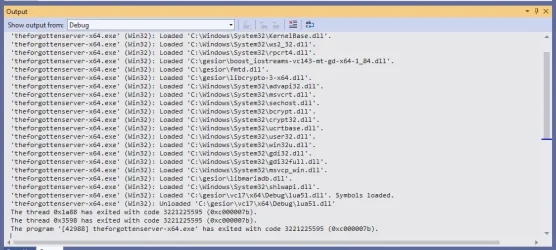
Running as debug:
1758573466977.webp

Running as Release after removing vcpkg & x64 in src:
1758573665863.webp

Wish I could add more info but my brain isnt braining very good atm.
 
Running as Release after removing vcpkg & x64 in src:
It should not load luajit from some C:\dev\luajit\src. It should load it from vcpkg_installed subfolder. Did you edit anything in VS project or setup some system variables that could force VS to use that directory?
You can try to download clean version of my branch and check, if it compiles. If it works, replace vc17 folder from your version of 1.4.2 in C:\gesior\ with clean version from my branch.
 
It should not load luajit from some C:\dev\luajit\src. It should load it from vcpkg_installed subfolder. Did you edit anything in VS project or setup some system variables that could force VS to use that directory?
You can try to download clean version of my branch and check, if it compiles. If it works, replace vc17 folder from your version of 1.4.2 in C:\gesior\ with clean version from my branch.
Thanks again, you're correct. I did has several edits in my VS project trying to manually add luajit, now when i removed that it ran properly. Now when built I no longer get these "commas" and my scripts works properly. :D
 
Running as debug:
View attachment 94934

Running as Release after removing vcpkg & x64 in src:
View attachment 94935

Wish I could add more info but my brain isnt braining very good atm.
Install cmake and compile as linux, easier to use vs2022

Just check if the vcpkg directory is the same

Code:
cmake -B build -S . -DCMAKE_TOOLCHAIN_FILE=C:/vcpkg/scripts/buildsystems/vcpkg.cmake
Code:
cmake --build build --config Release
 
Install cmake and compile as linux, easier to use vs2022
I use cmake on Windows, but with CLion IDE (build-in IDE cmake, not installed by me), it detects VS compiler/linker folder-path and configure cmake for me. It also auto-detects vcpkg folder like VS does, when I pick 'vcpkg preset' in TFS ( forgottenserver/CMakePresets.json at master · otland/forgottenserver (https://github.com/otland/forgottenserver/blob/master/CMakePresets.json#L25) ).

If I install cmake on Windows, do I have to install g++/clang (some Linux compiler) or it will be able to detect VS compiler/linker automatically?
 
I use cmake on Windows, but with CLion IDE (build-in IDE cmake, not installed by me), it detects VS compiler/linker folder-path and configure cmake for me. It also auto-detects vcpkg folder like VS does, when I pick 'vcpkg preset' in TFS ( forgottenserver/CMakePresets.json at master · otland/forgottenserver (https://github.com/otland/forgottenserver/blob/master/CMakePresets.json#L25) ).

If I install cmake on Windows, do I have to install g++/clang (some Linux compiler) or it will be able to detect VS compiler/linker automatically?
On Windows, CMake doesn't require Linux's g++ or clang to compile. It will detect and use the Visual Studio (MSVC) compiler directly.

You just need to run the vcpkg commands
Code:
cd C:\vcpkg
.\bootstrap-vcpkg.bat
.\vcpkg.exe integrate install

this already leaves vcpkg ready and integrated into your Visual Studio / CMake.

After that, in your project with vcpkg.json, just:

Code:
cmake -B build -S . -DCMAKE_TOOLCHAIN_FILE=C:/vcpkg/scripts/buildsystems/vcpkg.cmake
cmake --build build --config Release

This way you don't need to open the project in Visual Studio, at least that's how I compiled its source branch "compilation"

Notes: Check if the Windows variables are correct in the path when using cmake in the console
 
Last edited:
Back
Top