• There is NO official Otland's Discord server and NO official Otland's server list. The Otland's Staff does not manage any Discord server or server list. Moderators or administrator of any Discord server or server lists have NO connection to the Otland's Staff. Do not get scammed!
  • 2026 staff recruitment is open! Check it out and consider applying!

TFS 1.X+ TFS 1.7 <Which Map Editor actually works?>

xYzPrototype

Just a standard member
Joined
Feb 27, 2015
Messages
57
Reaction score
6
Location
EUW
Hello,

Back again with more issues (i must be really stupid).

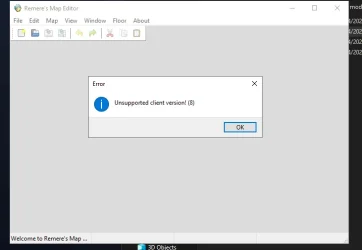
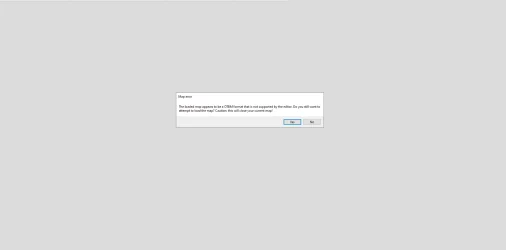
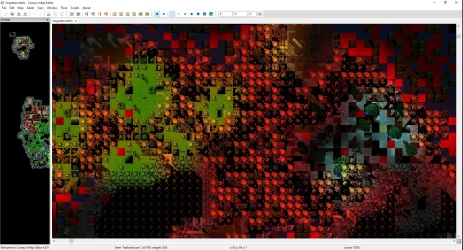
I am using TFS 1.7, server and custom client all working fine no errors there. However, I am trying to open my map but RME 3.2, 3.6.1 and Canary Map Editor v4.0 are all not working. RME 3.2 & 3.6.1 both bring up the same error (see Capture 6). And when i try the Canary Map Editor v4.0 it brings up this prompt (Capture7). If i click Yes and Ok through the pop ups something actually does come up in the end (Capture8), but it bares no relevance to the actual map. I've honestly never known such difficulty loading a map up! Can someone kindly point me in the right direction to the correct software to use (or how to make it so the software i have works!)

Thanks.
 

Attachments

Use this to convert your map! Works both ways.

Also instead of opening maps, try Importing Map, often works better.
 
Hello,

Back again with more issues (i must be really stupid).

I am using TFS 1.7, server and custom client all working fine no errors there. However, I am trying to open my map but RME 3.2, 3.6.1 and Canary Map Editor v4.0 are all not working. RME 3.2 & 3.6.1 both bring up the same error (see Capture 6). And when i try the Canary Map Editor v4.0 it brings up this prompt (Capture7). If i click Yes and Ok through the pop ups something actually does come up in the end (Capture8), but it bares no relevance to the actual map. I've honestly never known such difficulty loading a map up! Can someone kindly point me in the right direction to the correct software to use (or how to make it so the software i have works!)

Thanks.
You are using official TFS 1.7, which uses ServerID, not ClientID.

Because of that, I recommend using OTAcademy RME together with this SPR/DAT:

GitHub - Nottinghster/1098extended (https://github.com/Nottinghster/1098extended)

Open RME, enable the checkbox for version 13.10 or 13.30, select the 1098extended SPR/DAT files, click Apply/OK, and then try opening your TFS 1.7 map again. After that, you should be able to edit the map and save it normally.

Do not use Canary RME for this case, because Canary uses ClientID, and your TFS 1.7 map uses ServerID. That is probably why the map is not loading correctly there.

You can use:

GitHub - OTAcademy/RME: OTAcademy fork of Remere's Map Editor repository. (https://github.com/OTAcademy/RME)

or

For official TFS 1.7, OTAcademy RME should be the safer option because it is compatible with ServerID maps.
Post automatically merged:

If you want to use a full global map that someone already converted from ClientID to ServerID, you can check this one:

[14.12] Canary Map - Converted to TFS (https://otland.net/threads/14-12-canary-map-converted-to-tfs.290897/)

This map was already converted to work with TFS using ServerID, so it can be an easier option for anyone using official TFS 1.7.
 
You are using official TFS 1.7, which uses ServerID, not ClientID.

Because of that, I recommend using OTAcademy RME together with this SPR/DAT:

GitHub - Nottinghster/1098extended (https://github.com/Nottinghster/1098extended)

Open RME, enable the checkbox for version 13.10 or 13.30, select the 1098extended SPR/DAT files, click Apply/OK, and then try opening your TFS 1.7 map again. After that, you should be able to edit the map and save it normally.

Do not use Canary RME for this case, because Canary uses ClientID, and your TFS 1.7 map uses ServerID. That is probably why the map is not loading correctly there.

You can use:

GitHub - OTAcademy/RME: OTAcademy fork of Remere's Map Editor repository. (https://github.com/OTAcademy/RME)

or

For official TFS 1.7, OTAcademy RME should be the safer option because it is compatible with ServerID maps.
Post automatically merged:

If you want to use a full global map that someone already converted from ClientID to ServerID, you can check this one:

[14.12] Canary Map - Converted to TFS (https://otland.net/threads/14-12-canary-map-converted-to-tfs.290897/)

This map was already converted to work with TFS using ServerID, so it can be an easier option for anyone using official TFS 1.7.
Hey!

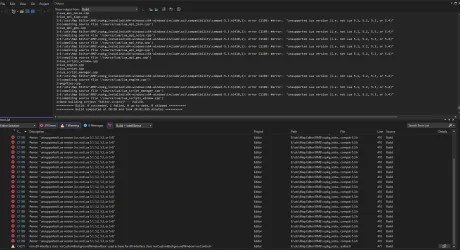
Thanks for this, i followed your advice. I compiled the GitHub - OTAcademy/RME: OTAcademy fork of Remere's Map Editor repository. (https://github.com/OTAcademy/RME) as you recommended but got a load of errors in the compile. Take a look.
 

Attachments

Hey!

Thanks for this, i followed your advice. I compiled the GitHub - OTAcademy/RME: OTAcademy fork of Remere's Map Editor repository. (https://github.com/OTAcademy/RME) as you recommended but got a load of errors in the compile. Take a look.
If you use OTAcademy RME, you do not need to compile it yourself. They already provide ready-to-use releases.

You can get the executable and the required DLLs from the releases page. Just download it, extract the files, and use them with RME:

Release Release 4.2.0 · OTAcademy/RME (https://github.com/OTAcademy/RME/releases/tag/4.2.0)

If you want to compile it yourself, then you need to have the required dependencies, such as vcpkg and Boost libraries.

The good thing is that OTAcademy RME already has a vcpkg.json file. So you only need to install Git and vcpkg on your PC, then compile the project. vcpkg should automatically download Boost and the other required dependencies during the build process.
 
I’m having a lot of trouble getting my map to load in any editor. I am running an 8.60 server (Real Map)

OTAcademy Map Editor: The map technically "loads" (I can see floating textboxes for signs/NPCs and the coordinates are correct), but the entire screen is black. The Minimap is also completely black/empty even though the file is clearly not empty. I have tried toggling everything in the "View" menu, but no terrain or graphics appear.

Remere's Map Editor (3.7.0): In this editor, everything shows up as red tiles. If I try to replace the editor's items.otb with my server's own items.otb to fix the IDs, I get an "Unhandled exception" and the program crashes immediately on startup.
Both version 8.40 and 8.60 are pointed to a clean Tibia 8.60 client.
"Check file signatures" is unchecked.
My global.otbm file size is 93,538 KB.
please need help <3
 
Back
Top