
![[OTCv8] In-Game Highscores Window [TFS 1.x]](/data/resource_icons/0/127.jpg?1779552952)
- OTClient version
- Kondra's v8
Good day, OTLand ^^
I made this for my server and thought I would share it with the community. I hope it is useful to someone.
I tried looking for something like this, but I was only able to find older highscores systems that worked through commands, so here it is.
Features

Download Contents
Quick Install
1. Copy
2. Copy
3. Install the server-side extended opcode handler from
4. Restart the client and server.
See
I made this for my server and thought I would share it with the community. I hope it is useful to someone.
I tried looking for something like this, but I was only able to find older highscores systems that worked through commands, so here it is.
Features
- In-game highscores popup using extended opcode
73 - Level category first, with no rebirth/reset-specific category
- Categories: Level, Sword, Axe, Club, Distance, Shielding, Magic Level, Fishing
- Search box for filtering visible names on the current page
- Page navigation
- Highlighted own character row
- Rank coloring: #1 gold, #2 white, #3 bronze, #4+ light gray
- Includes a fixed 20x40 topbutton icon strip for normal/open toggle states
Download Contents
Code:
client/
  modules/game_highscore/
    highscore.lua
    highscore.otmod
    highscore.otui
  data/images/topbuttons/
    highscore.png

server/
  tfs1x/highscores.lua

docs/
  INSTALL_TFS1X.md
Quick Install
1. Copy
client/modules/game_highscore/ into your OTCv8 client's modules/ folder.2. Copy
client/data/images/topbuttons/highscore.png into your OTCv8 client's data/images/topbuttons/ folder.3. Install the server-side extended opcode handler from
server/tfs1x/highscores.lua.4. Restart the client and server.
See
docs/INSTALL_TFS1X.md for the full TFS 1.x setup.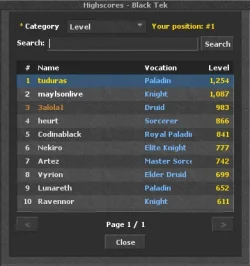

![[TFS 1.X] Guild Menu Module](/data/resource_icons/0/126.jpg?1777694034)
![[TFS 1.x] Kill Effects System - Cascading Death Animations](/data/resource_icons/0/125.jpg?1777559122)