Misaki1124
New Member
- Joined
- May 26, 2023
- Messages
- 1
- Reaction score
- 2
RME VERSAO =?



Friend, can you help me somehow? I want to open the map and the client, but I have different items. As in the regular client, from what I found, the ID doesn't match, but I'm not sure. Can you tell me how to do it? I downloaded it all and it doesn't workThis datapack was leaked a long time ago, I think over a year ago. I already tested it… the source is very bugged and needs a lot of fixes to be perfect. The owner of the datapack saw that someone had stolen his base and was selling it for an absurd price, so he decided to post it on Facebook. A lot of people downloaded it back then. It’s been a while.
View attachment 96200


Which base are you using? Is it the one from this topic: [8.60] Styller-Baiak 8.60 [OTX 1.0] + Mount DLL Modal? Are you unable to open RME, or is the error caused by different item IDs? If it’s this datapack, you need to take the items.otb and items.xml files from the Styller-Baiak 8.60 server and replace the files inside your RME’s data/860 folder. After that, open RME again and it should work correctly. This datapack uses a fully custom SPR, not the default 8.6 SPR. Yes, it is fully custom.Friend, can you help me somehow? I want to open the map and the client, but I have different items. As in the regular client, from what I found, the ID doesn't match, but I'm not sure. Can you tell me how to do it? I downloaded it all and it doesn't work
Yes, I have everything downloaded from this post. I did everything you wrote and I still get the same result and I see the same thing when I add data and sprite to OTClient.Which base are you using? Is it the one from this topic: [8.60] Styller-Baiak 8.60 [OTX 1.0] + Mount DLL Modal? Are you unable to open RME, or is the error caused by different item IDs? If it’s this datapack, you need to take the items.otb and items.xml files from the Styller-Baiak 8.60 server and replace the files inside your RME’s data/860 folder. After that, open RME again and it should work correctly. This datapack uses a fully custom SPR, not the default 8.6 SPR. Yes, it is fully custom.
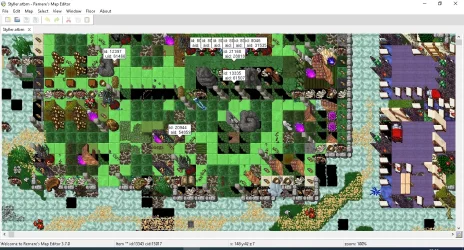

In addition to retrieving the items.xml and items.otb files, you need to open the baiak-styller client using object builder 0.5 and retrieve the client sprite code (which in this case is a customized ID). This code should be different from the sprite code of the Cipsoft client registered in RME. Then, simply go to versions.xml in the RME folder and add this sprite code to that file. After that, the map should work correctly. If you can't manage it, I can do it for you.Yes, I have everything downloaded from this post. I did everything you wrote and I still get the same result and I see the same thing when I add data and sprite to OTClient.
You can use Myaac, as it is easy to use.amazing I was looking for this thank you!!! and here is my question which account maker should I download for this?
how to log in as an admin on this accmaker?sorry for offtop but where is NPC task ?
PS: very good server best regards rep ;p
Post automatically merged:

GitHub - slawkens/myaac: Automatic Account Creator (AAC) for Open Tibia Servers written in PHP
Automatic Account Creator (AAC) for Open Tibia Servers written in PHP - slawkens/myaacgithub.com
GitHub - Znote/ZnoteAAC: Developement repository for the Znote AAC project. A website portal to represent and manage your Open Tibia server. (https://github.com/Znote/ZnoteAAC)
@
RcSegalotto Here You have got accmaker
_______________________________________________________________________________________________
Need sql query "ip list" can someone create them?
View attachment 96197
Thank you, you helped me. One last question: how do I configure the game client for my IP?U have to set gruop id to 6 in player table and set 6 in account table. Do You understand!? U know how to do it?
I downloaded the Baik new Styller client and where to change the IP to mineIf You are using tibia old client: you have to use asprate ip changer. If U are using otcv8 you write in center window ip local host I think
Ip own: 127.0.0.1
I downloaded the Baik new Styller client and where to change the IP to mine
I want it to be based on this IP 93.105.110.9 , Is anyone able to do this for me?You have to run "Styler-ots-LOCAL.exe"
its based on local host 127.0.0.1

What do you mean exactly based on ip 93.105.110.9?I want it to be based on this IP 93.105.110.9 , Is anyone able to do this for me?
this is the IP of my computer, for now I just want to let my friends from different cities into the game at the moment when I start the engine on the computerWhat do you mean exactly based on ip 93.105.110.9?
do you have a vps and you want to host this server on? or your router internet ip is 93.105.110.9? if it is your local router ip so it will be usless to use it since you are in your local place but incase you want to host your server in that ip I can help you.
You should open those ports 7171/7172 tcp/udp in your router port forwarding first there is a lot of tutorials here in OTland that explain how you can make it work.this is the IP of my computer, for now I just want to let my friends from different cities into the game at the moment when I start the engine on the computer
I have everything prepared, I just can't modify this client to work on the IP I sent in the previous messageYou should open those ports 7171/7172 tcp/udp in your router port forwarding first there is a lot of tutorials here in OTland that explain how you can make it work.


