• There is NO official Otland's Discord server and NO official Otland's server list. The Otland's Staff does not manage any Discord server or server list. Moderators or administrator of any Discord server or server lists have NO connection to the Otland's Staff. Do not get scammed!
  • 2026 staff recruitment is open! Check it out and consider applying!

[8.60] [TFS 1.2] -[Real Map full] with mount & market system

Hello everyone, this OT server is very interesting, congratulations to the author of the post for bringing this marvel. However, I only know the basics like opening XAMPP, installing the database, configuring Apache, installing the website, and running TFS. These published files aren't all the files needed to run this server; how can I run it on my PC? And is there a website compatible with it so I can create accounts and test with characters created on the site? Sorry if I'm being too clueless, but I'm just starting out and I find OT servers very interesting.
 
Hello everyone, this OT server is very interesting, congratulations to the author of the post for bringing this marvel. However, I only know the basics like opening

Hello everyone, this OT server is very interesting, congratulations to the author of the post for bringing this marvel. However, I only know the basics like opening XAMPP, installing the database, configuring Apache, installing the website, and running TFS. These published files aren't all the files needed to run this server; how can I run it on my PC? And is there a website compatible with it so I can create accounts and test with characters created on the site? Sorry if I'm being too clueless, but I'm just starting out and I find OT servers very interesting.
I don't think I've posted anything here before so I hope I don't break any rules.

You have to compile the source to "install all files". In the server folder there's a folder named VC17. You have a Visual Studio project file there, open with Visual Studio and compile. See tutorials below how to compile it. Just skip step 3 in the VCPKG guide. You already have the source. If you want to use powershell, download powershell 7.

If using a newer version of visual studio you have to "modernize" it. I just let Githubs Co-Pilot do it for me and the distribution works very well so far, you can just activate the trial and cancel once you're done if you need premium. I'm using MyACC as account creator. If using MyACC you have to delete the table named salt in the server database, unless you activate salt in config.lua. The passwords won't work otherwise.
Just delete it and leave salt off.


Edit: No idea why the qoute turned out like that :D
 
I got most of the server running a.t.m. and I can join with my local IP.
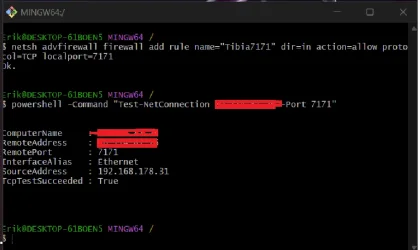
Both my 7171, 7172 ports are open TCP.
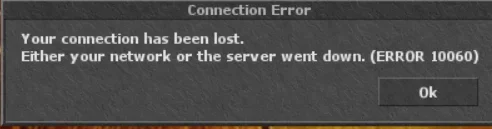
Connecting to server ends up in:
1773259222840.webp

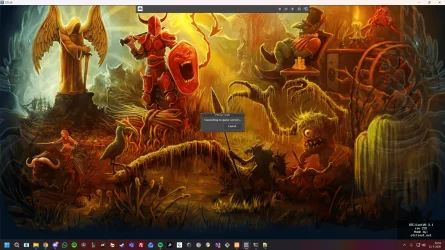
Anyone got a clue?

1773258947067.webp
1773259135841.webp
 
I got most of the server running a.t.m. and I can join with my local IP.
Both my 7171, 7172 ports are open TCP.
Connecting to server ends up in:
View attachment 98913

Anyone got a clue?

View attachment 98911
View attachment 98912
“Can you explain in a little more detail why, does server start? What IP address did you enter in the config? if you fixed database and gonna start local then use ip :127.0.0.1
if you downloaded compiled version this server is plug in and play kinda hope you find solution
 
I got most of the server running a.t.m. and I can join with my local IP.
Both my 7171, 7172 ports are open TCP.
Connecting to server ends up in:
View attachment 98913

Anyone got a clue?

View attachment 98911
View attachment 98912
Setting new server on ubuntu is 2h, free on oracle, or cheapest on contabo, save you a lot of time.

Show config.lua, from main engine folder.
Try changing there global ip.
Check if " really ports" and open.

Also:
Your internet provider can block opening your server, or router is not good for this, even if everything is set up.


Basic tutorial:
 
“Can you explain in a little more detail why, does server start? What IP address did you enter in the config? if you fixed database and gonna start local then use ip :127.0.0.1
if you downloaded compiled version this server is plug in and play kinda hope you find solution

Thanks for the reply!

I want to host my server for a couple of friends.
So I put the ip to be '0.0.0.0' and tried my 'router' ip aswell.

canyouseeme.org validates that both the 7171 and 7172 ports are open.

I think i kinda narrowed it down to my router. Im gonna try another network this weekend
:) I'll keep you posted
 
cool release

how do i use this spr/dat items.otb with my own otc? and server some feature that need to enable in otc? i use tfs 8.6 - 1.5
8.6 globl datapack taken from 8.0 it has zao yalahar and such
edit: Cool im using spr/dat items.otb with my 8.6 no problems at all

would like to add market system i already have added mount system can somebody give me the commits please?
View attachment 81071

View attachment 81072
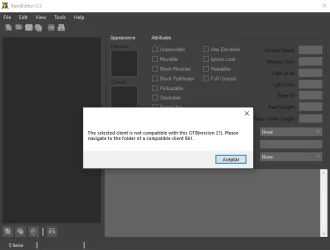
When i try to edit tiems.otb i get this

can you share your item editor pls?
changed version to 62 still the same problem


edit nvm problem solved
View attachment 81073
How did you solve it?
1776841537328.webp

This is what I'm getting, any ideas on how to fix it?
 
This map, or more specific sprites, are from many other tibia versions, not sure if this will help fully, i was not lucky with this.


Download downgraded 12, 13 client version sprites, and add them to rme > file. > preferences > client versions, like here, but your option is 8.6


Also there, set default client version to version 8.6,
and uncheck "file signatures".
Or also use other version of rme, like otacademy.

Go to releases, and download there.

If you still need help, send me message.
Descargué lo que mencionaste y puedo cargar el mapa, pero se ve todo negro. Si intento moverme a un punto específico, el programa se bloquea. ¿Debería revisar los registros o me estoy perdiendo algo? Espero que puedas ayudarme a editar mi mapa :)

I downloaded what you mentioned, and I can load the map, but it's all black. If I try to move to a specific point, the program crashes. Should I check the logs, or am I missing something? I hope you can help me edit my map :)
 
Descargué lo que mencionaste y puedo cargar el mapa, pero se ve todo negro. Si intento moverme a un punto específico, el programa se bloquea. ¿Debería revisar los registros o me estoy perdiendo algo? Espero que puedas ayudarme a editar mi mapa :)

I downloaded what you mentioned, and I can load the map, but it's all black. If I try to move to a specific point, the program crashes. Should I check the logs, or am I missing something? I hope you can help me edit my map :)
Probably missing sprites, try with 15x sprites.
 
Probably missing sprites, try with 15x sprites.
I was able to fix it; there's no need to add the sprites you mentioned. I just had the spr and dat folders arranged incorrectly. Another question: do you still have this server in production? I think the dat and spr files are corrupted, or the OTClient is misleading me with a log I've included below:

WARNING: HTTP error for http://************/api/status.php: Invalid http status code (403)
ERROR: Failed to read dat '/things/800/Tibia.dat': corrupt data (id: 134, category: 0, count: 255, lastAttr: 1)'
Exiting application..
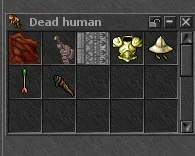
I was able to connect to the server, but I detected a problem with the loot from humanoid creatures like the hunter, for example. The loot is displayed with incorrect sprites and then it doesn't allow me to store it in my backpack.

I'm not sure if that error is related to the spr and dat files, or rather to the communication protocol with the server and the otclient.
 

Attachments

  • b6a4d4a8-7364-47ca-9278-82b1ee84099f.webp
    b6a4d4a8-7364-47ca-9278-82b1ee84099f.webp
    8.3 KB · Views: 2 · VirusTotal
I was able to fix it; there's no need to add the sprites you mentioned. I just had the spr and dat folders arranged incorrectly. Another question: do you still have this server in production? I think the dat and spr files are corrupted, or the OTClient is misleading me with a log I've included below:

WARNING: HTTP error for http://************/api/status.php: Invalid http status code (403)
ERROR: Failed to read dat '/things/800/Tibia.dat': corrupt data (id: 134, category: 0, count: 255, lastAttr: 1)'
Exiting application..
I was able to connect to the server, but I detected a problem with the loot from humanoid creatures like the hunter, for example. The loot is displayed with incorrect sprites and then it doesn't allow me to store it in my backpack.

I'm not sure if that error is related to the spr and dat files, or rather to the communication protocol with the server and the otclient.
You need to use the sprites in things/860.
 
Back
Top