

Adorius Black
Advanced OT User
- Joined
- Mar 31, 2020
- Messages
- 348
- Solutions
- 3
- Reaction score
- 226
Hey everyone! I’d like to introduce you to my gadget that I built out of pure boredom. Since I was a kid, I’ve loved hiking, and in my youth, I was a massive fan of the game Tibia. Between 2005 and 2010, I actively played "Real Tibia" as well as various OT (Open Tibia) servers like Tibiafun, Veterana, Realiaots, and Arkantes. I really enjoyed messing around with Elfbot, Bbot, and other tools. Towards the end of elementary school, I started digging deeper into the technical background, and through Shadowcores and Tibiafun, I discovered that one could actually create their own server.
I was fascinated. I registered on the OTLand and Tibia.net.pl forums, where I found an old compiled distribution. That feeling when I first managed to launch a server and install an XML acc maker was unforgettable. Back then, I was using Hamachi and couldn’t understand why others could have public servers while I couldn't. The free version of Hamachi was limiting, with a five-person cap. I tried tinkering with map editors and the "data" folder, but around 2011, during high school, I dropped it entirely.
Return to Development in the Netherlands
I returned to Tibia only in 2018 while working long-term in the Netherlands. Out of boredom, I thought about trying to create an OTS again. After years, I revisited OTLand and managed to compile TheForgottenServer 1.2 for the first time. It was a huge leap forward compared to the old Tibiafun server, which was full of malicious code. I finally had a clean server running Gesior 2012. However, I was still troubled by how to make my server public. Gradually, I figured out that I needed a static IP or a rented machine in a data center. Until then, I had no idea such a thing existed. It was a real "wow factor" for me. At the end of 2020, I launched a server called "Blackfun" for a month via Contabo. But paying €30 a month for something that wasn't earning anything seemed like a lot, so I started looking for cheaper solutions.
The World of Cybernetics and Raspberry Pi
Around the same time, I discovered the world of cybernetics. When a guy first told me about the Kali Linux operating system, I had no clue what he was talking about. I started digging into it, created my first Live USB, and began following the community on Instagram. I was amazed at the gadgets people could build. I told myself I wanted one too, so I bought my first Raspberry Pi 4B, even though I didn't know exactly what I’d use it for yet.
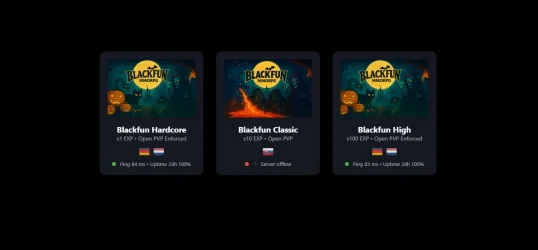
In 2021, I finally found a VPS that suited me. It was Zap-hosting, where they offered a "lifetime VPS." I didn't hesitate and bought it for €350 (Specs: 16GB RAM, ~2.4GHz CPU, 1Gbps connection, and 100GB storage). I learned the basics of PuTTY and Remote Desktop. I launched my Blackfun server there, which is still online today, and I still enjoy developing it. It has become a form of healthy addiction and an inseparable part of my free time. Whenever I have time off, the first thing that comes to mind is "Blackfun."
The Birth of Project "Cyber Nomad"
While creating my first security gadget, I had the idea to combine hiking, server creation, and cybernetics into one project. I wanted to be a "Cyber Nomad" who always has a server with him. Last year, I assembled my first Cyberdeck. After a few destroyed SD cards, it ended up in a drawer for a while.
A month ago, I returned to it, bought a high-quality SD card, and installed Kali Linux. My goal was clear: turn the Cyberdeck into a monitoring device while simultaneously compiling TheForgottenServer 1.4.2 on it. I suspected it was possible since Kali is based on Debian, but I couldn't find anyone on the forums using this specific combination (Kali + Raspberry Pi + TFS).
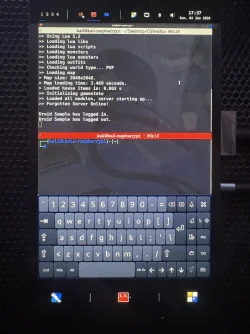
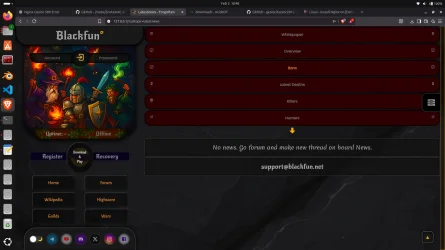
Gemini promised to help me, and we got to work. I installed the libraries, Nginx, and MariaDB, but the compilation threw errors at 7%, 40%, and 44%. Gemini helped me fix them—specifically in the iomarket.cpp files and others where the "action" needed to be wrapped in static_cast<uint16_t>(action) because the Kali compiler was strictly blocking it. Finally, the server compiled! I’ll upload it to GitHub later and put a link in my OTLand profile signature. Then I got Gesior 2012 running via PHP 8.4 (I expected I’d have to downgrade to 7.4, but it worked flawlessly). I imported the database, ran ./tfs, and the server started. From a second device (a laptop), I logged into the game via a hotspot and local network, and it worked.
I told Gemini I’m waiting for the day mobile operators start offering plans with Static Dedicated IP addresses so I can host the server directly from my iPhone and Cyberdeck right out of my backpack while hiking or camping. Gemini told me the IP issue could be bypassed using a Cloudflare tunnel, which shocked me; I couldn't believe it.
Connection Issues and Hardware Details
One last challenge remained: the Cloudflare tunnel. Since operators don't usually offer static IPs for mobile internet, I wanted to solve it this way. I bought the cheapest domain, created a tunnel via cloudflared, and set up the DNS. However, Gemini claimed that ports 7171 and 7172 had to be handled through playit.gg because Cloudflare is mainly for port 80. I paid for a premium subscription there for €3, got new IPs and 5-digit ports. We tried every combination, but at best, it only got me to the character list and no further. Around 4:00 AM, I gave up because even Gemini started repeating itself in loops, and I could see it was stuck too.
What is actually inside my Cyberdeck?
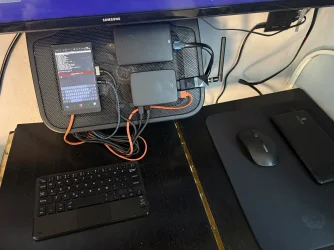
• Base: Raspberry Pi 4B 8GB.
• Display: Waveshare 5.5" Full HD Touch Display.
• Cables: I use high-quality JBL cables and HDMI. If you're building something similar, don't skimp on these. JBL cables carry enough current and, crucially, support touch data, which standard cables often don't.
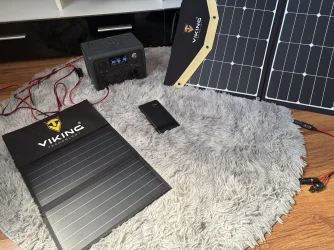
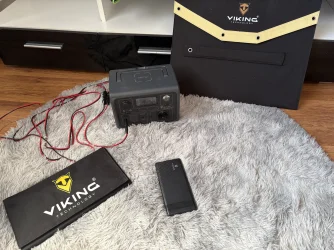
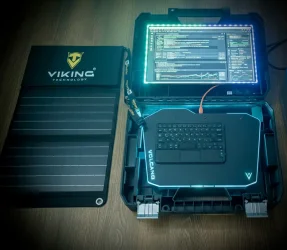
• Power: I use the original Raspberry Pi adapter to avoid "low electricity" mode. For outdoors, I have a Viking 74Wh power bank (lasts 10–20 hours), the JBL cable, and a Bluetti EB3A solar station (268Wh) (lasts 2–5 days of operation). I also have Viking solar panels (70Wh and 30Wh), so I can run nonstop.
• Storage: Samsung PRO Endurance 128GB (forget cheap cards like Kingston; the Raspberry will kill them in a day). Use this Samsung or the SanDisk Extreme series. They are very durable and have fast write speeds, which is a perfect combo for an OS. I'm speaking from experience. I also have a 1TB Toshiba HDD connected for logs.
• Network: Atheros AR9271 Wi-Fi adapter, which supports monitor mode for working with Wireshark.
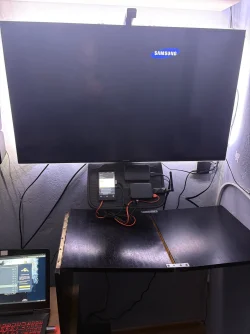
• Cooling: Everything is screwed onto a Yenkee cooling pad that I have hanging on my wall. For outdoor use, I just grab it and go.
With this gadget, you are unstoppable. The Raspberry Pi handles the server with ease; it’s silent and doesn't overheat. I’m not sure how it would perform with 100–1000 players online, though. At home, you can let the Raspberry server run 24/7 since it only consumes about €7 worth of electricity per year.
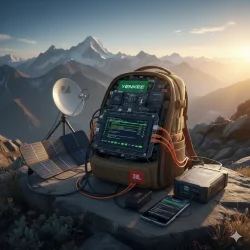
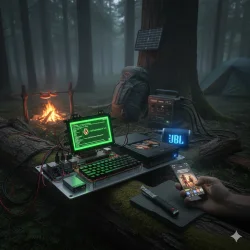
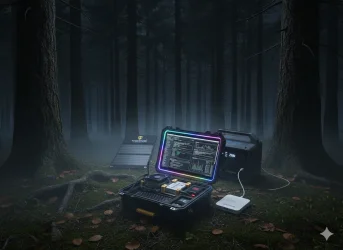
My goal is clear: an energy-independent, portable server that changes location depending on where I am. My future plan is to solve that portable hotspot with a static IP. If I succeed, my server won't be dedicated in some data center, but I’ll be carrying it in my backpack 24/7, whether I’m in the mountains, the woods, by the sea, or just camping. To upgrade it even further, I’d swap the internet for Starlink, meaning I could catch a satellite signal and host my server in the middle of the Pacific, a desolate desert, or on the peaks of the Himalayas, straight from my backpack. My server would move wherever my feet take me. I know it’s not as practical as professional solutions, but the idea of an energy-self-sufficient portable server that moves with me is fascinating. And I wonder if Starlink offers static IPs—that would solve everything in one go.
What do you guys think about this kind of theforgottenserver hosting?
I was fascinated. I registered on the OTLand and Tibia.net.pl forums, where I found an old compiled distribution. That feeling when I first managed to launch a server and install an XML acc maker was unforgettable. Back then, I was using Hamachi and couldn’t understand why others could have public servers while I couldn't. The free version of Hamachi was limiting, with a five-person cap. I tried tinkering with map editors and the "data" folder, but around 2011, during high school, I dropped it entirely.
Return to Development in the Netherlands
I returned to Tibia only in 2018 while working long-term in the Netherlands. Out of boredom, I thought about trying to create an OTS again. After years, I revisited OTLand and managed to compile TheForgottenServer 1.2 for the first time. It was a huge leap forward compared to the old Tibiafun server, which was full of malicious code. I finally had a clean server running Gesior 2012. However, I was still troubled by how to make my server public. Gradually, I figured out that I needed a static IP or a rented machine in a data center. Until then, I had no idea such a thing existed. It was a real "wow factor" for me. At the end of 2020, I launched a server called "Blackfun" for a month via Contabo. But paying €30 a month for something that wasn't earning anything seemed like a lot, so I started looking for cheaper solutions.
The World of Cybernetics and Raspberry Pi
Around the same time, I discovered the world of cybernetics. When a guy first told me about the Kali Linux operating system, I had no clue what he was talking about. I started digging into it, created my first Live USB, and began following the community on Instagram. I was amazed at the gadgets people could build. I told myself I wanted one too, so I bought my first Raspberry Pi 4B, even though I didn't know exactly what I’d use it for yet.
In 2021, I finally found a VPS that suited me. It was Zap-hosting, where they offered a "lifetime VPS." I didn't hesitate and bought it for €350 (Specs: 16GB RAM, ~2.4GHz CPU, 1Gbps connection, and 100GB storage). I learned the basics of PuTTY and Remote Desktop. I launched my Blackfun server there, which is still online today, and I still enjoy developing it. It has become a form of healthy addiction and an inseparable part of my free time. Whenever I have time off, the first thing that comes to mind is "Blackfun."
The Birth of Project "Cyber Nomad"
While creating my first security gadget, I had the idea to combine hiking, server creation, and cybernetics into one project. I wanted to be a "Cyber Nomad" who always has a server with him. Last year, I assembled my first Cyberdeck. After a few destroyed SD cards, it ended up in a drawer for a while.
A month ago, I returned to it, bought a high-quality SD card, and installed Kali Linux. My goal was clear: turn the Cyberdeck into a monitoring device while simultaneously compiling TheForgottenServer 1.4.2 on it. I suspected it was possible since Kali is based on Debian, but I couldn't find anyone on the forums using this specific combination (Kali + Raspberry Pi + TFS).
Gemini promised to help me, and we got to work. I installed the libraries, Nginx, and MariaDB, but the compilation threw errors at 7%, 40%, and 44%. Gemini helped me fix them—specifically in the iomarket.cpp files and others where the "action" needed to be wrapped in static_cast<uint16_t>(action) because the Kali compiler was strictly blocking it. Finally, the server compiled! I’ll upload it to GitHub later and put a link in my OTLand profile signature. Then I got Gesior 2012 running via PHP 8.4 (I expected I’d have to downgrade to 7.4, but it worked flawlessly). I imported the database, ran ./tfs, and the server started. From a second device (a laptop), I logged into the game via a hotspot and local network, and it worked.
I told Gemini I’m waiting for the day mobile operators start offering plans with Static Dedicated IP addresses so I can host the server directly from my iPhone and Cyberdeck right out of my backpack while hiking or camping. Gemini told me the IP issue could be bypassed using a Cloudflare tunnel, which shocked me; I couldn't believe it.
Connection Issues and Hardware Details
One last challenge remained: the Cloudflare tunnel. Since operators don't usually offer static IPs for mobile internet, I wanted to solve it this way. I bought the cheapest domain, created a tunnel via cloudflared, and set up the DNS. However, Gemini claimed that ports 7171 and 7172 had to be handled through playit.gg because Cloudflare is mainly for port 80. I paid for a premium subscription there for €3, got new IPs and 5-digit ports. We tried every combination, but at best, it only got me to the character list and no further. Around 4:00 AM, I gave up because even Gemini started repeating itself in loops, and I could see it was stuck too.
What is actually inside my Cyberdeck?
• Base: Raspberry Pi 4B 8GB.
• Display: Waveshare 5.5" Full HD Touch Display.
• Cables: I use high-quality JBL cables and HDMI. If you're building something similar, don't skimp on these. JBL cables carry enough current and, crucially, support touch data, which standard cables often don't.
• Power: I use the original Raspberry Pi adapter to avoid "low electricity" mode. For outdoors, I have a Viking 74Wh power bank (lasts 10–20 hours), the JBL cable, and a Bluetti EB3A solar station (268Wh) (lasts 2–5 days of operation). I also have Viking solar panels (70Wh and 30Wh), so I can run nonstop.
• Storage: Samsung PRO Endurance 128GB (forget cheap cards like Kingston; the Raspberry will kill them in a day). Use this Samsung or the SanDisk Extreme series. They are very durable and have fast write speeds, which is a perfect combo for an OS. I'm speaking from experience. I also have a 1TB Toshiba HDD connected for logs.
• Network: Atheros AR9271 Wi-Fi adapter, which supports monitor mode for working with Wireshark.
• Cooling: Everything is screwed onto a Yenkee cooling pad that I have hanging on my wall. For outdoor use, I just grab it and go.
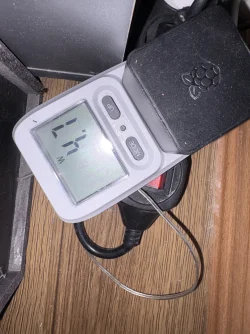
With this gadget, you are unstoppable. The Raspberry Pi handles the server with ease; it’s silent and doesn't overheat. I’m not sure how it would perform with 100–1000 players online, though. At home, you can let the Raspberry server run 24/7 since it only consumes about €7 worth of electricity per year.
My goal is clear: an energy-independent, portable server that changes location depending on where I am. My future plan is to solve that portable hotspot with a static IP. If I succeed, my server won't be dedicated in some data center, but I’ll be carrying it in my backpack 24/7, whether I’m in the mountains, the woods, by the sea, or just camping. To upgrade it even further, I’d swap the internet for Starlink, meaning I could catch a satellite signal and host my server in the middle of the Pacific, a desolate desert, or on the peaks of the Himalayas, straight from my backpack. My server would move wherever my feet take me. I know it’s not as practical as professional solutions, but the idea of an energy-self-sufficient portable server that moves with me is fascinating. And I wonder if Starlink offers static IPs—that would solve everything in one go.
What do you guys think about this kind of theforgottenserver hosting?
Post automatically merged:
Post automatically merged:
Last edited:
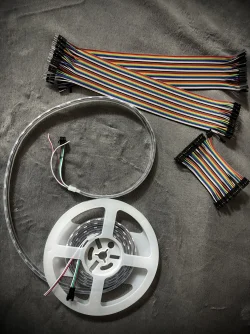


 Connect LED [Hardware preparation]
 Be Careful!
 ️- GND (Ground): pin 6 [3rd pin from up left]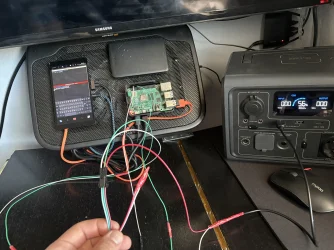
 ️ cable [tape]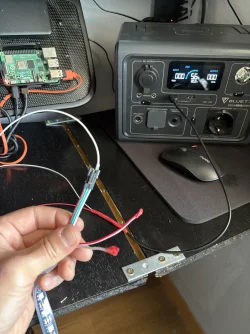


 Key Features:

 its 3rd card. Always same misstake.
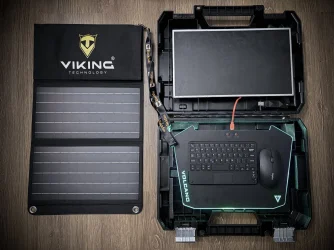


 If it does, it's time to party!
 Think later…