

almirtibiaalmir
Member
Hey everyone, so I just started building my own OT and I love trying out weird ideas, one day I thought what if I connect an npc to a local ai, i tried it and it was so funny to me. And now I want to share it so you can build on it too 
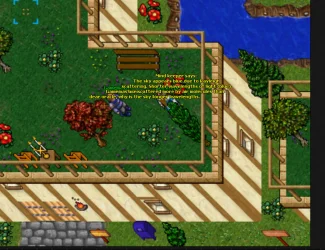
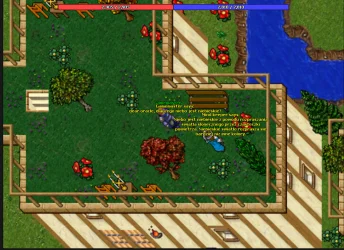
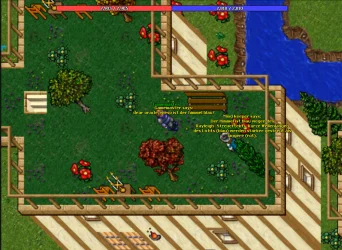
Screenshot example: asked ai, why is the sky blue in englisch, polish, german
Built this on TFS 1.2, other versions might need small tweaks to the class registration.
You'll also need LM Studio and two vcpkg libraries, cpr::cpr for the HTTP client and nlohmann_json::nlohmann_json for JSON parsing.
Step .1
get LM Studio running. Download it, activate Developer Mode, grab any AI model you like, there are plenty of tutorials out there if you get stuck. Then just start the local server inside LM Studio, thats really all there is to it.
Step 2
install the dependencies with vcpkg install cpr nlohmann-json
Step 3
add the HTTP client to your TFS. Add httpclient.cpp and httpclient.h to your server, then edit your root CMakeLists, the TFS CMakeLists and hook up the class registration.
Step 4
wire up the Lua method. Edit luascript.cpp and luascript.h to expose a new function to Lua that talks to your local AI server.
Step 5
drop in the NPC. Edit ChatGpt.lua and ChatGpt.xml and place the NPC wherever you want in your world.
In the payload for the Ai model you can set your own rules how the ai model should act. Like u see in httpclient.cpp file.
Thats it! Your NPC now talks back using a fully local AI model. Feel free to improve it like ratelimiter to to prevet ddos attack etc. For the start. I added in the chatgpt.lua the prefix 'dear oracle' so the ai post method will only be triggerd with this prefix. im excidted by your ideas.
Have fun
Screenshot example: asked ai, why is the sky blue in englisch, polish, german
Built this on TFS 1.2, other versions might need small tweaks to the class registration.
You'll also need LM Studio and two vcpkg libraries, cpr::cpr for the HTTP client and nlohmann_json::nlohmann_json for JSON parsing.
Step .1
get LM Studio running. Download it, activate Developer Mode, grab any AI model you like, there are plenty of tutorials out there if you get stuck. Then just start the local server inside LM Studio, thats really all there is to it.
Step 2
install the dependencies with vcpkg install cpr nlohmann-json
Step 3
add the HTTP client to your TFS. Add httpclient.cpp and httpclient.h to your server, then edit your root CMakeLists, the TFS CMakeLists and hook up the class registration.
Step 4
wire up the Lua method. Edit luascript.cpp and luascript.h to expose a new function to Lua that talks to your local AI server.
Step 5
drop in the NPC. Edit ChatGpt.lua and ChatGpt.xml and place the NPC wherever you want in your world.
In the payload for the Ai model you can set your own rules how the ai model should act. Like u see in httpclient.cpp file.
Thats it! Your NPC now talks back using a fully local AI model. Feel free to improve it like ratelimiter to to prevet ddos attack etc. For the start. I added in the chatgpt.lua the prefix 'dear oracle' so the ai post method will only be triggerd with this prefix. im excidted by your ideas.
Have fun
Attachments
-
ai_npc.zip6.1 KB · Views: 12 · VirusTotal


