
You are using an out of date browser. It may not display this or other websites correctly.
You should upgrade or use an alternative browser.
You should upgrade or use an alternative browser.
TFS 1.X+ cloud of thought / dialogue NPC
- Thread starter Sigoles
- Start date
Solution

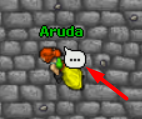
It is configurable in NPC XML file. Just add there "speechbubble" parameter into "<npc>" node and you will be able to configure it.
Possible options:
Just set it to the one of the values listed above, like "0", which is "none", till "4" which is "quest trader".
Example to remove speech bubble:
Regards,
Possible options:
Code:
SPEECHBUBBLE_NONE = 0,
SPEECHBUBBLE_NORMAL = 1,
SPEECHBUBBLE_TRADE = 2,
SPEECHBUBBLE_QUEST = 3,
SPEECHBUBBLE_QUESTTRADER = 4,
Just set it to the one of the values listed above, like "0", which is "none", till "4" which is "quest trader".
Example to remove speech bubble:
Code:
<npc name="Eryn" script="runes.lua" walkinterval="2000" floorchange="0" speechbubble="2">Regards,

yes it is, speech bubble take a look at sources


slaw
Software Developer
It is configurable in NPC XML file. Just add there "speechbubble" parameter into "<npc>" node and you will be able to configure it.
Possible options:
Just set it to the one of the values listed above, like "0", which is "none", till "4" which is "quest trader".
Example to remove speech bubble:
Regards,
Possible options:
Code:
SPEECHBUBBLE_NONE = 0,
SPEECHBUBBLE_NORMAL = 1,
SPEECHBUBBLE_TRADE = 2,
SPEECHBUBBLE_QUEST = 3,
SPEECHBUBBLE_QUESTTRADER = 4,
Just set it to the one of the values listed above, like "0", which is "none", till "4" which is "quest trader".
Example to remove speech bubble:
Code:
<npc name="Eryn" script="runes.lua" walkinterval="2000" floorchange="0" speechbubble="2">Regards,
Last edited:
OP
OP

Sigoles
Discord: @sigoles
- Joined
- Nov 20, 2015
- Messages
- 1,209
- Solutions
- 2
- Reaction score
- 154
It is configurable in NPC XML file. Just add there "speechbubble" parameter into "<npc>" node and you will be able to configure it.
Possible options:
Code:SPEECHBUBBLE_NONE = 0, SPEECHBUBBLE_NORMAL = 1, SPEECHBUBBLE_TRADE = 2, SPEECHBUBBLE_QUEST = 3, SPEECHBUBBLE_QUESTTRADER = 4,
Just set it to the one of the values listed above, like "0", which is "none", till "4" which is "quest trader".
Example:
Code:<npc name="Eryn" script="runes.lua" walkinterval="2000" floorchange="0" speechbubble="2">
Regards,
I put speechbubble = 0 and still with the cloud lol, ;S
slaw
Software Developer
I put speechbubble = 0 and still with the cloud lol, ;S
did you reload your server completely? I mean new start.
if so, then it would be a bug needed to be reported to the tfs team at github.

pepsiman
---
- Joined
- Nov 17, 2017
- Messages
- 128
- Solutions
- 5
- Reaction score
- 86
i tried with tfs and it worked, he is probably using OTX from malucodid you reload your server completely? I mean new start.
if so, then it would be a bug needed to be reported to the tfs team at github.
OP
OP
Sigoles
Discord: @sigoles
- Joined
- Nov 20, 2015
- Messages
- 1,209
- Solutions
- 2
- Reaction score
- 154
i tried with tfs and it worked, he is probably using OTX from maluco
I'm using otx malucoo, hmmm,
I put 0 there and showing

how you tested? create a npc (dont appear the cloud)..--> relogin (will appear the cloud)
Last edited by a moderator:

2Rec
Excellent OT User
- Joined
- Jul 31, 2013
- Messages
- 550
- Solutions
- 48
- Reaction score
- 887
Delete this part, up to the next 'end'.
malucooo/otxserver-new
malucooo/otxserver-new
slaw
Software Developer
Delete this part, up to the next 'end'.
malucooo/otxserver-new
So it seems its messing with cloud of thought outside the NPC .xml file. Not good. Because you set something in NPC.xml, and then it being overwritten by lua script. Not a good solution.
2Rec
Excellent OT User
- Joined
- Jul 31, 2013
- Messages
- 550
- Solutions
- 48
- Reaction score
- 887
Yeah, i know. Guess the dev took a bad shortcut.So it seems its messing with cloud of thought outside the NPC .xml file. Not good. Because you set something in NPC.xml, and then it being overwritten by lua script. Not a good solution.
E
Evil Puncker
Guest
probably yes you just need to extract the resources file, edit the respective image (graphics_resources.rcc\images\creatures\hud\flags\speech.png) and add as many as you want, and add the source part of course.Is there a possibility to add a new bubble?

probably yes you just need to extract the resources file, edit the respective image (graphics_resources.rcc\images\creatures\hud\flags\speech.png) and add as many as you want, and add the source part of course.
View attachment 66292
yesterday I was able to do it, I just had to add the speechbubbles in my src and in the client and it worked

Attachments
-
 imagen_2022-03-19_225938.png27.2 KB · Views: 2 · VirusTotal