
kronosdruida
New Member
- Joined
- Jul 25, 2011
- Messages
- 4
- Solutions
- 1
- Reaction score
- 3
Hello,
I'm having an issue with my local development that i'm not being able to run my copiled TFS 1.5 Nekiro downgrade
I'm using this TFS 1.5 as my starting point

 github.com
With this map from Alkurius Global
What i did so far is to compile the TFS server and merged some data folder
When i execute my docker to compile the server it crashers in this part
I have searched and read a lot of content here in the forum and also tried to use ChatGPT to debug what is happening
What i did so far:
Replaced items.otb from Alkurius in Nekiros downgrade items.
Opened the items.otb with RME and saved again to "re-index" the otb file.
Created a new map and imported my Alkurius map using the items.otb from nekiros and saved as a new file
Downloaded a ItemEditor for 8.60 and reloaded items attribute.
I'll also leave here my dockefile and docker-compose that i generated with chat gpt to help me to build this more easy
I'm having an issue with my local development that i'm not being able to run my copiled TFS 1.5 Nekiro downgrade
I'm using this TFS 1.5 as my starting point
GitHub - moviebr/TFS-1.5-Downgrades: Alternative forgottenserver versions for older protocols support
Alternative forgottenserver versions for older protocols support - moviebr/TFS-1.5-Downgrades
github.com
With this map from Alkurius Global

Hi everyone,
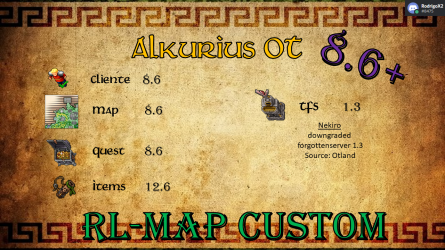
I am pleased to share a little of the effort of the following ot server:
Main points:
Server
Client
My github: Alkurius - Overview (https://github.com/Alkurius)
my Discord: Join the AlkuriusOT Discord...
I am pleased to share a little of the effort of the following ot server:
Main points:
Server
- Global map 8.6
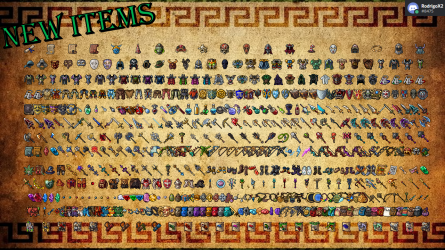
- New Items
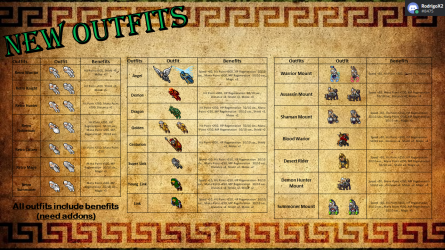
- New outfits
- Bonus Outfits
- New Monsters
- Teleports room
- Quiver
- Bounty Hunter System
- Auto loot
- Quest Reward System
- >200 quest tested
- Rarity items System
Client
- Otclient
- Bot
- Hunt Analyzer
- Android Client (only in github)
My github: Alkurius - Overview (https://github.com/Alkurius)
my Discord: Join the AlkuriusOT Discord...
- alkurius
- Replies: 78
- Forum: Distributions


What i did so far is to compile the TFS server and merged some data folder
When i execute my docker to compile the server it crashers in this part
LUA:
tfs  | >> Loading map
tfs  | > Map size: 34143x33812.
tfs  | [Fatal - Map::loadMap] [x:32754, y:31462, z:15] Failed to load item 1747.
tfs  | > ERROR: Failed to load map
I have searched and read a lot of content here in the forum and also tried to use ChatGPT to debug what is happening
What i did so far:
Replaced items.otb from Alkurius in Nekiros downgrade items.
Opened the items.otb with RME and saved again to "re-index" the otb file.
Created a new map and imported my Alkurius map using the items.otb from nekiros and saved as a new file
Downloaded a ItemEditor for 8.60 and reloaded items attribute.
I'll also leave here my dockefile and docker-compose that i generated with chat gpt to help me to build this more easy
Code:
# Multi-stage build for TFS (simple, all files in repo root)
FROM ubuntu:22.04 AS build
ENV DEBIAN_FRONTEND=noninteractive
RUN apt-get update && apt-get install -y \
    build-essential cmake git pkg-config \
    libboost-all-dev libcrypto++-dev libfmt-dev libgmp-dev \
    libluajit-5.1-dev libmariadb-dev libmariadb-dev-compat \
    libpugixml-dev libssl-dev liblzma-dev zlib1g-dev \
 && rm -rf /var/lib/apt/lists/*
WORKDIR /usr/src/forgottenserver
COPY . .
RUN cmake -DCMAKE_BUILD_TYPE=Release -S . -B build \
 && cmake --build build -j"$(nproc)"

FROM ubuntu:22.04 AS runtime
ENV DEBIAN_FRONTEND=noninteractive
RUN apt-get update && apt-get install -y \
    libboost-system1.74.0 libboost-filesystem1.74.0 libboost-iostreams1.74.0 libboost-date-time1.74.0 \
    libcrypto++8 libfmt8 libgmp10 \
    libluajit-5.1-2 libmariadb3 libpugixml1v5 libssl3 liblzma5 zlib1g \
 && rm -rf /var/lib/apt/lists/*
# Binary
COPY --from=build /usr/src/forgottenserver/build/tfs /bin/tfs
# Game files
COPY data /srv/data/
COPY LICENSE /srv/
COPY config.lua /srv/
COPY schema.sql /srv/
# key.pem é opcional; se você quiser usar, monte via docker-compose como volume
EXPOSE 7171 7172/udp
WORKDIR /srv
ENTRYPOINT ["/bin/tfs"]
Code:
services:
  database:
    image: mariadb:10.6
    container_name: ozamigot-db
    environment:
      MYSQL_ROOT_PASSWORD: rootpass
      MYSQL_DATABASE: tfs
      MYSQL_USER: tfs
      MYSQL_PASSWORD: tfs
    ports:
      - "3306:3306"
    volumes:
      - ./schema.sql:/docker-entrypoint-initdb.d/10-schema.sql:ro
      # - ./mysql:/docker-entrypoint-initdb.d:ro   # (opcional) se quiser rodar .sql extras
    healthcheck:
      test: ["CMD", "mysqladmin", "ping", "-h", "localhost", "-uroot", "-prootpass"]
      interval: 10s
      timeout: 5s
      retries: 10

  otserver:
    build:
      context: .
      dockerfile: Dockerfile
    container_name: ozamigot-tfs
    depends_on:
      database:
        condition: service_healthy
    volumes:
      - ./key.pem:/srv/key.pem:ro
    ports:
      - "7171:7171"
      - "7172:7172/udp"

