• There is NO official Otland's Discord server and NO official Otland's server list. The Otland's Staff does not manage any Discord server or server list. Moderators or administrator of any Discord server or server lists have NO connection to the Otland's Staff. Do not get scammed!

OTClient How do ots open the full map in the client?

Joined
Feb 11, 2023
Messages
38
Solutions
1
Reaction score
15
Location
Brazil, SP
Hello, I would like to know how this functionality of opening the map within the game is done, in a FULL way, I already played in a custom pokemon ot that had this, and I played a global one too, if I'm not mistaken I pressed the M key and opened the full map. I don't know where to start the search and what the name of the functionality is.
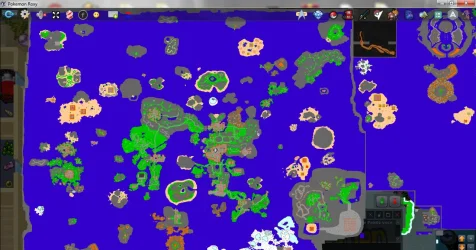
1752689997488.webp
 
- v8

Ctrl+Shift+M

- Redemption

click here
1752691564677.webp

or add feature Ctrl+Shift+M

in
add
LUA:
 Keybind.new("Windows", "Show/hide full minimap", "Ctrl+Shift+M", "")
    Keybind.bind("Windows", "Show/hide full minimap", {
      {
        type = KEY_DOWN,
        callback = fullscreen,
      }
    })
in
add
LUA:
Keybind.delete("Windows", "Show/hide full minimap")
 
Last edited:
You must use OTClient.
if I'm not mistaken I pressed the M key and opened the full map
You press CTRL+SHIFT+M to open/close Minimap on full screen (at least in OTCv8: otcv8-dev/modules/game_minimap/minimap.lua at master · OTCv8/otcv8-dev (https://github.com/OTCv8/otcv8-dev/blob/master/modules/game_minimap/minimap.lua#L27)).

To get full map of OTS in OTClient, you must generate it using server .otbm file in client.
I answered how to make it in:
and wrote full tutorial:

You can also distribute full map of your OTS using custom OTClient (so every player will have it), but it requires some changes in .lua files of OTClient.
 
Last edited:
Back
Top