• There is NO official Otland's Discord server and NO official Otland's server list. The Otland's Staff does not manage any Discord server or server list. Moderators or administrator of any Discord server or server lists have NO connection to the Otland's Staff. Do not get scammed!

OTClient How to Read spr file load a specific outfit and display it as module?

lukatxd

Board Moderator
Staff member
Board Moderator
Joined
Dec 9, 2010
Messages
155
Solutions
1
Reaction score
72
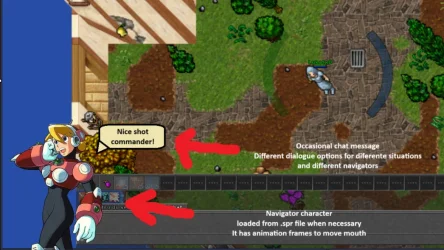
Hi guys, I'm designing an ot where the player is a mecha pilot. So to make it more imersive, I've thought of adding a crew/navigators at the corner of the screen.
I can add a navigator png and display it, but I would like it to be less static than that, even have a talk balloon sometimes just like the Ratha npc makes some snarky comments once in a while.

So I made it into a 128x128 outfit with animations which brings me to my current question: How do I make otc load it and display it? I opened the module "game_outfit" but I couldnt completely understand the serverData and how that attachedEffects work

Below is the otc part where it seems to have already loaded the outftis, but I'm not understanding the part where it gets them from the .spr file

LUA:
function showOutfits()
    window.presetsList:hide()
    window.presetsScroll:hide()
    window.presetButtons:hide()

    window.selectionList.onChildFocusChange = nil
    window.selectionList:destroyChildren()

    local focused = nil
    for _, outfitData in ipairs(ServerData.outfits) do
        local button = g_ui.createWidget("SelectionButton", window.selectionList)
        button:setId(outfitData[1])

        local outfit = table.copy(previewCreature:getCreature():getOutfit())
        outfit.type = outfitData[1]
        outfit.addons = outfitData[3]
        outfit.mount = 0
        outfit.familiar = 0
        outfit.auras = 0
        outfit.wings = 0
        outfit.shader = "Outfit - Default"
        outfit.healthBar = 0
        outfit.effects = 0
        button.outfit:setOutfit(outfit)
 
Hi guys, I'm designing an ot where the player is a mecha pilot. So to make it more imersive, I've thought of adding a crew/navigators at the corner of the screen.
I can add a navigator png and display it, but I would like it to be less static than that, even have a talk balloon sometimes just like the Ratha npc makes some snarky comments once in a while.

So I made it into a 128x128 outfit with animations which brings me to my current question: How do I make otc load it and display it? I opened the module "game_outfit" but I couldnt completely understand the serverData and how that attachedEffects work

Below is the otc part where it seems to have already loaded the outftis, but I'm not understanding the part where it gets them from the .spr file

LUA:
function showOutfits()
    window.presetsList:hide()
    window.presetsScroll:hide()
    window.presetButtons:hide()

    window.selectionList.onChildFocusChange = nil
    window.selectionList:destroyChildren()

    local focused = nil
    for _, outfitData in ipairs(ServerData.outfits) do
        local button = g_ui.createWidget("SelectionButton", window.selectionList)
        button:setId(outfitData[1])

        local outfit = table.copy(previewCreature:getCreature():getOutfit())
        outfit.type = outfitData[1]
        outfit.addons = outfitData[3]
        outfit.mount = 0
        outfit.familiar = 0
        outfit.auras = 0
        outfit.wings = 0
        outfit.shader = "Outfit - Default"
        outfit.healthBar = 0
        outfit.effects = 0
        button.outfit:setOutfit(outfit)
Describe in simple language the effect you want to achieve ingame
 
If you've put it as an outfit, you can just use UICreature (otui) and setOutfit (Lua) just like in the code segment you posted.

In modules/game_interface/gameinterface.otui, around line 46 you will see the gameMapPanel, all depends on whether you want to anchor it to the actual game window, or the bottom left of the client viewport, you can create the UICreature around here, and create a global reference to it in gameinterface.lua so you can access it/change the outfit looktype from other modules.
 
Describe in simple language the effect you want to achieve ingame
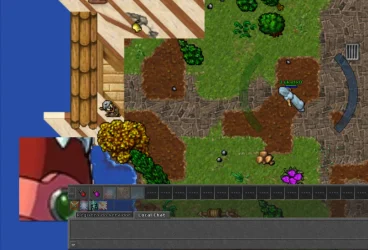
They say an image is worth a thousand words, so:
1784821617453.webp
Post automatically merged:

If you've put it as an outfit, you can just use UICreature (otui) and setOutfit (Lua) just like in the code segment you posted.

In modules/game_interface/gameinterface.otui, around line 46 you will see the gameMapPanel, all depends on whether you want to anchor it to the actual game window, or the bottom left of the client viewport, you can create the UICreature around here, and create a global reference to it in gameinterface.lua so you can access it/change the outfit looktype from other modules.

this is in game_outfit/outfit.lua
LUA:
function showOutfits()
    local outt = {}
    outt.type = 904
    navigatorUICreature.outfit = outt

game_interface/gameinterface.lua
LUA:
navigatorUICreature = {}
game_interface/gameinterface.otui
LUA:
GameSidePanel < UIMiniWindowContainer
  image-source: /images/ui/2pixel_up_frame_borderimage
  image-border: 4
  width: 176
  layout:
    type: verticalBox
    //spacing: 1

SelectColumnButton < CheckBox
  visible: false
  opacity: 0.3
  $hover:
    opacity: 1

GameBottomPanel < UIWindow
  image-source: /images/ui/background_dark
  image-repeated: true
  draggable:false

  ResizeBorder
    id: bottomResizeBorder
    anchors.bottom: parent.bottom
    anchors.left: parent.left
    anchors.right: parent.right
    enabled: false
    height: 5
    margin-top: 5
    minimum: 170

  ResizeBorder
    id: rightResizeBorder
    anchors.right: parent.right
    anchors.top: parent.top
    anchors.bottom: parent.bottom
    enabled: false
    minimum: 300


GameMapPanel < UIGameMap
  padding: 4
  image-source: /images/ui/panel_map
  image-border: 4

  $on:
    padding: 0

UIWidget
  id: gameRootPanel
  anchors.fill: parent
  anchors.top: topMenu.bottom

  GameMapPanel
    id: gameMapPanel
    anchors.left: gameLeftActionPanel.right
    anchors.right: gameRightActionPanel.left
    anchors.top: gameTopPanel.bottom
    anchors.bottom: bottomSplitter.top
    focusable: false
    margin-top: 1
    margin-bottom: 1

    Button
      id: showTopMenuButton
      anchors.top: parent.top
      anchors.left: parent.left
      !text: tr('Show Top Menu')
      height: 32
      visible: false
  UICreature
      id: Sprite
      size: 128 128
      anchors.left: parent.left
      anchors.bottom: parent.bottom
      margin-bottom: 10
      margin-right: 5
      phantom: true
I pasted the upper part of .otui because I think I may have misplaced it with the spacings. But I could see with the help of Gesios module debugger, that it created a place where the navigator module would be shown.

This is the message Im getting in otc console
/game_outfit/outfit.lua:876: attempt to index global 'navigatorUICreature' (a nil value)
 
Last edited:
They say an image is worth a thousand words, so:
View attachment 101884
Post automatically merged:


this is in game_outfit/outfit.lua
LUA:
function showOutfits()
    local outt = {}
    outt.type = 904
    navigatorUICreature.outfit = outt

game_interface/gameinterface.lua
LUA:
navigatorUICreature = {}
game_interface/gameinterface.otui
LUA:
GameSidePanel < UIMiniWindowContainer
  image-source: /images/ui/2pixel_up_frame_borderimage
  image-border: 4
  width: 176
  layout:
    type: verticalBox
    //spacing: 1

SelectColumnButton < CheckBox
  visible: false
  opacity: 0.3
  $hover:
    opacity: 1

GameBottomPanel < UIWindow
  image-source: /images/ui/background_dark
  image-repeated: true
  draggable:false

  ResizeBorder
    id: bottomResizeBorder
    anchors.bottom: parent.bottom
    anchors.left: parent.left
    anchors.right: parent.right
    enabled: false
    height: 5
    margin-top: 5
    minimum: 170

  ResizeBorder
    id: rightResizeBorder
    anchors.right: parent.right
    anchors.top: parent.top
    anchors.bottom: parent.bottom
    enabled: false
    minimum: 300


GameMapPanel < UIGameMap
  padding: 4
  image-source: /images/ui/panel_map
  image-border: 4

  $on:
    padding: 0

UIWidget
  id: gameRootPanel
  anchors.fill: parent
  anchors.top: topMenu.bottom

  GameMapPanel
    id: gameMapPanel
    anchors.left: gameLeftActionPanel.right
    anchors.right: gameRightActionPanel.left
    anchors.top: gameTopPanel.bottom
    anchors.bottom: bottomSplitter.top
    focusable: false
    margin-top: 1
    margin-bottom: 1

    Button
      id: showTopMenuButton
      anchors.top: parent.top
      anchors.left: parent.left
      !text: tr('Show Top Menu')
      height: 32
      visible: false
  UICreature
      id: Sprite
      size: 128 128
      anchors.left: parent.left
      anchors.bottom: parent.bottom
      margin-bottom: 10
      margin-right: 5
      phantom: true
I pasted the upper part of .otui because I think I may have misplaced it with the spacings. But I could see with the help of Gesios module debugger, that it created a place where the navigator module would be shown.

This is the message Im getting in otc console
/game_outfit/outfit.lua:876: attempt to index global 'navigatorUICreature' (a nil value)
Are you making a megaman x server?
This is pretty cool tbh I was thinking on making something like battle network in the feature as well.
 
Are you making a megaman x server?
This is pretty cool tbh I was thinking on making something like battle network in the feature as well.
Not really, was more focused on Gundam and making mechas digimon style, you know, weapons in every place possible. Alia was just the first real navigator I could think and get a sample image lol.

--

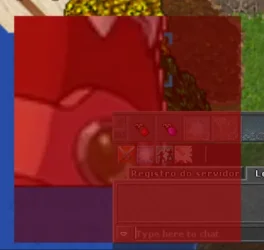
Ok, I managed to make it to appear on the corner of the screen! Now even though I set the UICreature thing to 288x288 pixels, it only shows the 64x64 (2x2) bottom of the sprite... How do I make it show more? The full sprite is 288x288 9x9

1784901972613.webp
 
Instead of using outfits, you should save the sprites/images directly into the data/images folder and use Panel instead (and just set image source). You won't even need to mess around with the .spr and outfits.

1. Create a subfolder called pilot (data/images/pilot)
2. Place your images/sprites there and name them however you like.
3. Change UICreature to Panel, and use setImageSource() to a value such as:
Code:
/images/pilot/whatever

(this will also solve your above issue as you can set width and height directly to the panel and the image will be full size)
 
Instead of using outfits, you should save the sprites/images directly into the data/images folder and use Panel instead (and just set image source). You won't even need to mess around with the .spr and outfits.

1. Create a subfolder called pilot (data/images/pilot)
2. Place your images/sprites there and name them however you like.
3. Change UICreature to Panel, and use setImageSource() to a value such as:
Code:
/images/pilot/whatever

(this will also solve your above issue as you can set width and height directly to the panel and the image will be full size)

but does panels accept .gifs or something? I wanted to use outfits because I could add animation frames and adds a layer of obfuscation so that players cant just change the .png inside folders

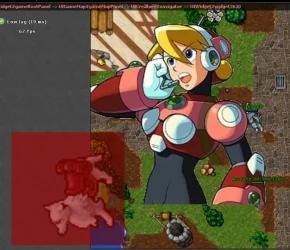
Now that I realised it also has some weird paddings in it

1784903739597.webp
 
I wanted to use outfits because I could add animation frames
Fair enough, show me the OTUI that you have written for the UICreature
(you might need to checkout UICreature in the sources, perhaps it maxes out at 64x64 rendering, hard to check on my phone :p)

and adds a layer of obfuscation so that players cant just change the .png inside folders
I see yeah, but anyone change anything they want in their own client, it only affects them... don't waste your time on obfuscation, as long as your client <> server protocol is solid and bulletproof no-one will care
 
Fair enough, show me the OTUI that you have written for the UICreature
(you might need to checkout UICreature in the sources, perhaps it maxes out at 64x64 rendering, hard to check on my phone :p)


I see yeah, but anyone change anything they want in their own client, it only affects them... don't waste your time on obfuscation, as long as your client <> server protocol is solid and bulletproof no-one will care

It renders other outfits properly in the UICreature module, and it also renders the full outfit if its a creature inside the map using it.
I just copied the UICreature from some other module, I guess it was bestiary? then just increased the size

game_interface.otui
LUA:
GameMapPanel < UIGameMap
  padding: 4
  image-source: /images/ui/panel_map
  image-border: 4

  $on:
    padding: 0

UIWidget
  id: gameRootPanel
  anchors.fill: parent
  anchors.top: topMenu.bottom

  GameMapPanel
    id: gameMapPanel
    anchors.left: gameLeftActionPanel.right
    anchors.right: gameRightActionPanel.left
    anchors.top: gameTopPanel.bottom
    anchors.bottom: bottomSplitter.top
    focusable: false
    margin-top: 1
    margin-bottom: 1

    Button
      id: showTopMenuButton
      anchors.top: parent.top
      anchors.left: parent.left
      !text: tr('Show Top Menu')
      height: 32
      visible: false
     
    UICreature
      id: navigator
      size: 288 288
      anchors.left: parent.left
      anchors.bottom: parent.bottom
      margin-left: 50
      phantom: true

1784905117269.webp
 
Ahh, is there something like oldScaling.
You should check src/client/luafunctions_client.cpp for UICreature lua funcs. The answer could be here.
I can help you later on when I am not on my phone if you are still stuck.
 
Back
Top