
Hi,
I've ran into the issue trying to setup a sever using attached otland guide: Setting up your first server | OTS Guide (https://docs.otland.net/ots-guide/running-your-first-ot-server/setting-up-your-first-server)
I am using this distribution: [8.0] [TFS 1.2] - Server Global Full [Real Map] (https://otland.net/threads/8-0-tfs-1-2-server-global-full-real-map.280265/)
Here are the steps I have done so far:
1. Installed UniServer
2. Created database under name "test123"
3. Downloaded distribution
4. Imported znote_schema.sql from distribution to database
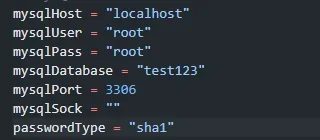
4. Config settings -
5. launched theforgottenserver_x64.exe
Here is the error I receive:

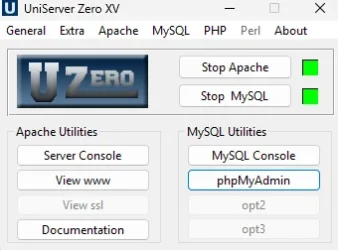
Apache & MySQL = on
The error message is self explanatory - I don't really know what I'm doing wrong when following a step by step (idiot free guide) and it still not working.
Can anyone lead me in the right direction of what the issue could be?
I've ran into the issue trying to setup a sever using attached otland guide: Setting up your first server | OTS Guide (https://docs.otland.net/ots-guide/running-your-first-ot-server/setting-up-your-first-server)
I am using this distribution: [8.0] [TFS 1.2] - Server Global Full [Real Map] (https://otland.net/threads/8-0-tfs-1-2-server-global-full-real-map.280265/)
Here are the steps I have done so far:
1. Installed UniServer
2. Created database under name "test123"
3. Downloaded distribution
4. Imported znote_schema.sql from distribution to database
4. Config settings -
5. launched theforgottenserver_x64.exe
Here is the error I receive:
Apache & MySQL = on
The error message is self explanatory - I don't really know what I'm doing wrong when following a step by step (idiot free guide) and it still not working.
Can anyone lead me in the right direction of what the issue could be?

