• There is NO official Otland's Discord server and NO official Otland's server list. The Otland's Staff does not manage any Discord server or server list. Moderators or administrator of any Discord server or server lists have NO connection to the Otland's Staff. Do not get scammed!
  • 2026 staff recruitment is open! Check it out and consider applying!

Complaint It does not show any warning/error, when file upload fails

Gesior.pl

Mega Noob&LOL 2012
Senator
Joined
Sep 18, 2007
Messages
3,587
Solutions
140
Reaction score
4,680
Location
Poland
GitHub
gesior
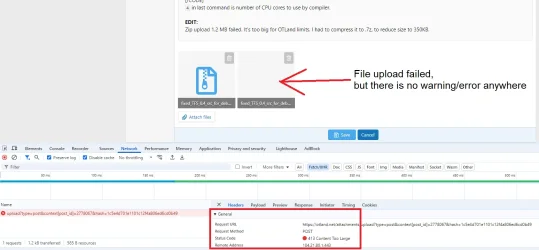
I tried to attach 1.2 MB .zip in post, but it failed, because it's too big file.
File upload box and name are visible and there is no error/warning anywhere on site, so I assumed that it's uploaded.

Without Network console, I would not know, why my file disappears, when I press 'Save' in post.
1752678744011.webp
 
It's not perfect, but muuuch better.

I can upload 20+ MB without error, and now it always shows that file is too big on uploaded file.

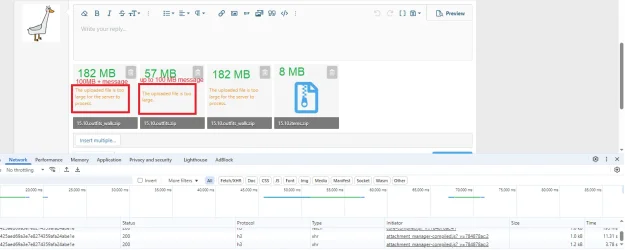
Only problem left is that I can "upload" 57 MB - it shows progress bar and takes time to upload - and at end of upload it shows "The uploaded file is too large". IDC with 90 mb/s upload, but for someone with 1 mb/s upload, it can be very annoying.

100+ MB file upload file error is different (probably Cloudflare limit? appears instantly, does not upload file at all), than up to 100 MB file upload error:
1753116378236.webp
 
It's not perfect, but muuuch better.

I can upload 20+ MB without error, and now it always shows that file is too big on uploaded file.

Only problem left is that I can "upload" 57 MB - it shows progress bar and takes time to upload - and at end of upload it shows "The uploaded file is too large". IDC with 90 mb/s upload, but for someone with 1 mb/s upload, it can be very annoying.

100+ MB file upload file error is different (probably Cloudflare limit? appears instantly, does not upload file at all), than up to 100 MB file upload error:
View attachment 93848
Your user group's upload limit is 50 MB and Cloudflare's limit is 100 MB.
 
In the past, we could attach images and files via private messages,
and now we can't anymore :(
 
In the past, we could attach images and files via private messages,
and now we can't anymore :(
That's correct. Since we have increased upload limits (it used to be 1 MB, now it's 50 MB for most users), it makes no sense to allow large file uploads in private conversations where nobody but (usually) one person can benefit. It's not the best use of forum's resources and I trust you can find other private file sharing method if you really need to.
 
My comment was more directed at the images rather than the files themselves.
I trust you can find other private file sharing method if you really need to.
and yes, I found a method by sending links through prnt.sc 🤣

1753765210700.webp
:rolleyes:

Nowadays, we live in a society where you can't easily trust hyperlinks. Just look at how many Discord accounts have been compromised simply by clicking on a suspicious link.
 
Back
Top