Hola a todos,
tengo un problema que no consigo resolver, ni siquiera con ayuda de la IA. Estoy añadiendo nuevos sprites usando Object Builder; he reemplazado algunos existentes por otros nuevos, ¡y hasta ahora todo funcionaba a la perfección!
Al añadir atuendos , no tuve ningún problema. Por ejemplo, el Creador de objetos muestra el "atuendo 368", y cuando creo una criatura y le asigno el tipo de aspecto 368, funciona a la perfección.
Sin embargo, el problema surge con los objetos .
El Creador de Objetos muestra el objeto como 11705 (el último número de la lista), pero cuando uso ese número como ID del objeto, claramente no es el real; si ejecuto /i 11705 como GM, ¡genera un trozo de suelo en lugar de mi nuevo objeto!
¿A alguien le ha pasado esto antes?
Estoy usando:
- OTClientV8 3.2
- Creador de objetos versión 0.4.9

You are using an out of date browser. It may not display this or other websites correctly.
You should upgrade or use an alternative browser.
You should upgrade or use an alternative browser.
Object Builder shows wrong item ID in OTClientV8 (spawns floor instead)
- Thread starter Kelah
- Start date
Solution

This means you need to export your .dat and .spr from the object builder for the target otb version. You select "compile as" in the object builder and select the appropriate version for export.. so you need to...Yes my friend, I’ve watched like 300 tutorial videos on how to do it! The problem is that I can’t find the correct version of the Item Editor — it keeps saying I need version 19, and I can’t find it anywhere! And when it doesn’t ask for version 19, it says it couldn’t load the .dat and .spr files, so all the images appear blank! (I’m copying the .dat and .spr files from my client directly into the Item Editor folder, because the old version doesn’t have an option to load them manually.)
I NEED HELP!!! I WANNA CRY HAHA

Wazzup88
Crystal Lake Butcher
Object builder only handles client id which is how the sprite looks. Items.otb and items.xml determines the item id. So for example go to your map editor and take a look at any item, or look at any item in game, that is your item id. Outfits/effects are handled directly by the client ID. You need to use item editor to add new items to your items.otb. Then update the items.xml.
Alright, that’s exactly what I’m doing!El constructor de objetos solo gestiona el ID del cliente, que determina la apariencia del sprite. Los archivos items.otb e items.xml definen el ID del objeto. Por ejemplo, en el editor de mapas, busca cualquier objeto, o en cualquier objeto del juego; ese es su ID. Los atuendos y efectos se gestionan directamente mediante el ID del cliente. Debes usar el editor de objetos para añadir nuevos objetos a items.otb y, a continuación, actualizar items.xml.
But I don’t want to replace sprites or IDs anymore — I want to add my own sprite with my own ID!
I already created the sprite in Object Builder, and it shows up as Object 11704.
Now, how do I assign an actual ID to that object?
I want to clarify that I’m still learning — I’m new to this topic, so I apologize if I’m not explaining things perfectly yet.
Wazzup88
Crystal Lake Butcher
I perfectly understand. Don’t worry. I’ll help you get it solved. open item editor, go to the top tabs and press create missing items. And then tools>reload all, save. Then move your new items.otb to the map editor/server. And create a name for the item on your item.xml.
Last edited:
I perfectly understand. Don’t worry. I’ll help you get it solved. open item editor, go to the top tabs and press create missing items. And then tools>reload all, save. Then move your new items.otb to the map editor/server. And create a name for the item on your item.xml.
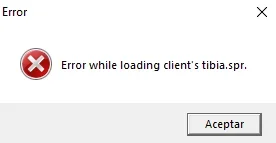
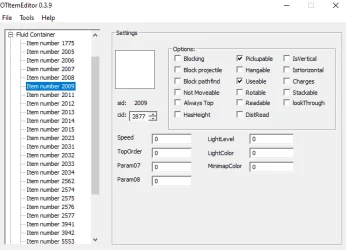
Yes my friend, I’ve watched like 300 tutorial videos on how to do it! The problem is that I can’t find the correct version of the Item Editor — it keeps saying I need version 19, and I can’t find it anywhere! And when it doesn’t ask for version 19, it says it couldn’t load the .dat and .spr files, so all the images appear blank! (I’m copying the .dat and .spr files from my client directly into the Item Editor folder, because the old version doesn’t have an option to load them manually.)I perfectly understand. Don’t worry. I’ll help you get it solved. open item editor, go to the top tabs and press create missing items. And then tools>reload all, save. Then move your new items.otb to the map editor/server. And create a name for the item on your item.xml.
I NEED HELP!!! I WANNA CRY HAHA
Attachments
-
 erro2.webp3.8 KB · Views: 9 · VirusTotal
 -
 erro2.webp3.8 KB · Views: 10 · VirusTotal
 -
 error3.webp33 KB · Views: 10 · VirusTotal
Wazzup88
Crystal Lake Butcher
here, use mine. i'm not sure where i got it from. but it should work, if your version isn't working, something in one of the plugin notes needs edited.Yes my friend, I’ve watched like 300 tutorial videos on how to do it! The problem is that I can’t find the correct version of the Item Editor — it keeps saying I need version 19, and I can’t find it anywhere! And when it doesn’t ask for version 19, it says it couldn’t load the .dat and .spr files, so all the images appear blank! (I’m copying the .dat and .spr files from my client directly into the Item Editor folder, because the old version doesn’t have an option to load them manually.)
I NEED HELP!!! I WANNA CRY HAHA
Attachments
-
Item Editor - Copy.zip639.3 KB · Views: 3 · VirusTotal

- Joined
- Dec 26, 2013
- Messages
- 2,126
- Solutions
- 14
- Reaction score
- 1,522
- Location
- USA
- GitHub
- Codinablack
This means you need to export your .dat and .spr from the object builder for the target otb version. You select "compile as" in the object builder and select the appropriate version for export.. so you need to match correct otb.. version 19 is super old I would highly suggest updating the code for your otb parser... at any rate, you can match the client version to the expected .otb version (yours is apparently 19)... in your case 8.60Yes my friend, I’ve watched like 300 tutorial videos on how to do it! The problem is that I can’t find the correct version of the Item Editor — it keeps saying I need version 19, and I can’t find it anywhere! And when it doesn’t ask for version 19, it says it couldn’t load the .dat and .spr files, so all the images appear blank! (I’m copying the .dat and .spr files from my client directly into the Item Editor folder, because the old version doesn’t have an option to load them manually.)
I NEED HELP!!! I WANNA CRY HAHA
TLDR
Object Builder -> Compile As -> 8.60 v1
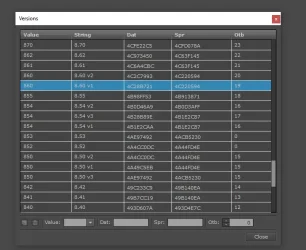
Thank youuuuuuuuuuuuuuuuu!!!!!!!!!!!! I solved it by doing that!This means you need to export your .dat and .spr from the object builder for the target otb version. You select "compile as" in the object builder and select the appropriate version for export.. so you need to match correct otb.. version 19 is super old I would highly suggest updating the code for your otb parser... at any rate, you can match the client version to the expected .otb version (yours is apparently 19)... in your case 8.60
TLDR
Object Builder -> Compile As -> 8.60 v1
View attachment 95869
Thanks to you too, @Wazzup88 — that item editor worked!
Last edited: