• There is NO official Otland's Discord server and NO official Otland's server list. The Otland's Staff does not manage any Discord server or server list. Moderators or administrator of any Discord server or server lists have NO connection to the Otland's Staff. Do not get scammed!
  • 2026 staff recruitment is open! Check it out and consider applying!

TibiaAPI: Record, Redact, Extract, and Watch

I'm completely lost. I'm using the fork by @Marcosvf132 and I've built the app and now run it, using the example code to intercept/send packets. But absolutely nothing works. I want to run this on the real Tibia game client. What am I doing wrong? For reference, here are all the steps I've taken:

Bash:
# Download and build TibiaAPI
git clone https://github.com/marcosvf132/TibiaAPI
cd TibiaAPI
dotnet build

# Create a new project
cd ..
dotnet new console -n TibiaPackets
cd TibiaPackets
dotnet add reference ../TibiaAPI/TibiaAPI/TibiaAPI.csproj

Then I add this to Program.cs:

C#:
using System;
using OXGaming.TibiaAPI;
using OXGaming.TibiaAPI.Network.ClientPackets;
using OXGaming.TibiaAPI.Network.ServerPackets;
using OXGaming.TibiaAPI.Constants;

class Program
{
    static void Main()
    {
        // First, we'll need to create our `Client` object and a boolean flag to determine if we are hasted:
        var isAutoHasteEnabled = false;
        using var client = new OXGaming.TibiaAPI.Client();

        // Enable client packet modification so we can block `Text` client packets with our command identifier.
        client.Connection.IsClientPacketModificationEnabled = true;

        // Now let's create the `Talk` client packet we'll use to cast the haste spell:
        var hasteSpell = new OXGaming.TibiaAPI.Network.ClientPackets.Talk(client)
        {
            MessageMode = OXGaming.TibiaAPI.Constants.MessageModeType.Say,
            Text = "utani hur"
        };

        // Next, we need to intercept the `Talk` client packet so we can check for our commands:
        client.Connection.OnReceivedClientTalkPacket += (packet) =>
        {
            var data = (OXGaming.TibiaAPI.Network.ClientPackets.Talk)packet;
            if (data.Text.StartsWith("/"))
            {
                if (data.Text == "/on")
                {
                    isAutoHasteEnabled = true;
                }
                else if (data.Text == "/off")
                {
                    isAutoHasteEnabled = false;
                }
                return false; // block any packet that starts with our command identifier in case of typos
            }
            return true; // all other messages can be forwarded as normal
        };

        // Then, we need to intercept the `PlayerState` server packet to check if we need to cast our haste spell:
        client.Connection.OnReceivedServerPlayerStatePacket += (packet) =>
        {
            var data = (OXGaming.TibiaAPI.Network.ServerPackets.PlayerState)packet;

            // The 7th bit of the `State` integer is the haste flag; if it's not set then the player isn't hasted.
            if (isAutoHasteEnabled && (data.State & 64) == 0)
            {
                client.Connection.SendToServer(hasteSpell);
            }
            return true;
        };

        client.StartConnection();
        Console.Read();
    }
}

Then I run the app:

Bash:
dotnet run

And then I launch the Tibia game client (Debian, Linux):

Bash:
~/.local/share/CipSoft GmbH/Tibia/packages/Tibia/bin/client

(since I am using this on real Tibia and not OT, do I need to launch it with a proxy or something? I tried adding "--proxy 7172" flag but it made no difference)

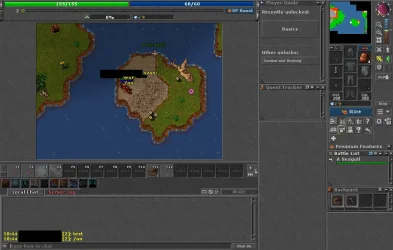
I login to the game and try it out. But nothing happens.

packets.webp


Any help is appreciated!
 
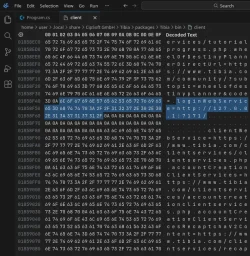
I wanted to add that I've now modifed the Tibia binary file using a hex editor on Linux.

I changed these values:

LUA:
// old value
loginWebService=https://www.tibia.com/clientservices/loginservice.php

// new value
loginWebService=http://127.0.0.1:7171/

hex.webp

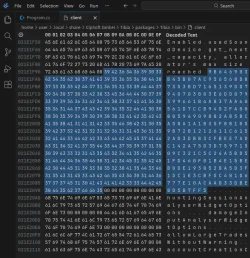
I then added 31 "0A" at the end of the loginWebService line, because there was a 31 character difference between the original URL and the localhost one. I then also changed the RSA key:

Code:
// old value
BC27F992A96B8E2A43F4DFBE1CEF8FD51CF43D2803EE34FBBD8634D8B4FA32F7D9D9E159978DD29156D62F4153E9C5914263FC4986797E12245C1A6C4531EFE48A6F7C2EFFFFF18F2C9E1C504031F3E4A2C788EE96618FFFCEC2C3E5BFAFAF743B3FC7A872EE60A52C29AA688BDAF8692305312882F1F66EE9D8AEB7F84B1949

// new value
9B646903B45B07AC956568D87353BD7165139DD7940703B03E6DD079399661B4A837AA60561D7CCB9452FA0080594909882AB5BCA58A1A1B35F8B1059B72B1212611C6152AD3DBB3CFBEE7ADC142A75D3D75971509C321C5C24A5BD51FD460F01B4E15BEB0DE1930528A5D3F15C1E3CBF5C401D6777E10ACAAB33DBE8D5B7FF5

rsa.webp

I then launch TibiaAPI:

C#:
using System;
using OXGaming.TibiaAPI;
using OXGaming.TibiaAPI.Network.ClientPackets;
using OXGaming.TibiaAPI.Network.ServerPackets;
using OXGaming.TibiaAPI.Constants;

class Program
{
    static void Main(string[] args)
    {
        using var client = new OXGaming.TibiaAPI.Client();
        client.StartConnection();

        Console.WriteLine("Started TibiaAPI proxy...");
        Console.Read();
    }
}

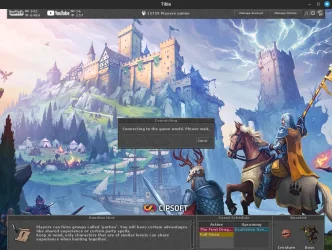
I get to the login screen and can see my characters. I also see the "Players Online" count correctly displayed at the top. But when I attempt to login to a character, it just gets stuck. Nothing happens. Any idea how to resolve this?

login.webp
 
In case this is ever helpful to anyone, I vibecoded some fixes to the Record app to make it compatible with official Tibia client 15.24.


Used GitHub - opentibiabr/client-editor: Patch Programmatically Client 11+ with OTServ RSA and Custom WebService URL (https://github.com/opentibiabr/client-editor) to patch the client. Make sure you point it at client.exe, not Tibia which is the launcher.

Disclaimer: I have no idea what I'm doing.
 
In case this is ever helpful to anyone, I vibecoded some fixes to the Record app to make it compatible with official Tibia client 15.24.


Used GitHub - opentibiabr/client-editor: Patch Programmatically Client 11+ with OTServ RSA and Custom WebService URL (https://github.com/opentibiabr/client-editor) to patch the client. Make sure you point it at client.exe, not Tibia which is the launcher.

Disclaimer: I have no idea what I'm doing.
I can't quite tell if I want to five laughing or like reaction, last part gived me laugh so it will stay like that. Nonetheless good job!
 
Back
Top