

- Joined
- Jul 12, 2008
- Messages
- 278
- Solutions
- 13
- Reaction score
- 522
- Location
- Bialystok, Poland
- GitHub
- rookgaard
- YouTube
- Rookgaard
Warning: this will be a long post – TL;DR: Below, I describe a method for eliminating dozens of proxies in favor of a single, well-protected WebSocket-based connection.

Some time ago, there was a topic about a browser (ot)client OTClient for Web Browsers (https://otland.net/threads/otclient-for-web-browsers.290165/). It worked by compiling (appropriately modified) OTClient sources as WASM and then running it in a browser. Since it's impossible/insecure (yet) to connect directly from the browser using the TCP protocol, WebSockets were used. After several attempts and with the help of @Gesior.pl , I managed to configure it, which still works today - for example, in the cam viewer for the Tibiantis server – Tibiantis Info - Cams (https://tibiantis.info/cams) – simply click "watch" next to any entry, and a browser window will open and a connection to the server will be established.
To support WebSockets connections with TFS (or any other Tibia engine, even the original binary from the leak), the connection needs to be "translated" back. For this purpose, I used nginx, which receives and maintains a WSS connection, and then forwards (proxies) it to the specified ip/port. Websockify runs there, which (according to the wiki) "is a WebSocket to TCP proxy/bridge" to the login/game server port (how I configured this is described here OTClient for Web Browsers (https://otland.net/threads/otclient-for-web-browsers.290165/post-2761622)).
Okay, we have the server part, we have the client in the browser, but what if we went further and forced the standard Cipsoft client to work in this mode? What's missing is a proxy/bridge that would work the other way around – translating the TCP connection into a WebSocket. Why Cipsoft? Because I really enjoy working with it through the extensions I create (e.g., Tibia - DLL for 7.72 client to mimic 7.4 client (https://otland.net/threads/dll-for-7-72-client-to-mimic-7-4-client.283169/) or Client DLL extension (https://www.youtube.com/playlist?list=PLwGkOisgt0UMyX8E1w3n1Bj5SWqIuScmt)). Many servers still use it as a "return to nostalgia," and even more develop their clients based on the otclient just to make them resemble it as closely as possible.
Inspired by the similarly functioning "bridge" mentioned by Gesior in the context of Giveria - Alpha Proxy Guide (kondrah/otclient multi-path proxy) (https://otland.net/threads/alpha-proxy-guide-kondrah-otclient-multi-path-proxy.291492/post-2772030), and bearing in mind that in today's world of AI agents, this isn't a problem - I described what I needed and obtained 95% of the following code (with some my fixes later) from it - TibiaBridge.cpp (https://gist.github.com/rookgaard/1e7ba703c3a51439fcba022e5d65089d). Of course there's nothing stopping you from adapting this code using OTC from Kondrah or Mehah.
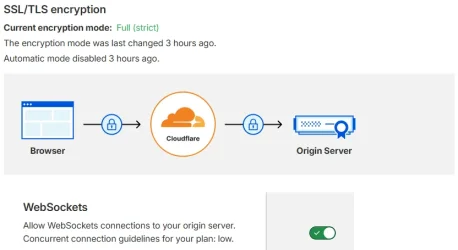
One might ask - what's the point of all this - there is Alpha-proxy, so the server IP is not visible anyway. I wouldn't have bothered with this myself, either and just stuck with the browser client until @Niebieski pointed out to me that Cloudflare also protects WebSocket connections (!!!), and it showed in my head something like this:

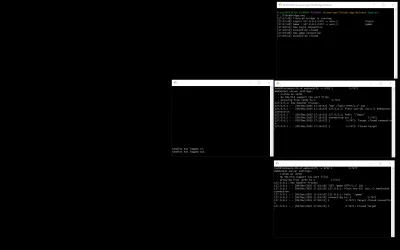
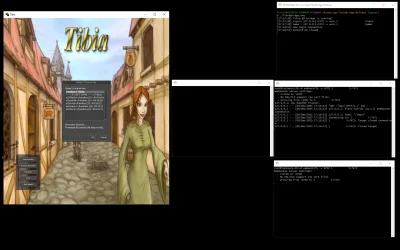
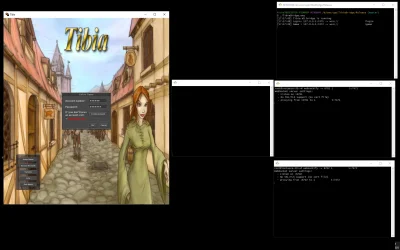
After configuration (steps visualized in the attachments - in left column is TFS console, right column is local bridge, screen with websockify for login server and screen with websockify with game server), the entire process looks like this:
I tested it on a sample server, and it looks promising. It's hard to say how much latency is imposed by having traffic flow through CF, but it's certainly similar to servers using proxy servers. A major advantage is that it eliminates the need for multiple proxy servers, and it's free.
This is only a Proof of Concept – the next steps maybe will be integrating the code directly into the DLL to reduce the number of steps for the end user, who typically expects a single click to log in and play.
Some time ago, there was a topic about a browser (ot)client OTClient for Web Browsers (https://otland.net/threads/otclient-for-web-browsers.290165/). It worked by compiling (appropriately modified) OTClient sources as WASM and then running it in a browser. Since it's impossible/insecure (yet) to connect directly from the browser using the TCP protocol, WebSockets were used. After several attempts and with the help of @Gesior.pl , I managed to configure it, which still works today - for example, in the cam viewer for the Tibiantis server – Tibiantis Info - Cams (https://tibiantis.info/cams) – simply click "watch" next to any entry, and a browser window will open and a connection to the server will be established.
To support WebSockets connections with TFS (or any other Tibia engine, even the original binary from the leak), the connection needs to be "translated" back. For this purpose, I used nginx, which receives and maintains a WSS connection, and then forwards (proxies) it to the specified ip/port. Websockify runs there, which (according to the wiki) "is a WebSocket to TCP proxy/bridge" to the login/game server port (how I configured this is described here OTClient for Web Browsers (https://otland.net/threads/otclient-for-web-browsers.290165/post-2761622)).
Okay, we have the server part, we have the client in the browser, but what if we went further and forced the standard Cipsoft client to work in this mode? What's missing is a proxy/bridge that would work the other way around – translating the TCP connection into a WebSocket. Why Cipsoft? Because I really enjoy working with it through the extensions I create (e.g., Tibia - DLL for 7.72 client to mimic 7.4 client (https://otland.net/threads/dll-for-7-72-client-to-mimic-7-4-client.283169/) or Client DLL extension (https://www.youtube.com/playlist?list=PLwGkOisgt0UMyX8E1w3n1Bj5SWqIuScmt)). Many servers still use it as a "return to nostalgia," and even more develop their clients based on the otclient just to make them resemble it as closely as possible.
Inspired by the similarly functioning "bridge" mentioned by Gesior in the context of Giveria - Alpha Proxy Guide (kondrah/otclient multi-path proxy) (https://otland.net/threads/alpha-proxy-guide-kondrah-otclient-multi-path-proxy.291492/post-2772030), and bearing in mind that in today's world of AI agents, this isn't a problem - I described what I needed and obtained 95% of the following code (with some my fixes later) from it - TibiaBridge.cpp (https://gist.github.com/rookgaard/1e7ba703c3a51439fcba022e5d65089d). Of course there's nothing stopping you from adapting this code using OTC from Kondrah or Mehah.
C++:
...
void printUsage() {
    std::printf("Create config.ini next to TibiaBridge.exe with values:\n");
    std::printf("[remote]\n");
    std::printf("host=example.com\n");
    std::printf("port=443\n");
    std::printf("login_path=/example_login\n");
    std::printf("game_path=/example_game\n\n");
    std::printf("[local]\n");
    std::printf("host=127.0.0.1\n");
    std::printf("login_port=7171\n");
    std::printf("game_port=7172\n");
}
...
One might ask - what's the point of all this - there is Alpha-proxy, so the server IP is not visible anyway. I wouldn't have bothered with this myself, either and just stuck with the browser client until @Niebieski pointed out to me that Cloudflare also protects WebSocket connections (!!!), and it showed in my head something like this:
After configuration (steps visualized in the attachments - in left column is TFS console, right column is local bridge, screen with websockify for login server and screen with websockify with game server), the entire process looks like this:
- instead of connecting to the target server address/domain on default ports 7171 and 7172, the Tibia client connects to localhost (e.g., by hex editing the binary file) on any ports we specify (or default).
- on localhost (the user's home computer), a program (also in attachment) runs that listens for TCP connections on these two ports and then connects to the WebSocket, forwarding all outgoing and incoming packets.
- CloudFlare monitors and protects the connection, while the WebSocket itself (or rather, the domain) resolves to the address of the server where the program (e.g., nginx) is listening for the WSS connection. Because traffic goes through CF, the location of this server cannot be seen by the player/attacker (the attachment shows what local connections look like).
- another program (e.g., websockify) runs on the server, which, after receiving a connection from nginx, accepts the connection and "translates" them to TCP
I tested it on a sample server, and it looks promising. It's hard to say how much latency is imposed by having traffic flow through CF, but it's certainly similar to servers using proxy servers. A major advantage is that it eliminates the need for multiple proxy servers, and it's free.
This is only a Proof of Concept – the next steps maybe will be integrating the code directly into the DLL to reduce the number of steps for the end user, who typically expects a single click to log in and play.
Attachments
-
TibiaBridge.zip13.6 KB · Views: 23 · VirusTotal
-
 cloudflare.webp25.6 KB · Views: 234 · VirusTotal
 -
 step3.webp71.6 KB · Views: 149 · VirusTotal
 -
 step1.webp136.9 KB · Views: 113 · VirusTotal
 -
 step0.webp114.8 KB · Views: 215 · VirusTotal


