
I'm still working on updating to 860 internally.Thanks, I haven't had time to update this project and I was also discouraged to see people selling it.

-
2026 staff recruitment is open! Check it out and consider applying!
You are using an out of date browser. It may not display this or other websites correctly.
You should upgrade or use an alternative browser.
You should upgrade or use an alternative browser.
[8.60] [TFS 1.2] -[Real Map full] with mount & market system
- Thread starter Shiris undrin
- Start date
It's supposed to explain what you need to do to avoid those black square meters.What client should I use for this? I had lots of black squares when using OTClient V8. Am I missing the correct sprites?
Hm... I don't get it. I don't see any logs or anything. I cloned the repo, compiled it correctly and ran it on OTC V8 as indicated. I set it to 8.6 and logged on it normally. The only thing I suspect is not using the correct sprites once I only have the 8.6 .dat and .spr in data/things/It's supposed to explain what you need to do to avoid those black square meters.
Ownerchrissi
New Member
- Joined
- Mar 1, 2012
- Messages
- 16
- Reaction score
- 4
@iFall Remove the black squares with Itemeditor. Its very simple. Login in you client . show where are the black squares postion. Go in map editor and look what Item Ids are there ? Now you go in itemeditor . an look for the item ids . show where are the checks. ( is it moveable , dropable and so) remove check by moveable . Tip: i have remove alle black squares in this server. Most of the items was flowers and decoration.
In short, I think it's better to add the new adaptation spr to 860 (those from the Tibia 15.xx)@iFall Remove the black squares with Itemeditor. Its very simple. Login in you client . show where are the black squares postion. Go in map editor and look what Item Ids are there ? Now you go in itemeditor . an look for the item ids . show where are the checks. ( is it moveable , dropable and so) remove check by moveable . Tip: i have remove alle black squares in this server. Most of the items was flowers and decoration.
xchaffer0
New Member
Has anyone managed to edit the map?
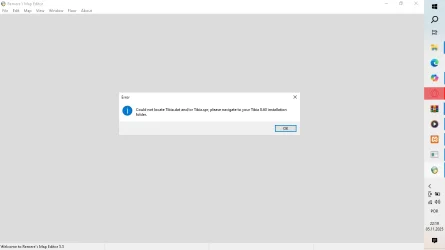
Go to that page, download the Tibia 8.60 data and spr file, and place it in the path
xchaffer0
New Member
If it's an 8.40 map, use the 8.40 directory; if you upgrade it, it will be version 8.60 and will again require the 8.60 directory.
xchaffer0
New Member
Thanks for the help :/
I'm using the files from this post, but only the SPR and DAT files from version 8.40. Could the map be from a different version?
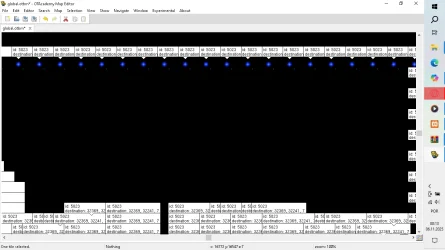
Post automatically merged:
I'm using the files from this post, but only the SPR and DAT files from version 8.40. Could the map be from a different version?
Last edited:
Probably so, it's just a matter of going into the map properties and raising it to 860, check that there are no spawn or house errorsThanks for the help :/
Post automatically merged:
I'm using the files from this post, but only the SPR and DAT files from version 8.40. Could the map be from a different version?
View attachment 95800
xchaffer0
New Member
I'm having this problem, I think the OTB isn't working, does anyone have another option or a solution?
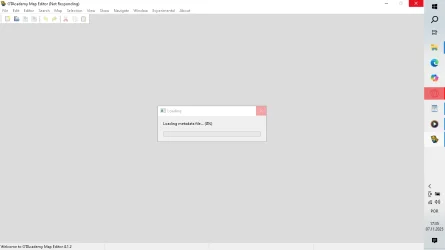
, Release v3.7 · hampusborgos/rme (https://github.com/hampusborgos/rme/releases/tag/v3.7)Tengo este problema, creo que el OTB no funciona, ¿alguien tiene otra opción o solución?
View attachment 95843
YIt's the one I'm currently using

You can recreate the magic, brother, so there's not much of a problem with that (those spells don't exist in that version of Tibia).exani hur "up, exani hur "down or exiva don't work terrible
Some one can help ?
Hello my friends, I'm using and working with this database:
RealMap-Global-8.0-With-Mount-Market-TFS-1.2
And at one point I encountered an error that I can't solve.
It's an error in RME when opening the map: "error unsupported client version! (8)"
I even managed to open this map in my RME, but I opened another map and I believe it got misconfigured, and after that it won't open anymore.
Could you give me some guidance on how I can solve this problem?
RealMap-Global-8.0-With-Mount-Market-TFS-1.2
And at one point I encountered an error that I can't solve.
It's an error in RME when opening the map: "error unsupported client version! (8)"
I even managed to open this map in my RME, but I opened another map and I believe it got misconfigured, and after that it won't open anymore.
Could you give me some guidance on how I can solve this problem?

Allynn
Well-Known Member
This map, or more specific sprites, are from many other tibia versions, not sure if this will help fully, i was not lucky with this.Hello my friends, I'm using and working with this database:
RealMap-Global-8.0-With-Mount-Market-TFS-1.2
And at one point I encountered an error that I can't solve.
It's an error in RME when opening the map: "error unsupported client version! (8)"
I even managed to open this map in my RME, but I opened another map and I believe it got misconfigured, and after that it won't open anymore.
Could you give me some guidance on how I can solve this problem?d more client versions to rme > preferences,
Download downgraded 12, 13 client version sprites, and add them to rme > file. > preferences > client versions, like here, but your option is 8.6
Also there, set default client version to version 8.6,
and uncheck "file signatures".
Or also use other version of rme, like otacademy.
Go to releases, and download there.
GitHub - OTAcademy/RME: OTAcademy fork of Remere's Map Editor repository.
OTAcademy fork of Remere's Map Editor repository. Contribute to OTAcademy/RME development by creating an account on GitHub.
 github.com
If you still need help, send me message.
jeanphilip
Well-Known Member
- Joined
- Oct 26, 2023
- Messages
- 254
- Reaction score
- 55
i have a problem nhave been strugglign with this in spite i use same otb 860 -15 spr /dat rme crashes have tried with so many server load properly but can't load map with rmeThis map, or more specific sprites, are from many other tibia versions, not sure if this will help fully, i was not lucky with this.
Download downgraded 12, 13 client version sprites, and add them to rme > file. > preferences > client versions, like here, but your option is 8.6
Also there, set default client version to version 8.6,
and uncheck "file signatures".
Or also use other version of rme, like otacademy.
Go to releases, and download there.

GitHub - OTAcademy/RME: OTAcademy fork of Remere's Map Editor repository.
OTAcademy fork of Remere's Map Editor repository. Contribute to OTAcademy/RME development by creating an account on GitHub.
If you still need help, send me message.
Similar threads

- Replies
- 45
- Views
- 6K


- Replies
- 67
- Views
- 10K


- Replies
- 86
- Views
- 11K

- Replies
- 147
- Views
- 21K