• There is NO official Otland's Discord server and NO official Otland's server list. The Otland's Staff does not manage any Discord server or server list. Moderators or administrator of any Discord server or server lists have NO connection to the Otland's Staff. Do not get scammed!
  • 2026 staff recruitment is open! Check it out and consider applying!

NPC Module Trade otclient

Jpstafe

Well-Known Member
Joined
Aug 8, 2011
Messages
587
Reaction score
91
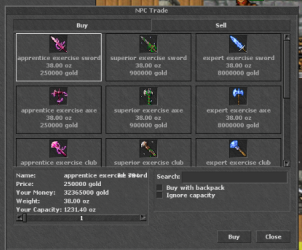
Happy New Year to the whole Otland community, my query is, is there any tutorial to be able to put this Trade module to your OTCLIENT? I'm using TFS 1.2 8.0 and otclientv8
tradeee.png
 
Also would like to know

i did uncomment everything with containing "ShopWindow" in npc.h/cpp player.h/cpp game.cpp. Still when being ingame once i say trade to the npc he says "Of course, just browse through my wares." however it doesnt open the trading window.
 
Also would like to know

i did uncomment everything with containing "ShopWindow" in npc.h/cpp player.h/cpp game.cpp. Still when being ingame once i say trade to the npc he says "Of course, just browse through my wares." however it doesnt open the trading window.
I haven't been able to find a tutorial that tells how to do things. If you can find something, let me know and let's try to help each other and see if we can achieve it.
 
ur most likely missing the /npc/lib files for that to work properly.
make sure to copy required functions and not whole libs to crash ur datapack.
 
Also would like to know

i did uncomment everything with containing "ShopWindow" in npc.h/cpp player.h/cpp game.cpp. Still when being ingame once i say trade to the npc he says "Of course, just browse through my wares." however it doesnt open the trading window.
can u solved it? i have same error :S i dont know like solved that
 
server is sending packets to open npc trade, client must receive and parse those informations.

Older TFS may not have support for NPC Trade or NPC channel, you may need to add it manually.
analyze server side protocolgame.cpp and npc/npcs.cpp look if you have functions related to NPC channell or NPC Trade.


At client side its probably ok, both otclients mehah and otcv8 already have support.
If you need to check how client is processing informations about NPC channel from server, you can check files protocolcodes.h protocolgameparse.cpp protocolgamesend.cpp

for example one code in protocolcodes.h is
GameServerOpenNpcTrade = 122,

this is server side function from protocolgame.cpp
C++:
void ProtocolGame::sendShop(const std::shared_ptr<Npc> &npc) {
    Benchmark brenchmark;
    NetworkMessage msg;
    msg.addByte(0x7A);
    msg.addString(npc->getName());

    if (!oldProtocol) {
        msg.add<uint16_t>(npc->getCurrency());
        msg.addString(std::string()); // Currency name
    }

    const auto &shoplist = npc->getShopItemVector(player->getGUID());
    uint16_t itemsToSend = std::min<size_t>(shoplist.size(), std::numeric_limits<uint16_t>::max());
    msg.add<uint16_t>(itemsToSend);

    // Initialize before the loop to avoid database overload on each iteration
    auto talkactionHidden = player->kv()->get("npc-shop-hidden-sell-item");
    // Initialize the inventoryMap outside the loop to avoid creation on each iteration
    std::map<uint16_t, uint16_t> inventoryMap;
    player->getAllSaleItemIdAndCount(inventoryMap);
    uint16_t i = 0;
    for (const ShopBlock &shopBlock : shoplist) {
        if (++i > itemsToSend) {
            break;
        }

        // Hidden sell items from the shop if they are not in the player's inventory
        if (talkactionHidden && talkactionHidden->get<bool>()) {
            const auto &foundItem = inventoryMap.find(shopBlock.itemId);
            if (foundItem == inventoryMap.end() && shopBlock.itemSellPrice > 0 && shopBlock.itemBuyPrice == 0) {
                AddHiddenShopItem(msg);
                continue;
            }
        }

        AddShopItem(msg, shopBlock);
    }

    writeToOutputBuffer(msg);
    g_logger().debug("ProtocolGame::sendShop - Time: {} ms, shop items: {}", brenchmark.duration(), shoplist.size());
}



you can see a byte server is sending
C++:
 msg.addByte(0x7A);

this relates to GameServerOpenNpcTrade = 122, in hex value.
 
Back
Top