• There is NO official Otland's Discord server and NO official Otland's server list. The Otland's Staff does not manage any Discord server or server list. Moderators or administrator of any Discord server or server lists have NO connection to the Otland's Staff. Do not get scammed!
  • 2026 staff recruitment is open! Check it out and consider applying!

The Lost Lands — Custom 2D MMORPG Built in Godot/C#

Me again

Advanced OT User
Joined
Jun 14, 2007
Messages
835
Reaction score
178
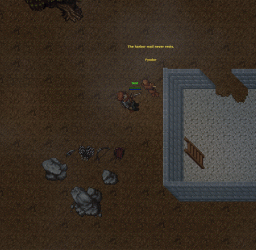
Screenshot 2026-05-30 100248.webp

Hello everyone,

I wanted to start sharing progress on a project I am working on called The Lost Lands.

This is a custom 2D MMORPG inspired by the feeling of old-school Tibia, but it is not an OT server, not based on The Forgotten Server, and not meant to be another edited Tibia server.

The project is currently being built in Godot 4 using C#, with a custom client/server setup. The goal is to create my own MMORPG foundation with server-authoritative gameplay, custom systems, custom world design, and eventually its own identity, lore, monsters, quests, and progression.

The reason I am posting it here is because I know many people on OTLand understand old-school MMORPG systems, Tibia-like mechanics, mapping, combat, inventory, and the kind of gameplay feeling I am aiming for.

What is The Lost Lands?​

The Lost Lands is a 2D MMORPG project focused on:

  • Old-school MMORPG atmosphere
  • Grid-based movement (was contemplating free form but I am not sure yet)
  • Exploration
  • Monster hunting
  • Loot and corpses
  • Skills and progression
  • A living world with secrets, quests, books, and lore
  • A custom client and server foundation

The game is inspired by the kind of freedom and danger old Tibia had, but I want to build it as its own game instead of modifying an existing OT base.

What has been built so far?​

Some of the systems currently working or being tested:

  • Godot C# client and server
  • Multiplayer connection
  • Grid-based player movement
  • Server-side movement validation
  • Basic collision
  • Floor/Z-level handling
  • Player spawning and synchronization
  • Monster spawning and movement
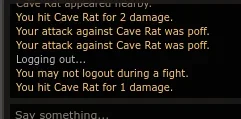
  • Monster targeting and attacks
  • Melee and ranged combat
  • Projectiles for arrows/bolts/spears
  • Floating damage text
  • Health bars and nameplates
  • Ground items
  • Backpack/container system
  • Drag and drop items between inventory and ground
  • Corpse/decay foundations
  • Account creation
  • Login
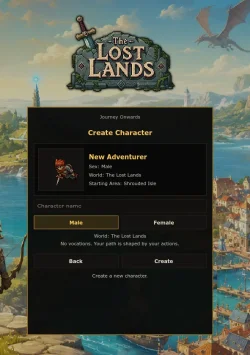
  • Character creation
  • Character selection
  • Position saving
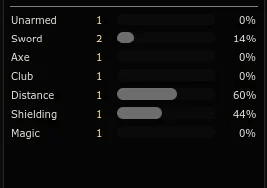
  • Old-school inspired HUD with chat, equipment, skills, battle list, and backpack windows

The project is still early, but the base is growing steadily.

Current focus​

Right now I am mainly working on:

Improving monster visuals and monster configuration
Polishing the HUD/UI
Making the client feel more like a real MMORPG client
Expanding item, container, combat, and world interaction systems
Screenshot 2026-05-29 152139.webp
 

Recent Progress​

Lately I have been working on making the prototype feel more like a real MMORPG client instead of just a technical test.

Some of the recent progress includes:
  • Account creation is working
  • Login flow is working
  • Character creation is working
  • Character selection is working
  • Characters now save/load their position
  • Inventory and equipment are being saved
  • Skills and attributes are being stored in the database
  • Backpack/container state is becoming persistent
  • Items can be moved between backpack, equipment, and the ground
  • Equipment now affects combat instead of only using temporary test values
  • Ranged weapons, arrows/bolts/spears, and projectiles are being tested
  • Monster definitions are data-driven
  • Monster visuals can be configured with offsets, body size, selection size, nameplate position, health bar position, and speech position
  • Corpse and decay foundations are in place
  • The HUD has been improved with chat, action bar, skills, battle list, equipment, and backpack windows
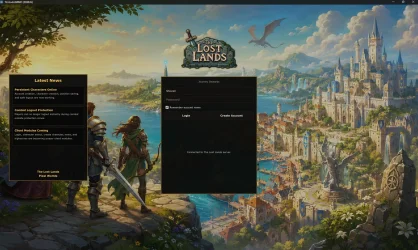
  • The client now has a start screen with login, account creation, character selection, character creation, and a news panel

It is still very early, but a lot of the foundation systems are starting to connect together now.

What I am focusing on now​

Right now I am mainly focusing on three things:

  1. Making the game feel more like a real client
    Login, account creation, character selection, start screen, news panel, and character preview.
  2. Improving inventory and equipment
    Dragging items, equipping weapons, moving items back into containers, saving backpacks, and making combat depend on real equipped items.
  3. Polishing monsters and combat
    Data-driven monsters, better visuals, nameplates, health bars, speech, ranged combat, projectiles, corpses, and loot foundations.

    Screenshot 2026-05-31 231845.webpScreenshot 2026-05-31 231558.webp
 
Lately I have been working mostly on the inventory/backpack system, window modules, and the first version of the NPC system.
Some of the recent improvements include:
  • Backpack windows can now be opened and managed better
  • Containers support scrolling
  • Backpack/container windows can be resized smaller
  • It is now possible to show only one row of slots and scroll through the rest
  • Multiple container windows can be open at the same time
  • Items can be moved between backpack, equipment, ground, and other containers
  • Nested containers are supported
  • Opened container state is being improved so windows can restore more naturally
  • Container slot count is based on item data instead of every bag behaving the same

Window Module Improvements​

The HUD and module system is also getting better.
The current UI now includes several movable windows/modules, such as:
  • Backpack
  • Skills
  • Battle list
  • Character/equipment
  • Combat controls
  • NPC dialogue window
  • Chat panel
  • Action bar

NPC System Started​

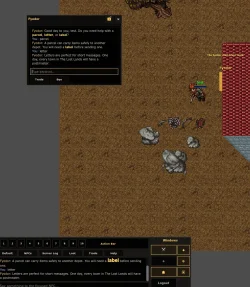
The first version of the NPC system is now being added.
The NPCs are becoming data-driven, loaded from JSON config files. Right now the system supports things like:
  • NPC name
  • NPC title
  • Position
  • Facing direction
  • Talk radius
  • Sprite path
  • Greeting keywords
  • Farewell keywords
  • Dialogue replies
  • Fallback replies
  • Ambient speech
  • Basic keyword-based interaction
NPCs can now spawn into the world from server-side definitions, and the client can display them with nameplates and speech bubbles.

Screenshot 2026-06-03 174246.webp

I used a tibia npc as an example.
 

The Lost Lands — Progress Update: NPC Trading & Lighting​


Hey everyone,
I wanted to share another progress update for The Lost Lands.

This update is mainly about two systems
  • NPC interaction and trading
  • World lighting

NPC System Progress​

The NPC system has been expanded a lot recently.

NPCs are now loaded from data/config files, so each NPC can have its own setup instead of everything being hardcoded. This makes it much easier to create different NPCs later for towns, shops, quests, lore, tutorials, secrets, and world-building.

NPCs now support things like:
  • Name
  • Title
  • Position
  • Facing direction
  • Talk radius
  • Sprite/visual configuration
  • Greeting messages
  • Farewell messages
  • Fallback replies
  • Keyword-based dialogue
  • Ambient speech
  • Focus handling
  • Window close behavior
  • Wandering/movement settings
  • Shop/trading data
This is still in an early stage.

NPC Dialogue​

Players can now talk to NPCs using keywords, similar to Tib.
Features still needed to add are.
  • Quests
  • Missions
  • Shops
  • Lore conversations
  • Storage-based dialogue
  • Hidden keywords
  • Story hints
  • World-building
  • Random ambient lines
  • Different behavior per NPC

NPC Trading Now Works​

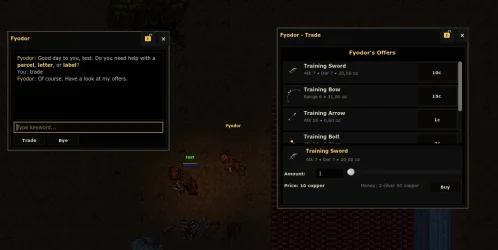
The biggest part of this update is that NPC trading is now working.
NPCs can now have shop offers defined in their config, and the player can open the NPC shop window and buy items.

The shop system currently supports:
  • NPC shop window
  • Buy offers
  • Item name
  • Item icon/sprite
  • Price
  • Amount selection
  • Total price calculation
  • Player money display
  • Basic purchase handling
  • Adding bought items to the player
  • Placing items on the ground if needed
  • Server-side validation
This is a big step because it connects several systems together: NPCs, item definitions, inventory, containers, money, and the UI.
It is still a first version, but it already feels really good seeing an NPC actually sell items inside the game.

Screenshot 2026-06-08 170726.webp

Lighting System​

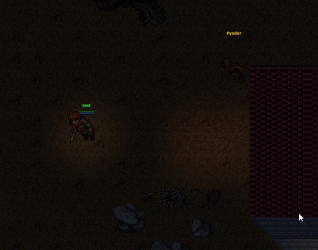
Lighting is also now working in the client.
The world now supports darker ambient lighting with local light sources. This already makes caves, night areas, houses, torches, and atmospheric locations much more interesting.

The current lighting work includes:
  • Ambient darkness
  • A subtle player light
  • Warm torch-style lights
  • Static test lights
  • Flickering light behavior
  • Softer night color/tint
  • Light fading depending on darkness level
The lighting still needs tuning, but it already changes the feeling of the game a lot. Areas can now feel warmer, darker, more mysterious, or more dangerous depending on the lighting.
This will be very useful later for caves, dungeons, towns at night, hidden areas, and story locations.

Godot_v4.6.3-stable_mono_win64_Ljc9npzEMO.gif
 
Back
Top