TibiCAM
Veteran OT User
- Joined
- Feb 3, 2020
- Messages
- 221
- Reaction score
- 298
Someone was able to get a vocation in Rookgaard on real Tibia by supposedly creating an application that invokes a function on the address that handles the vocation window. In other words he could make a character and go to Rookgaard, and then call the function that shows the "Select vocation" dialog window, and pick any vocation.
Video:
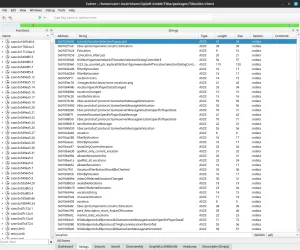
On Linux, so far I have used Cutter to analyze the game client. It found 493377 strings. When I filter by "vocation" I see many that could potentially be connected to that "Select vocation" dialog window. It finds 183 strings. The first one in the list is this:
Address: 0x0182e640
String: tutorial/VocationSelectionPopup.qml
Further down we can see this:
Address: 0x01a99904
String: VocationCardWithBanner
And many, many more.
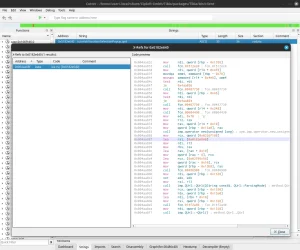
When I right-click on one, for example the first address, and select "Show X-Refs" it shows the following:
Am I now supposed to lookup each function (assuming it's the ones beginning with "fcn.xxxxxxxx") and try invoke that somehow?
I have no idea how to try invoke a function on a specific address via C++, so naturally I used AI like the C++ noob I am, and made this (Sorry for the AI slop code):
I then compile it like so:
g++ tibia_vocation.cpp -o tibia_vocation
And then I launch it by giving it the PID and the address:
For example:
./tibia_vocation 37776 0x01940230
I've tried hundreds of addresses related to functions, but it either crashes the game client or just prints to the console that it successfully called the function (but nothing happens). I've tried going through the C++ code but I'm unsure what I'm doing. I was looking around the forums to see if anyone has any example code that shows how to invoke a function in the real Tibia client using C++, but could not find any.
Would love to see if anyone here has a clue on how to do this "trick" (bug). Thanks!
I don't mind if CipSoft will patch it soon. But this could be a good learning experience for me and others.
Cutter using their AppImage from Github repo:
I then set it to analzye the Tibia client file (inside ~/.local/share/CipSoft GmbH/Tibia/packages/Tibia/bin/client)
It took 1-2 minutes and then it revealed all Strings in the game client.
Video:
On Linux, so far I have used Cutter to analyze the game client. It found 493377 strings. When I filter by "vocation" I see many that could potentially be connected to that "Select vocation" dialog window. It finds 183 strings. The first one in the list is this:
Address: 0x0182e640
String: tutorial/VocationSelectionPopup.qml
Further down we can see this:
Address: 0x01a99904
String: VocationCardWithBanner
And many, many more.
When I right-click on one, for example the first address, and select "Show X-Refs" it shows the following:
Code:
0x004aa82c      mov     rdi, qword [rbp - 0x1358]
0x004aa833      call    fcn.01512ec0 ; fcn.01512ec0
0x004aa838      mov     rdi, qword [r14 + 0x4f0]
0x004aa83f      movdqa  xmm4, xmmword [rbp - 0x70]
0x004aa844      movups  xmmword [r14 + 0x4e8], xmm4
0x004aa84c      test    rdi, rdi
0x004aa84f      je      0x4aa856
0x004aa851      call    fcn.00487730 ; fcn.00487730
0x004aa856      mov     rdi, qword [rbp - 0x48]
0x004aa85a      test    rdi, rdi
0x004aa85d      je      0x4aa864
0x004aa85f      call    fcn.00487730 ; fcn.00487730
0x004aa864      mov     rdi, qword [r14 + 0x248]
0x004aa86b      call    fcn.00604430 ; fcn.00604430
0x004aa870      mov     edi, 0x70  ; 'p'
0x004aa875      mov     r12, rax
0x004aa878      mov     rax, qword [r14 + 0x10]
0x004aa87c      mov     qword [rbp - 0x13a0], rax
0x004aa883      call    imp.operator new(unsigned long) ; sym.imp.operator_new_unsigned_long
0x004aa888      mov     rcx, qword [0x0226f108]
0x004aa88f      lea     rsi, [0x0182e640]
0x004aa896      mov     rdi, r13
0x004aa899      mov     rbx, rax
0x004aa89c      lea     rax, [rax + 0x10]
0x004aa8a0      mov     qword [rax - 8], rcx
0x004aa8a4      lea     rcx, [0x02795c58]
0x004aa8ab      mov     qword [rax - 0x10], rcx
0x004aa8af      mov     qword [rbp - 0x13b8], rax
0x004aa8b6      call    fcn.00486980 ; fcn.00486980
0x004aa8bb      mov     rdi, qword [rbp - 0x1328]
0x004aa8c2      xor     edx, edx
0x004aa8c4      mov     rsi, r13
0x004aa8c7      call    imp.QUrl::QUrl(QString const&, QUrl::ParsingMode) ; method.QUrl.QUrl_QString_const___QUrl::ParsingMode
0x004aa8cc      mov     rcx, qword [rbp - 0x1330]
0x004aa8d3      mov     rdx, qword [rbp - 0x13a0]
0x004aa8da      lea     rdi, [rbx + 0x10]
0x004aa8de      mov     rsi, qword [rbp - 0x1328]
0x004aa8e5      call    fcn.014f2a40 ; fcn.014f2a40
0x004aa8ea      mov     rdi, qword [rbp - 0x1328]
0x004aa8f1      call    imp.QUrl::~QUrl() ; method.QUrl._QUrl
Am I now supposed to lookup each function (assuming it's the ones beginning with "fcn.xxxxxxxx") and try invoke that somehow?
I have no idea how to try invoke a function on a specific address via C++, so naturally I used AI like the C++ noob I am, and made this (Sorry for the AI slop code):
C++:
#include <sys/ptrace.h>
#include <sys/wait.h>
#include <sys/user.h>
#include <sys/mman.h>
#include <unistd.h>
#include <stdio.h>
#include <stdlib.h>
#include <string.h>
#include <errno.h>
#include <stdint.h>
// Shellcode to call function and trap (int3) to return control.
// Assembly: push rbp; mov rbp, rsp; call <addr>; int3; (simple, no args)
// Replace <addr> with runtime addr.
// Hex: \x55\x48\x89\xe5\xe8\x00\x00\x00\x00\xcc (rel call placeholder)
unsigned char shellcode[] = {
0x55, // push rbp
0x48, 0x89, 0xe5, // mov rbp, rsp
0xe8, 0x00, 0x00, 0x00, 0x00, // call rel32 (placeholder)
0xcc // int3 (breakpoint to catch)
};
size_t shellcode_size = sizeof(shellcode);
// Function to write data to process memory
void poke_data(pid_t pid, uintptr_t addr, const void* data, size_t len) {
const uint8_t* bytes = (const uint8_t*)data;
size_t word_size = sizeof(long);
for (size_t i = 0; i < len; i += word_size) {
long word = 0;
memcpy(&word, bytes + i, (len - i < word_size) ? (len - i) : word_size);
if (ptrace(PTRACE_POKEDATA, pid, addr + i, word) == -1) {
perror("ptrace(POKEDATA)");
exit(1);
}
}
}
int main(int argc, char* argv[]) {
if (argc != 3) {
fprintf(stderr, "Usage: %s <pid> <function_address_hex>\n", argv[0]);
return 1;
}
pid_t pid = atoi(argv[1]);
uintptr_t func_addr = strtoull(argv[2], NULL, 0);
// Attach to process
if (ptrace(PTRACE_ATTACH, pid, NULL, NULL) == -1) {
perror("ptrace(ATTACH)");
return 1;
}
int status;
waitpid(pid, &status, 0);
// Get current registers
struct user_regs_struct regs, orig_regs;
if (ptrace(PTRACE_GETREGS, pid, NULL, ®s) == -1) {
perror("ptrace(GETREGS)");
return 1;
}
orig_regs = regs;
// Find injectable memory (e.g., use /proc/<pid>/maps to find rw- region; simplify: assume near RIP or allocate via mmap injection)
// For simplicity, overwrite at current RIP (dangerous! Backup first). Better: Inject into .text or alloc new.
uintptr_t inject_addr = regs.rip; // Overwrite current instruction pointer location (pause point)
// Backup original code at inject_addr
unsigned char orig_code[shellcode_size];
for (size_t i = 0; i < shellcode_size; i += sizeof(long)) {
errno = 0;
long word = ptrace(PTRACE_PEEKDATA, pid, inject_addr + i, NULL);
if (errno != 0) {
perror("ptrace(PEEKDATA)");
return 1;
}
memcpy(orig_code + i, &word, sizeof(long));
}
// Patch shellcode with call offset (relative to call instr + 5)
int32_t call_offset = (int32_t)(func_addr - (inject_addr + 4 + 5)); // call is at offset 4, +5 for instr size
memcpy(shellcode + 5, &call_offset, sizeof(int32_t));
// Inject shellcode
poke_data(pid, inject_addr, shellcode, shellcode_size);
// Set RIP to inject_addr
regs.rip = inject_addr;
if (ptrace(PTRACE_SETREGS, pid, NULL, ®s) == -1) {
perror("ptrace(SETREGS)");
return 1;
}
// Continue to execute shellcode (calls function, hits int3)
if (ptrace(PTRACE_CONT, pid, NULL, NULL) == -1) {
perror("ptrace(CONT)");
return 1;
}
waitpid(pid, &status, 0); // Wait for int3 (SIGTRAP)
// Restore original code and registers
poke_data(pid, inject_addr, orig_code, shellcode_size);
if (ptrace(PTRACE_SETREGS, pid, NULL, &orig_regs) == -1) {
perror("ptrace(SETREGS restore)");
return 1;
}
// Detach
if (ptrace(PTRACE_DETACH, pid, NULL, NULL) == -1) {
perror("ptrace(DETACH)");
return 1;
}
printf("Function called successfully.\n");
return 0;
}I then compile it like so:
g++ tibia_vocation.cpp -o tibia_vocation
And then I launch it by giving it the PID and the address:
For example:
./tibia_vocation 37776 0x01940230
I've tried hundreds of addresses related to functions, but it either crashes the game client or just prints to the console that it successfully called the function (but nothing happens). I've tried going through the C++ code but I'm unsure what I'm doing. I was looking around the forums to see if anyone has any example code that shows how to invoke a function in the real Tibia client using C++, but could not find any.
Would love to see if anyone here has a clue on how to do this "trick" (bug). Thanks!
I don't mind if CipSoft will patch it soon. But this could be a good learning experience for me and others.
Cutter using their AppImage from Github repo:
Bash:
wget https://github.com/rizinorg/cutter/releases/download/v2.4.1/Cutter-v2.4.1-Linux-x86_64.AppImage
sudo chmod +x Cutter-v2.4.1-Linux-x86_64.AppImage
./Cutter-v2.4.1-Linux-x86_64.AppImage
I then set it to analzye the Tibia client file (inside ~/.local/share/CipSoft GmbH/Tibia/packages/Tibia/bin/client)
It took 1-2 minutes and then it revealed all Strings in the game client.
Last edited: