Glaszcz Koldre
Veteran OT User
- Joined
- Mar 16, 2016
- Messages
- 150
- Reaction score
- 267
Warning: Project is still EXPERIMENTAL – expect bugs, freezes and occasional crashes. Some actions that normally wait for server packets will hang the client.
I've been working on a tool that lets you explore OT maps completely offline, and I wanted to share it with the community. This is a customized build of OTClientV8 designed specifically for OTBM map exploration - no server connection required.
What is it?
The OTClientV8 Offline Map Explorer is a standalone tool that loads your
Quick demo:
Example: data/things/1098
How to use
Controls in explorer:
Open the panel → choose spawn.xml → watch monsters spawn exactly like on a real server
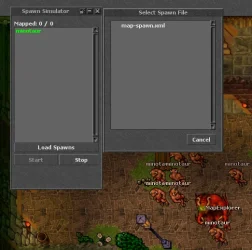
When you double click on a name, you can change its appearance. Its saved in data/spawn_data.json
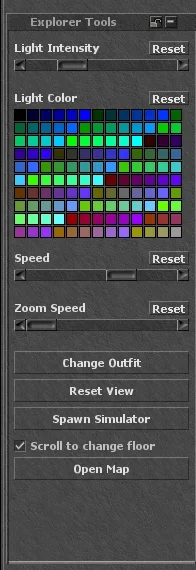
Explorer Tools
Change global light, your outfit/mount/addons, walk speed, etc. – perfect for making cool screenshots or testing
Each setting is saved per map in data/explorer_state.json
Live map editing
Edit the .otbm in Remere’s Map Editor while the client is running → save → client auto-reloads the map in <1 second.
First release - Release v0.0.1-alpha · karolak6612/otclientv8-offline-map-explorer (https://github.com/karolak6612/otclientv8-offline-map-explorer/releases/tag/alpha)
GitHub: GitHub - karolak6612/otclientv8-offline-map-explorer: Mirror of official OTClientV8 (https://github.com/karolak6612/otclientv8-offline-map-explorer)
If you map, develop or just love playing with OT files – give it a try and let me know what you think!
Pull requests, bug reports and ideas are very welcome
I've been working on a tool that lets you explore OT maps completely offline, and I wanted to share it with the community. This is a customized build of OTClientV8 designed specifically for OTBM map exploration - no server connection required.
What is it?
The OTClientV8 Offline Map Explorer is a standalone tool that loads your
.otbm map files and lets you navigate through them just like in-game, but without needing a running server. Perfect for mappers, server owners who want to preview maps, or anyone needing to extract visual data from maps.Quick demo:
Main Features
- Full offline map loading (.otbm) straight from disk - no server needed
- Spawn Simulator – load your spawn.xml and see monsters appear in real-time
- Explorer Tools – change server light, outfit, speed, mount, addons, etc.
- Supports all client versions 7.40 → 12.20
- Hot-reloading – edit the map in RME, save it, and the client reloads it instantly

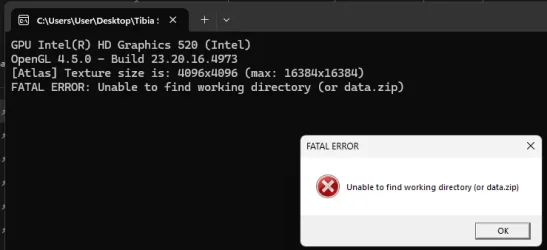
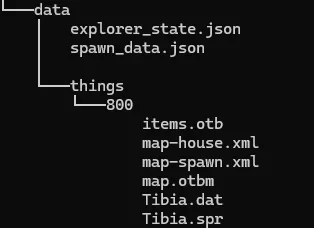
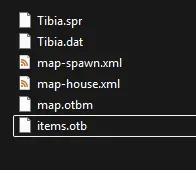
How to prepare data/things/[version] folder
Example: data/things/1098
- Copy Tibia.spr + Tibia.dat from real Tibia client
- Copy items.otb (you can take it from RME)
- Put your .otbm map files here (you can have many)
- Put your spawn.xml / monster.xml files here (also supports many)
How to use
- In “Enter Game” window change client version to the one you prepared (e.g. 1098)
- On login screen click the new button “Offline Map Explorer”
- Pick any .otbm file from your data/things/[version] folder
- Enjoy!
Controls in explorer:
- Move → Arrow keys
- Change floor → Mouse wheel
- Zoom → Ctrl + Mouse wheel
- Teleport → Ctrl + Left Click on map/minimap
Open the panel → choose spawn.xml → watch monsters spawn exactly like on a real server
When you double click on a name, you can change its appearance. Its saved in data/spawn_data.json
Explorer Tools
Change global light, your outfit/mount/addons, walk speed, etc. – perfect for making cool screenshots or testing
Each setting is saved per map in data/explorer_state.json
Live map editing
Edit the .otbm in Remere’s Map Editor while the client is running → save → client auto-reloads the map in <1 second.
Download & Source
First release - Release v0.0.1-alpha · karolak6612/otclientv8-offline-map-explorer (https://github.com/karolak6612/otclientv8-offline-map-explorer/releases/tag/alpha)
GitHub: GitHub - karolak6612/otclientv8-offline-map-explorer: Mirror of official OTClientV8 (https://github.com/karolak6612/otclientv8-offline-map-explorer)
If you map, develop or just love playing with OT files – give it a try and let me know what you think!
Pull requests, bug reports and ideas are very welcome